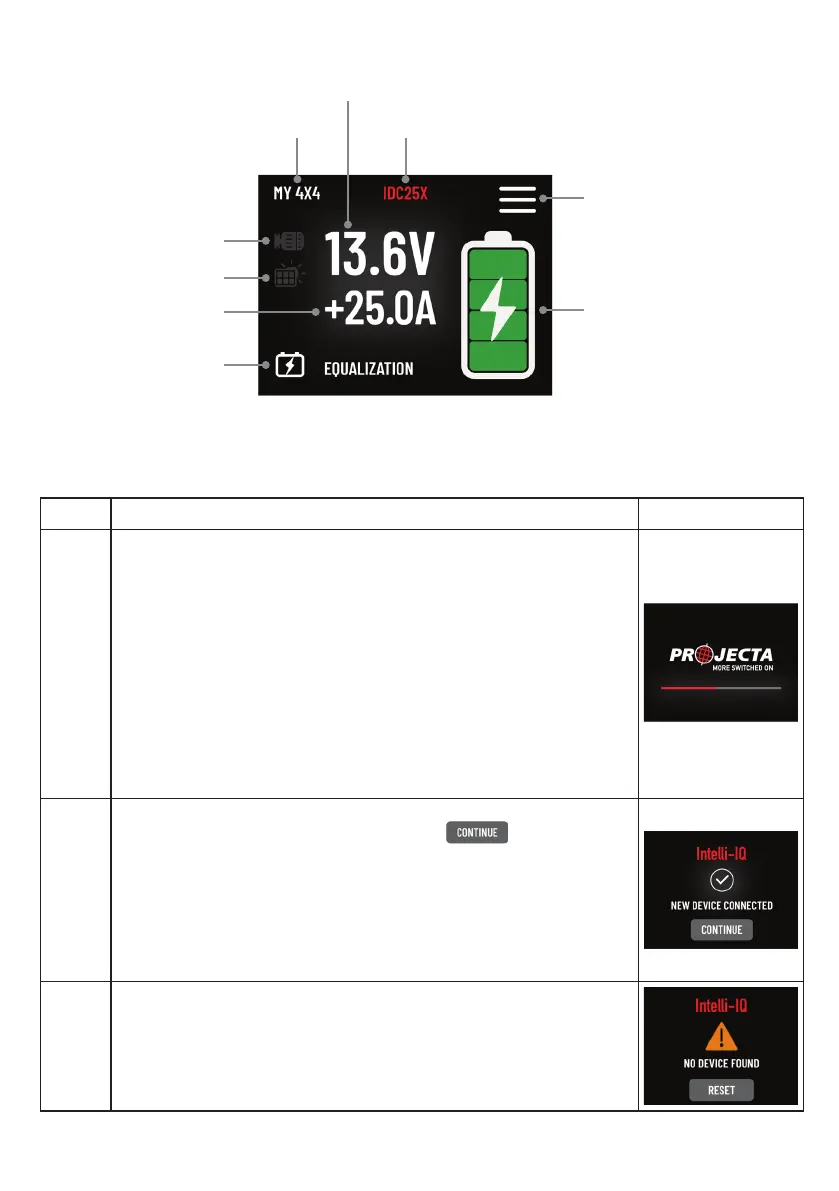
STEP INSTRUCTION DISPLAY
1 After successfully installing and powering up IQD2, the display
screen will transition to the welcome page and initiate Bluetooth
search automatically.
To connect, users can activate the Bluetooth feature on their smart
devices and launch the Intelli-IQ APP.
During the initial Bluetooth setup, it’s crucial to maintain a stable
power source for IQD2. Ensure the smart device is within 3 meters
of IQD2 and keep the APP open throughout. The connection process
typically takes 20 seconds to 1minutes. For step-by-step instructions,
please consult Page 13 for detailed application guidance.
2 Upon a successful connection and device search, the display will
indicate “New Device Connected.” Tap the icon to main
screen.
In instances where a device has been previously connected and
recognized, subsequent connections will not be labelled as “New
Device Connected.” This streamlined plug ‘n play functionality,
which retains settings for recognized devices, simplies the
conguration of battery groups to a one-time setup.
3 If the IQD2 fails to detect any device within the network, it will
prompt the user to perform the network searching procedure once
more. Ensure the LIN connections of the network are securely
connected together for optimal functionality.
MAIN DISPLAY SCREEN LAYOUT
DISPLAY INSTRUCTIONS
1. System Setup
IQ System Name
IDCX Output Voltage
Connected Device Name
Alternator Input
Status
IDCX Output
Current
Aux Battery
Charging Stage
Aux Battery Status
Setting Menu
Solar Input
Status
8


 To Next Page