INSTRUCTION DISPLAY
In the user account settings screen, on the
bottom right of the screen, tap the
Change Password
Peter@peter.com
Peter
My Account
DELETE
button.
You will be presented with a warning screen.
To conrm you want to delete your account, type
in your password in “CONFIRM PASSWORD”.
After pressing
DELETE
WARNING: Deleng your
account will remove all of
your IntelliIQ App
Informaon.
If you are sure you would
like to proceed, please
confirm your password and
press delete.
CONFIRM PASSWORD
Delete Account
, you user account data
and Intelli IQ account will be deleted. When
complete, you will be presented with the login
screen again.
Change Password
Peter@peter.com
Peter
My Account
DELETE
DELETE
WARNING: Deleng your
account will remove all of
your IntelliIQ App
Informaon.
If you are sure you would
like to proceed, please
confirm your password and
press delete.
CONFIRM PASSWORD
Delete Account
INSTRUCTION DISPLAY
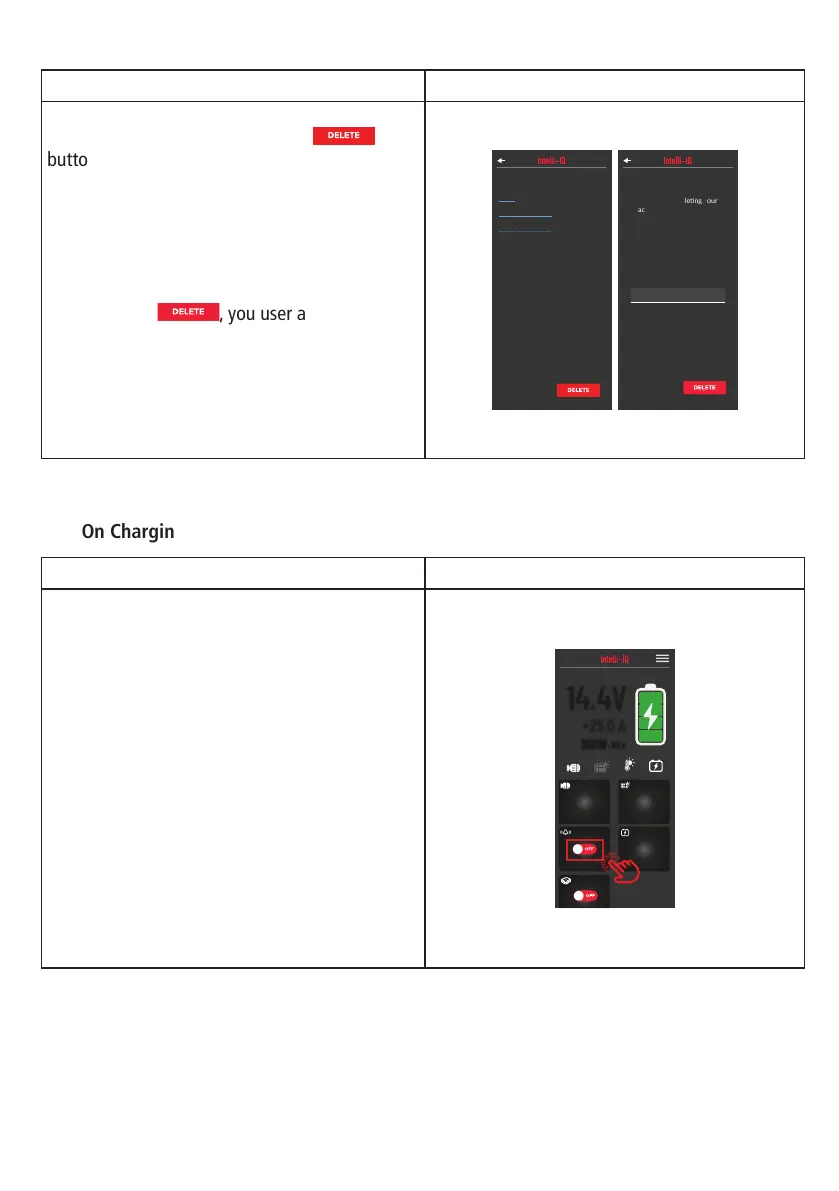
When connected to an Intelli-IQ device. On the
IQ dashboard screen. Swipe up to show the
“POWER” switch.
To start the charging process, when the
“POWER” switch is red “OFF” tap the “POWER”
switch and if it stays in the “ON” position, the
connected charger should be working.
19.1V
WET
SOLAR
12.5V
STARTER BATTERY
DEFAULT
MY 4X4
14.4V
+25.0 A
360W
- BULK
WAKE UP
OFF
OFF
Delete Account:
Turn On Charging:
18


 To Next Page