INSTRUCTION DISPLAY
During operation, you may be presented with a
warning or error alert.
Warning and error alerts will be appearing
during app operation, or if the app is in
the background, they will appear as app
notications.
To receive app notications, you will need to
accept the permissions for notications.
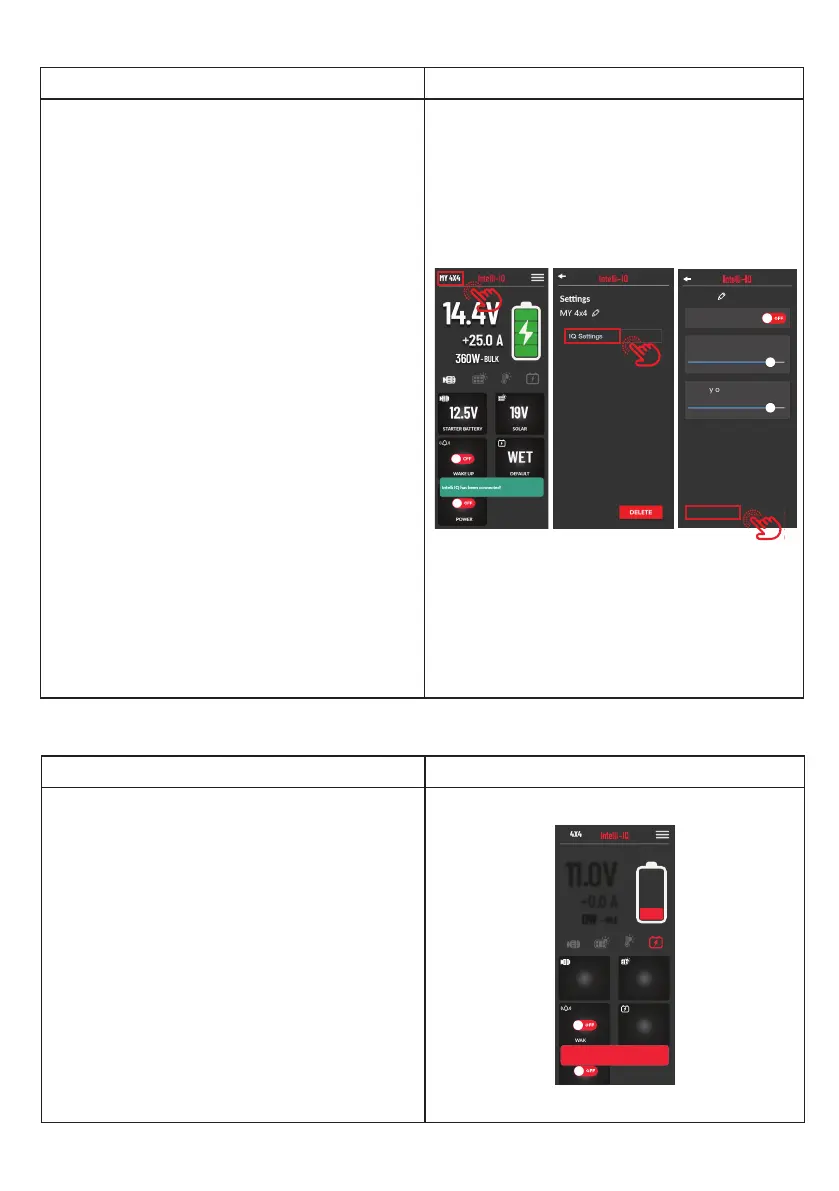
On the Dashboard screen, if you notice an item is
highlighted red or ashing red, tap it to present
the alert to learn more about the error.
0.0V
WET
SOLAR
12.5V
STARTER BATTERY
USER
11.0V
+0.0 A
OFF
WAKE UP
OFF
MY 4X4
0W
- IDLE
Low Baery Voltage Warning Message.
Tap here
X
Warning Displays and Alerts:
INSTRUCTION DISPLAY
In the IQD2 device settings screen, at the bottom
of the screen, there will be an Update Firmware
button.
If you cannot see it, swipe up the view.
When tapping this button, we will check
if the device you have requires a rmware
update.
NOTE:
• Before rst use of the IQD2, please update
it to the latest rmware version.
• To update your rmware, you will need to
have the following ready.
1. A strong internet connection.
2. Phone with more than 50% battery power.
NOTE: To update your rmware, you will
need to have the following ready.
1. A strong internet connection.
2. Phone with more than 50% battery
power.
WARNING: Do not exit or close the app
during a rmware update as it can cause
issues with your device.
MY 4x4
Model No: xxxxxxx
Hardware Version: xx.xx
Soware Version: xx.xx.xx
Serial Number: xxxxxxxx
Update Firmware
Brightness
60 %
Auto Brightness
OFF
Display on Time
6 min
Update IQD2 Firmware:
23


 To Next Page