15
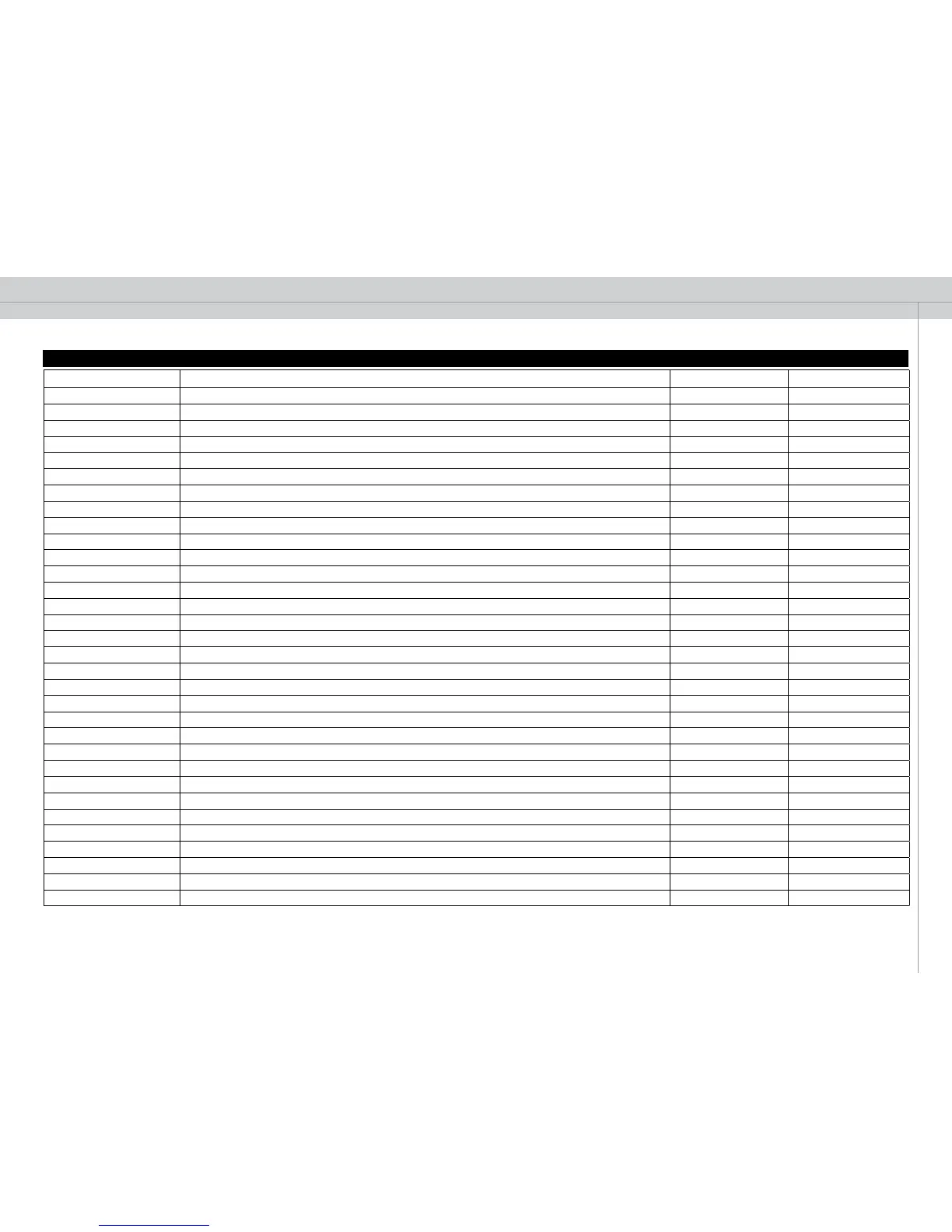
ASCII Function Operations supported Legal modifiers
LGWH Select Splash/Background White Logo/White
Get, Set A, ?
LGBK Select Splash/Background Black Logo/Black
Get, Set A, ?
VAUT Select Video Format Auto (default)
Get, Set A, ?
VNTC Select Video Format NTSC
Get, Set A, ?
VPAL Select Video Format PAL
Get, Set A, ?
VSEC Select Video Format SECAM
Get, Set A, ?
VDVD Select Video Type DVD
Get, Set A, ?
VVCR Select Video Type VCR Get, Set A, ?
TEST 1 Test Image On Get, Set A, ?
TEST 0 Test Image Off Get, Set A, ?
ECOM 1 Eco Mode On Get, Set A, ?
ECOM 0 Eco Mode Off Get, Set A, ?
RSAU RS232 address mode auto Get, Set A, ?
RSFI RS232 address mode fixed Get, Set A, ?
OSDC 1 OSD On Get, Set A, ?
OSDC 0 OSD Off Get, Set A, ?
OSDW 1 OSD Warning On Get, Set A, ?
OSDW 0 OSD Warning Off Get, Set A, ?
SWVR Software Version Get Get A, ?
THRM Thermal Monitor Get Get A, R, ?, ?M, ?N
AUTO Execute auto adjust Execute A
ECHO 0 Turn acknowledge off Get, Set A, ?
ECHO 1 Turn acknowledge on Get, Set A, ?
LPW1 Lamp Power Get, Set A, ?,
LTR1 Lamp Runtime Get A, ?
LHO1 Lamp Total Light On Time Hours Get Get A, ?
LST1 Lamp Status Get Get A, ?
LRM1 Lamp Estimated Remaining Lamp Time Get A, ?


 To Next Page