562500-000, Issue1.0, May 2013
28 of 69
8.1 Height Limit
8.1.2 Height Limit Menu
A height limit can be set by entering a known height on the key-
pad or by manually moving the machine to the desired limit.
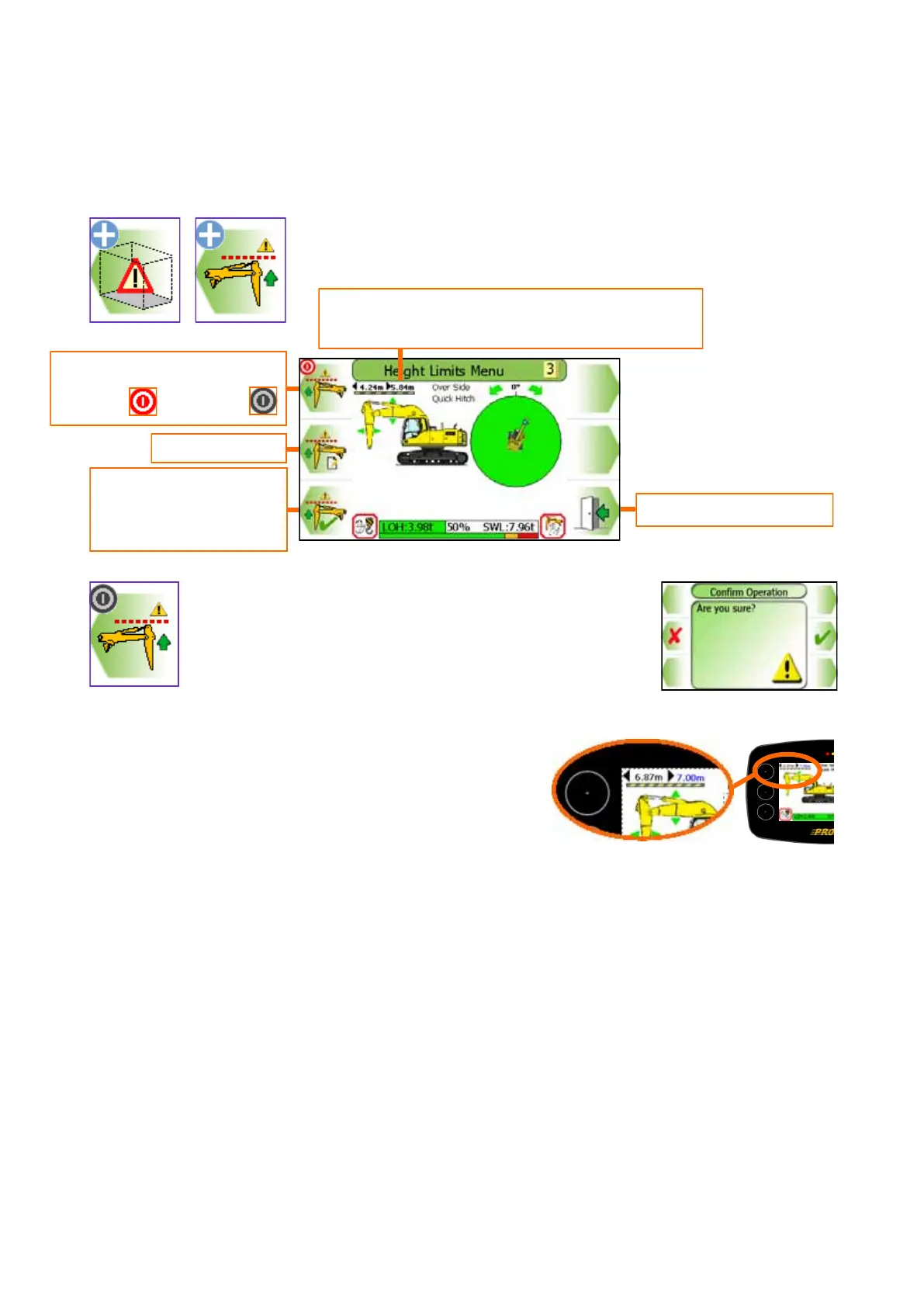
Using the height Limits Menu, the height limit can be
switched ON and OFF (a Confirm Operation screen will
be displayed, see sections 8.1.2 to enter a known height
and section 8.1.3 for setting the limit by moving the ma-
chine.
With a height limit set, the screen will display normally
display the current highest point value. To display the
current limit value, exit to the full screen and hold any
button for three seconds, the value will then turn blue
indicating it is the current limit value.
Enter a height
Set height limit using
current highest part of
equipment
Exit to previous menu
Switches height monitoring
ON and OFF
Current highest point. Only displayed if a
height limit is set.


 To Next Page