562500-000, Issue1.0, May 2013
44 of 69
8.5 Slew Limits Menus
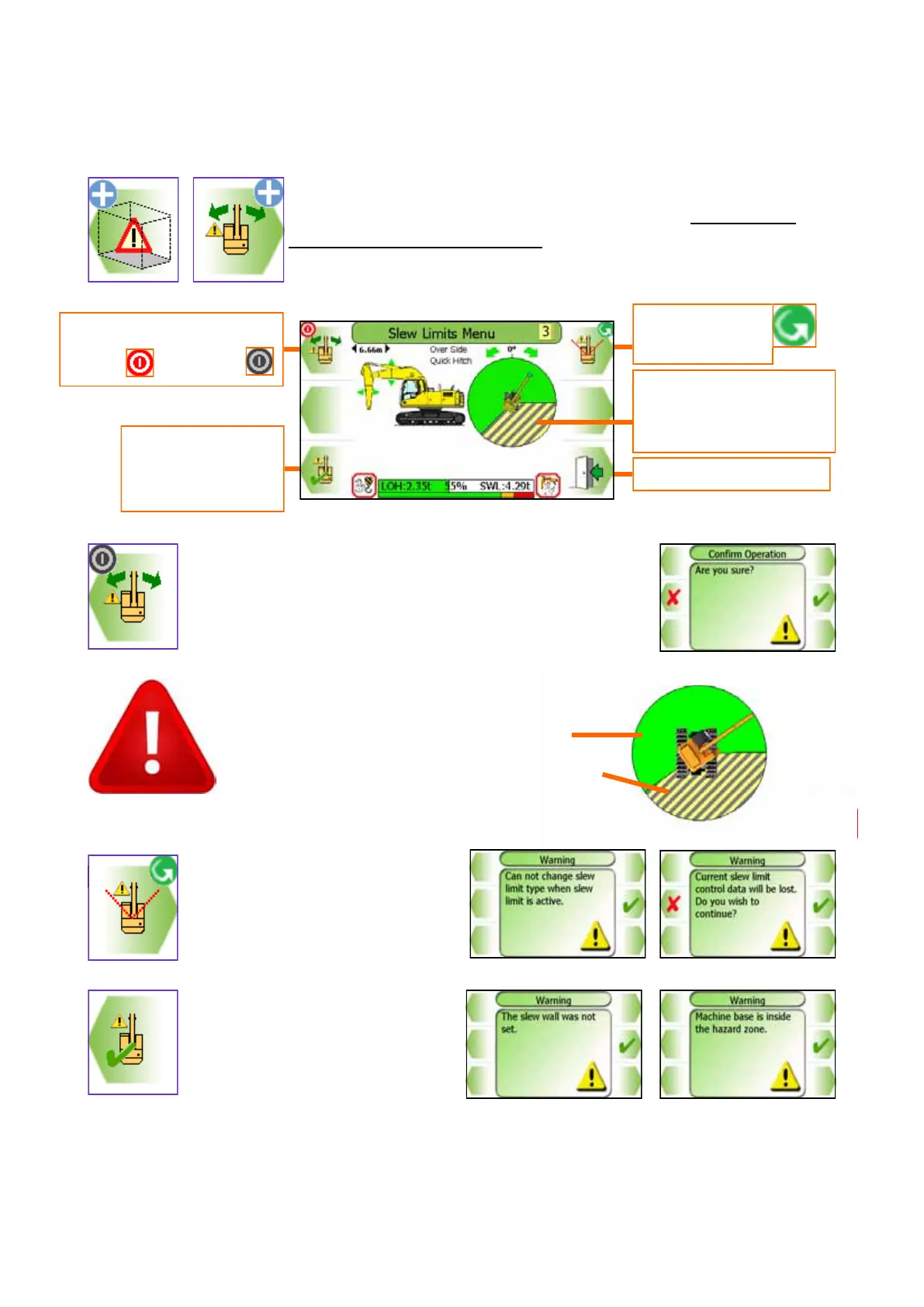
Slew restriction can be set by manually moving the machine to
the desired limit. Slew limits screen shown here. Do not travel
once a slew limit has been set.
Using the Slew Limits Menu, the Slew limit can be
switched ON and OFF (a Confirm Operation screen will
be displayed). The type of slew restriction can be se-
lected and is be set by moving the machine.
The type of slew restriction cannot
be altered if a limit is currently
ON. The warning message must
be acknowledged.
If altering the type of slew
Restriction the current limit will be
lost. If the slew limit was not
successfully set then a warning
message which must be acknowl-
edged will be displayed.
Press this button
to start the setup
procedure
Exit to previous menu
Switches slew monitoring
ON and OFF
Select Slew
restriction type
With the slew limit ON:
The Green area indicates the safe zone
The Hatched area indicates the hazard zone
Current hazard zone
shown if a slew limit is
ON.


 To Next Page