9.
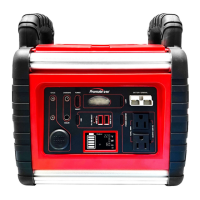
Type C Port IN / OUT
10.
Power ON / OFF Switch
11.
USB Power ON / OFF Switch
12.
LED Work Light ON / OFF Switch
13.
External Battery / Jumpstarting Connection
14.
Power Inverter ON / OFF Switch
15.
2 x 220V AC Outlet
16.
5 x LED Work-light
III.
CHARGING THE POWERSTATION
NOTE: Powerstation must be fully charged for 24 hours before first use.
Failure to do so may permanently damage the battery.
TO READ THE POWERSTATION’S BATTERY VOLTAGE / INVERTER STATUS
1. Short press the Power (On/off) button to show the batter level
< 10.1V----L0
10.1-11.0V----20%
11.1-11.6V----40%
11.7-12.0V----60%
12.1-12.5V----80%
12.6V-----100%
The LCD screen will only display the battery level. If you do not turn on any function, the screen will automatically
turn off after a few seconds.
2. Charge the unit using one of the 4 ways
a. Connect the AC Charger Adapter to the AC/DC Charging Port.


 To Next Page