Before you place each AeroPoint, spray an
AeroStencil mark (paying special attention to the
outside corners).
Remove AeroStencil and allow paint to dry. Place AeroPoint on top of AeroStencil mark, using
painted corners to align exactly. Activate each
AeroPoint and complete flight as usual.
1
Before you place each AeroPoint, spray an
AeroStencil mark (paying special attention to the
outside corners).
Remove AeroStencil and allow paint to dry. Place AeroPoint on top of AeroStencil mark, using
painted corners to align exactly. Activate each
AeroPoint and complete flight as usual.
1 3
2
Before you place each AeroPoint, spray an
AeroStencil mark (paying special attention to the
outside corners).
Remove AeroStencil and allow paint to dry. Place AeroPoint on top of AeroStencil mark, using
painted corners to align exactly. Activate each
AeroPoint and complete flight as usual.
1
3
Subsequent ights:
Carry out your drone ight without distributing
AeroPoints, and Propeller will use your existing
AeroStencil marks to calibrate your data set instead.
Alternatively, you can use a combination of AeroStencil
marks (in stable areas) and AeroPoints (in unstable
areas, like a pit oor) for subsequent ights.
You can rely on AeroStencil marks for up to three months.
After this time, we recommend you complete another
survey using AeroPoints to maintain the highest accuracy.
First ight:
Distribute the full set of AeroPoints around your
site as usual. But before placing each unit, spray an
AeroStencil mark (including outside corners) then place
your AeroPoint on top (using the corner marks to align).
Press the button on each AeroPoint to start recording,
and complete your survey as normal.
Do you y the same site every day? Ifso, you can avoid placing and
picking up your AeroPoints each time by using AeroStencils to mark
your AeroPoint positions semipermanently.
AeroStencil marks work best on hard, at surfaces that won’t move
orbe disturbed.
Use heavy-duty aerosol paint (like that used for line-marking) in a
high-contrast color like pink or yellow.
For PPK users,
please refer to the
PPK User Manual
for specic guidance
onAeroStencil use.
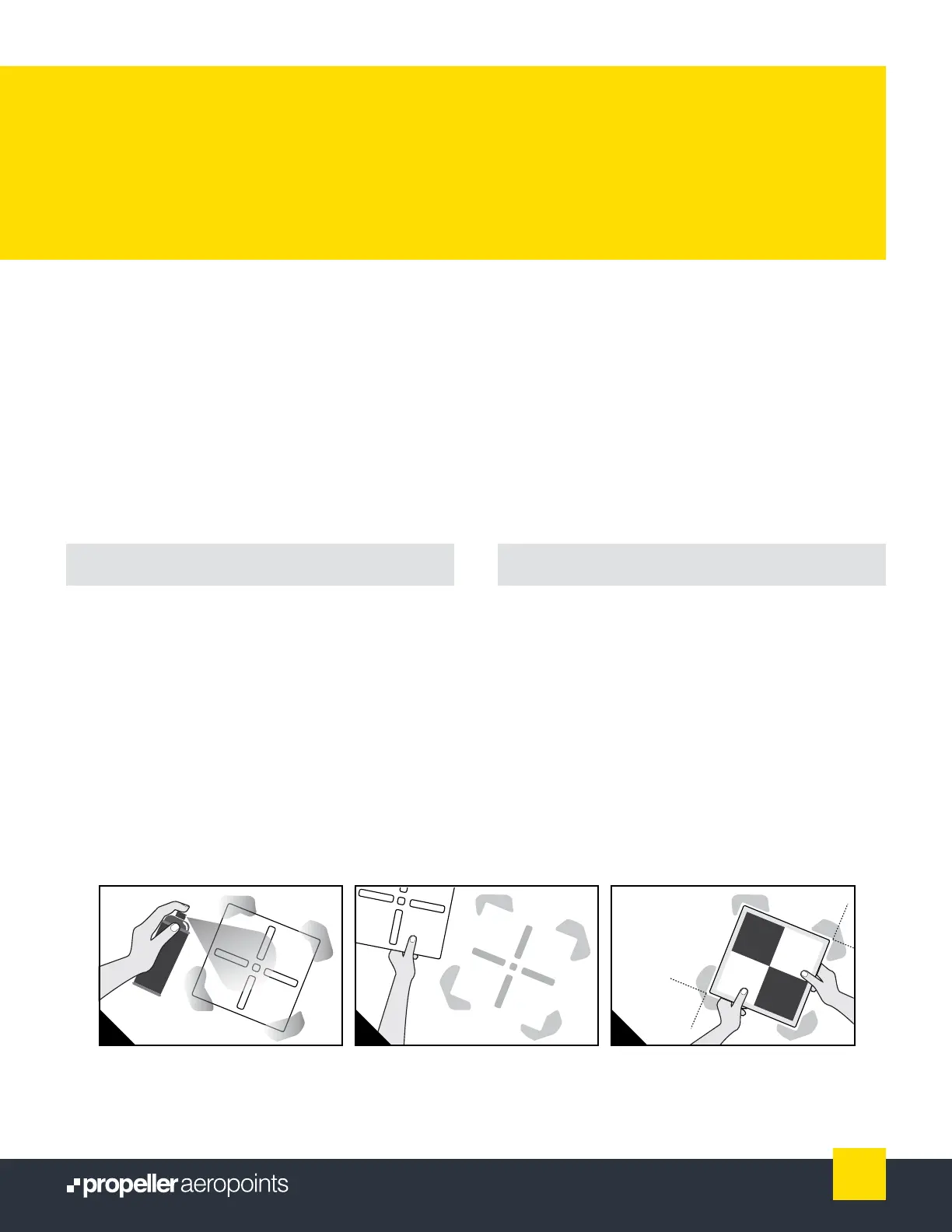
Before you place each AeroPoint, spray
anAeroStencil mark (paying special
attention to the outside corners).
Remove AeroStencil and allow paint
to dry.
AEROSTENCILS:
FOR FREQUENT FLYERS
Place AeroPoint on top of AeroStencil mark,
using painted corners to align exactly. Activate
each AeroPoint and complete ight as usual.
13
AeroPoints User Manual



 To Next Page