TROUBLESHOOTING
- 7 -
- 2 -
IMPORTANT SAFETY INSTRUCTIONS
INSTRUCTIONS PERTAINING TO A RISK OF FIRE, ELECTRIC SHOCK OR INJURY TO PERSONS
WARNING - Using electric product, basic precautions should always be followed, including the following:
1. Read all the SAFETY INSTRUCTIONS before using the product.
2. To reduce the risk of injury, close supervision is necessary when the product is used near children.
3. Do not use this product near water - for example, near a bathtub, washbowl, kitchen sink, in a wet
basement or near a swimming pool or the like.
4. This product is capable of producing sound levels that could cause permanent hearing loss. DO NOT
operate for a long period of time at high volume or at a level that is uncomfortable. If you experience any
hearing loss or ringing in the ears, you should consult an audiologist.
5. This product should be located so that its location or position does not interfere with its proper ventilation.
6. This product should be located away from heat sources such as radiators, heat registers or other
products that produce heat.
7. The product should be connected to a power supply only of the type described on the operating instruc-
tions or as marked on the product. Always ensure that a good quality mains lead is used applicable for your
country. The following wiring convention is used in all product mains leads, and must be strictly observed:
Green & Yellow = Earth. Brown = Live. Blue = Neutral. IMPORTANT: THIS UNIT MUST BE EARTHED!
8. This product may be equipped with a polarized line plug (one blade wider than the other). This is a safety
feature. If you are unable to insert the plug into the outlet, contact an electrician to replace your obsolete
outlet. DO NOT defeat the safety purpose of the plug.
9. If the mains fuse need replacing, DISCONNECT THE PRODUCT FROM THE MAIN
SUPPLY. The fuse
is below the mains IEC socket, an must be replaced with a fuse of the type and rating stated on the rear
panel. If a replacement fuse fails immediately, contact your local service agent. DO NOT replace with a
higher value.
10. The power-supply cord of the product should be unplugged from the outlet when left unused for a long
period of time. When unplugged the power-supply cord, DO NOT pull on the cord, but grasp it by the plug.
11. Ensure the mains isolation switch is readily accessible when the product is in use.
12. Care should be taken so that objects do not fall and liquids are not spilled into the enclosure through
openings.
13. The product should be serviced by qualified service personnel when:
A. The power-supply cord or the plug has been damaged; or
B. Object have fallen, or liquid has been spilled into the product; or
C. The product has been exposed to rain; or
D. The product does not appear or operate normally or exhibits a marked change in performance; or
E. The product has been dropped or the enclosure damaged.
14. DO NOT attempt to service the product beyond that described in the user-maintenance instructions. All
other serving should be referred to qualified service personnel.
15. WARNING - DO NOT place objects on the product’s power cord or place it in a position where anyone
could trip over, walk on or roll anything over it. DO NOT allow the product to rest on or to be installed over
power cords of any type. Improper installations of this type create the possibility of fire hazard and/or
personal injury.
SAVE THESE INSTRUCTIONS
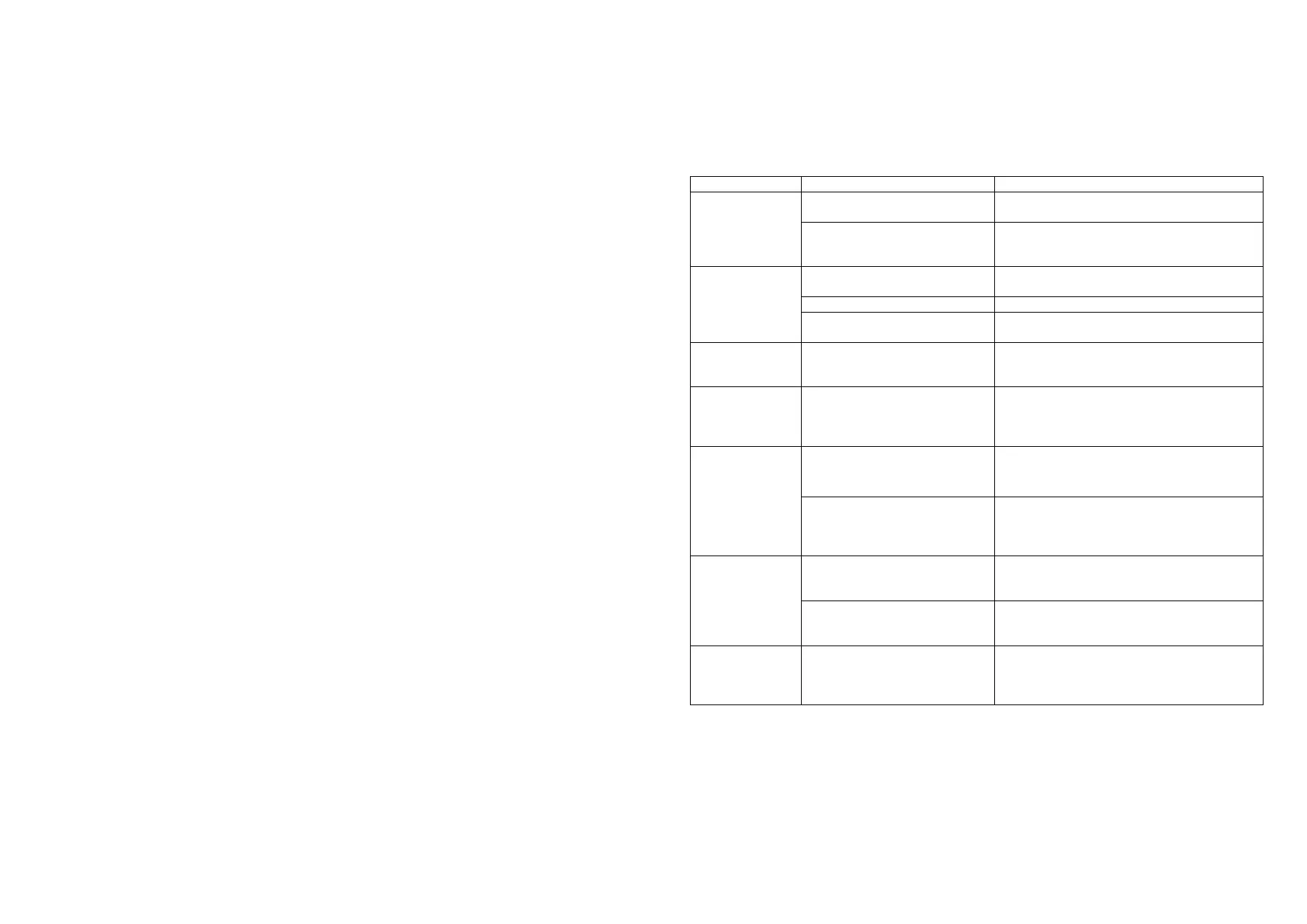
AC supply not connected or
switched off.
Check AC connections and switches.
Check and replace fuses at plug and IEC
socket. USE ONLY SAME TYPE AND
RATING !
No input, or input too low
Check input is connected, and VU meters
are showing adequate signal present.
Level controls set too low
Speakers faulty or not
connected
Check speakers and speaker connections
No sound
(Protect LED on)
Speaker outputs short circuited,
or low impedance load
connected.
Check all output connections, and check
speaker load total impedance. Press reset
button when problem is cleared.
Turn levels to minimum and allow to cool for
5 minutes. Check front and rear vents are
not blocked, check input level is not causing
clip lights to illuminate.
Noise from AC supply is being
picked up in the signal path
Use good quality, shielded signal cables and
ensure they are kept away from AC power
cables and other AC powered equipment.
There is an earth problem
Use a mains tester to ensure the AC outlet
has a good earth. Power connected
equipment (e.g mixer and amp) from the
same AC outlet where possible.
Excessive signal level
somewhere in signal chain.
Use the VU meters to ensure the input level
to the amp is at the correct level. Check
levels at mixer or source
Damaged or poor quality
cables
Use only high quality cables of the
appropriate type, protect them from damage
and regularly check connections.
Sound cuts out
or is intermittent
Damaged or poor quality
cables or connectors,
connectors not properly
inserted, amp overheating
Check all cables and connections, refer to
above sections regarding distortion and
temp warning light.


 To Next Page
 Loading...