10
Rev. D / January 2015
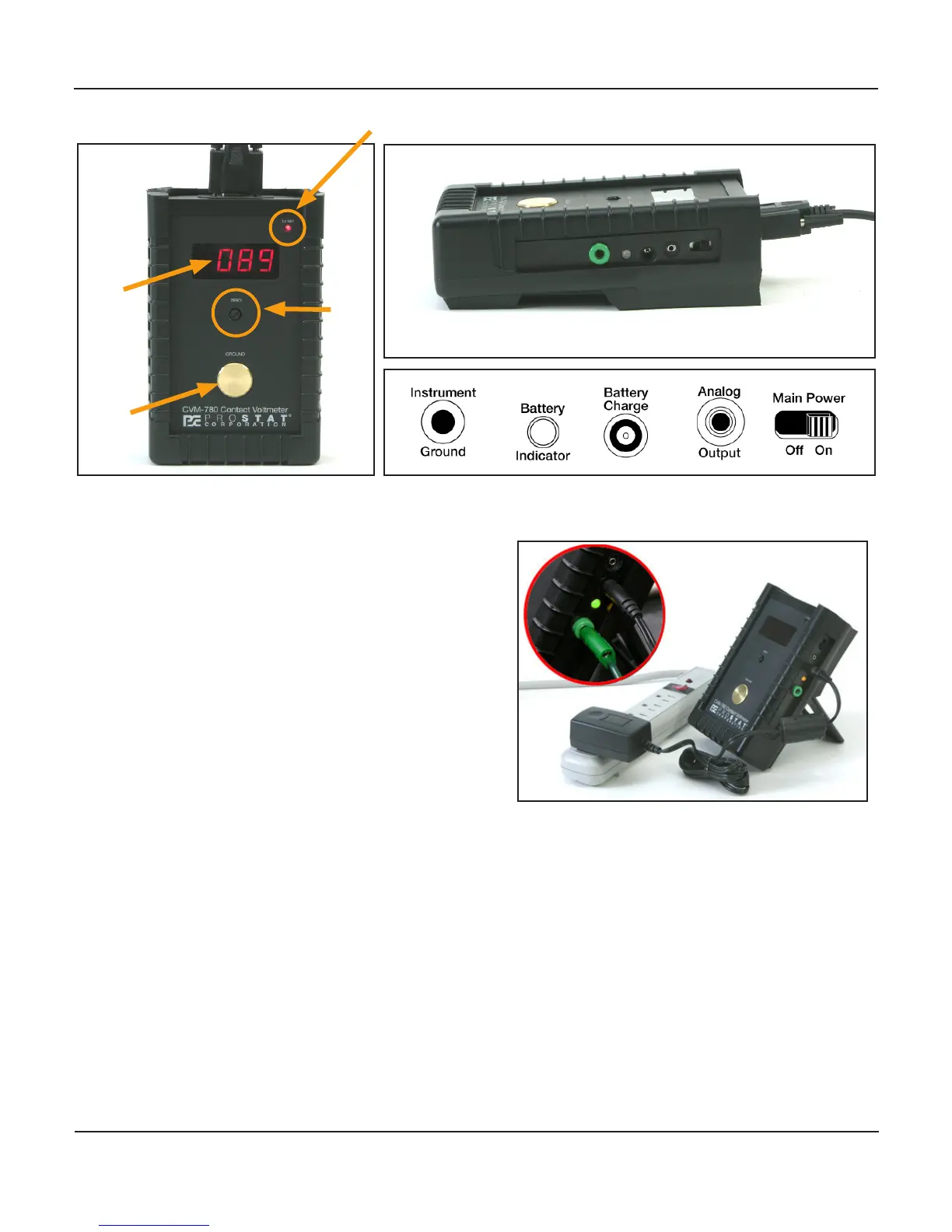
CVM-780 Contact Voltmeter
Low Ba Indicator
Manual Zero
LED
Display
Ground
Plate
J. Before using the CVM-780 fully charge the
metal hydride baeries using supplied universal
baery charger.
1. Plug charger into a standard AC outlet. Use
appropriate adapter if necessary.
2. Plug charger’s DC output connector rmly
into the CVM-780 charging receptacle locat-
ed in the side panel of the Meter assembly
3. Baery charging LED will be ORANGE during
charging and GREEN when charge is com-
pleted.
4. Disconnect the charger from AC when
charge is complete and for mobile operaons
K. Install a ceramic or metal probe measurement p at the front end of the probe assembly
1. Remove the p cover by PULLING it straight o the probe. Avoid twisng the cover during its
removal or installaon.
2. Select an appropriate p from the accessory box.
Probe Tips have very sharp points – handle them with care to avoid injury


 To Next Page