Manual & Installer Guide 6
Selecting Your Desired Temperature and Mode
The Heat or Cool Setpoint is
the temperature the room
has to reach before heating
or cooling will turn on.
(Without regard
to deadband)
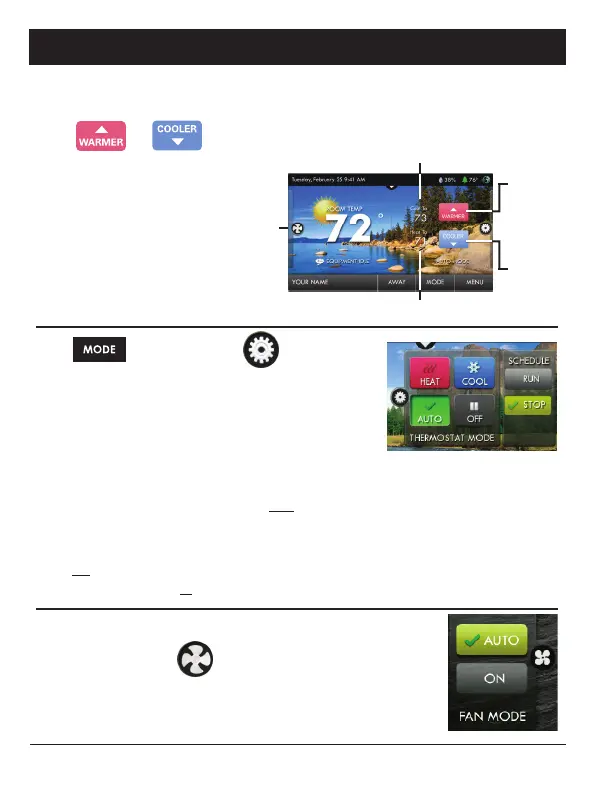
Press or to adjust temperature
Press
or the MODE Icon
HEAT will allow only heat operation.
COOL will allow only cool operation.
AUTO will allow both Heat and Cool operation.
OFF - heating and cooling systems are turned off.
AUTO-CHANGEOVER MODE - Pressing the WARMER or
COOLER buttons in Auto mode will adjust both the heat and cool setpoints simultaneously.
To adjust heat and cool setpoints individually, choose HEAT mode to adjust the heat setpoint
and COOL mode to adjust the cool setpoint, then return to AUTO mode.
HEAT OR COOL MODE - Pressing the WARMER or COOLER buttons in Heat or Cool mode
will adjust only the heat or cool setpoints.
Using the Fan Button
Press the FAN Icon
FAN ON fan runs constantly even in OFF Mode.
FAN AUTO fan only runs with a heating or cooling demand.
Cool Setpoint
Warm
Button
n
Cooler
Button
Heat Setpoint
4 Quick Start - Temperature, Modes & Fan



 To Next Page