Home
ProtoArc
Keyboard
EK01 Plus
Page 3 (2.4 G USB Connection)
ProtoArc EK01 Plus - 2.4 G USB Connection; Connection Procedure
8 pages
Manual
Save Page as PDF
To Next Page
To Next Page
To Previous Page
To Previous Page
Loading...
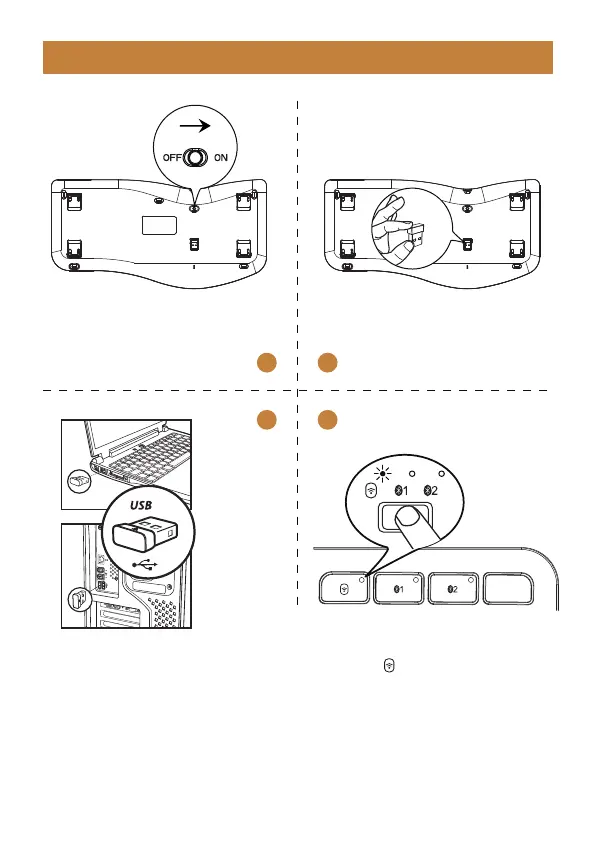
2.4G USB Connection
1
2
3
4
1. T
urn the power switch to ON.
2. T
ake out the USB receiver
.
3. Plug it into a USB port on your
computer
.
4. Press key to switch to 2.4G
channel, the white indicator will
flash slowly
, enter into 2.4G
channel.
- 2 -
2
4
Table of Contents
Main Page
Product Features
2
Bluetooth Connection
4
Charging Guide
5
Product Specification
7
Sleep Mode
7
Packing List
8
Related product manuals
ProtoArc EKM01
2 pages
ProtoArc EKM01 Plus
12 pages
ProtoArc EK01
3 pages
ProtoArc MECH K301
10 pages
ProtoArc XK03
11 pages
ProtoArc MECH K300
10 pages
ProtoArc XKM01 Mini
11 pages
ProtoArc XK01 Mini
9 pages
ProtoArc CaseUp XKM01
16 pages
ProtoArc XK02
14 pages
ProtoArc XK01 TP
17 pages
ProtoArc XKM03
11 pages



 To Next Page