019
If thermostat is set in AF model, and set to show air temperature only, press
and hold the
Down button for 3 seconds, floor temperature will show and it will
automatically revert back to air temperature in 5 seconds.
In AUTO mode to temporary override the current set temperature,
1. Press
or button once, the set temperature starts flashing
2. Press
or button again to adjust the set temperature
3. Wait for 5 seconds to confirm the setting,
OVERRIDE will display on the LCD.
Now your thermostat will maintain the new set temperature until the next set-point.
To cancel the override setting, press and hold
button for 5 seconds until
OVERRIDE disappear.
Your thermostat has the ability to reset all settings to the factory defaults.
If you are certain you want to do this:
In standby mode (when thermostat is turned off), press and hold button
M
and
for 5 seconds until RESET is shown on the screen.
Press and hold the
and buttons for 3 seconds until you see a lock
icon appearing, to unlock, repeat the steps above.
To set vacation mode press and hold the
button for 3 seconds
Until
appears. Use same procedure to exit this mode.
Vacation mode will maintain a set temperature (default 10°C) all the time.
Press
or button to change the set point and wait for 5 seconds to
accept and exit.
View floor temperature
Temporary temperature override
Factory Reset
Lock the buttons
Vacation mode
86mm
mm68
mm94
mm05
Rear View
13mm
28 mm
94m
m
Side View
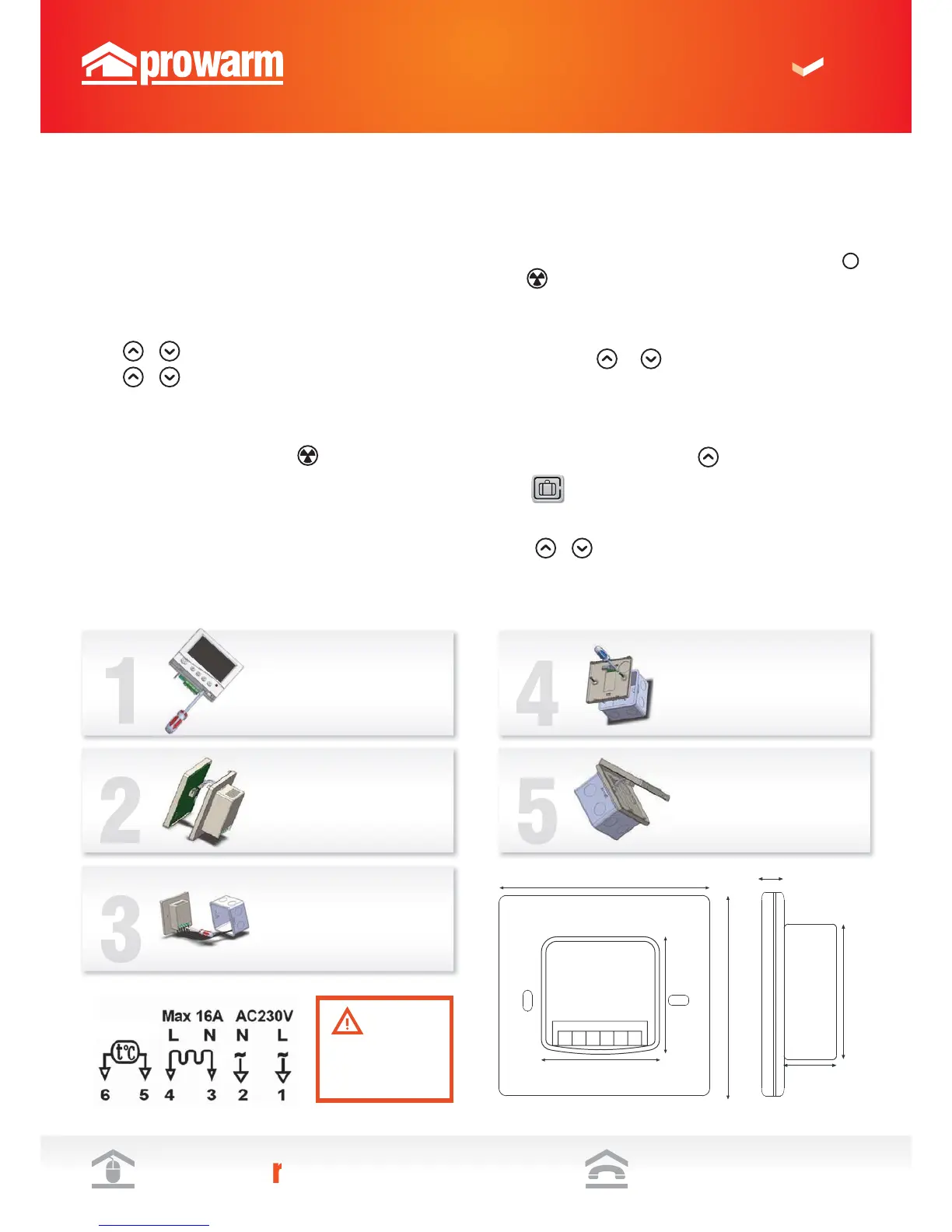
Installation & Wiring
Carefully separate the front half of
the thermostat from the back plate by
placing a small flat head terminal driver
into the slots on the bottom face of the
thermostat.
STEP 1
STEP 1
Carefully unplug the ribbon connector
which is plugged in to the front half of
the thermostat
STEP 1
Place the thermostat front half
somewhere safe Terminate the
thermostat as shown in the diagrams
below
STEP 1
Screw the thermostat back plate on to
the back box
STEP 1
Re-connect the thermostat ribbon
cable and clip the two halves together
Dimensions
This product should be
installed by a qualified
electrician.
Wiring Diagram
HEATING MAT
Sensor
(no polarity)


 To Next Page