Tsunami
®
800 and 8000 Series - Hardware Installation Guide 32
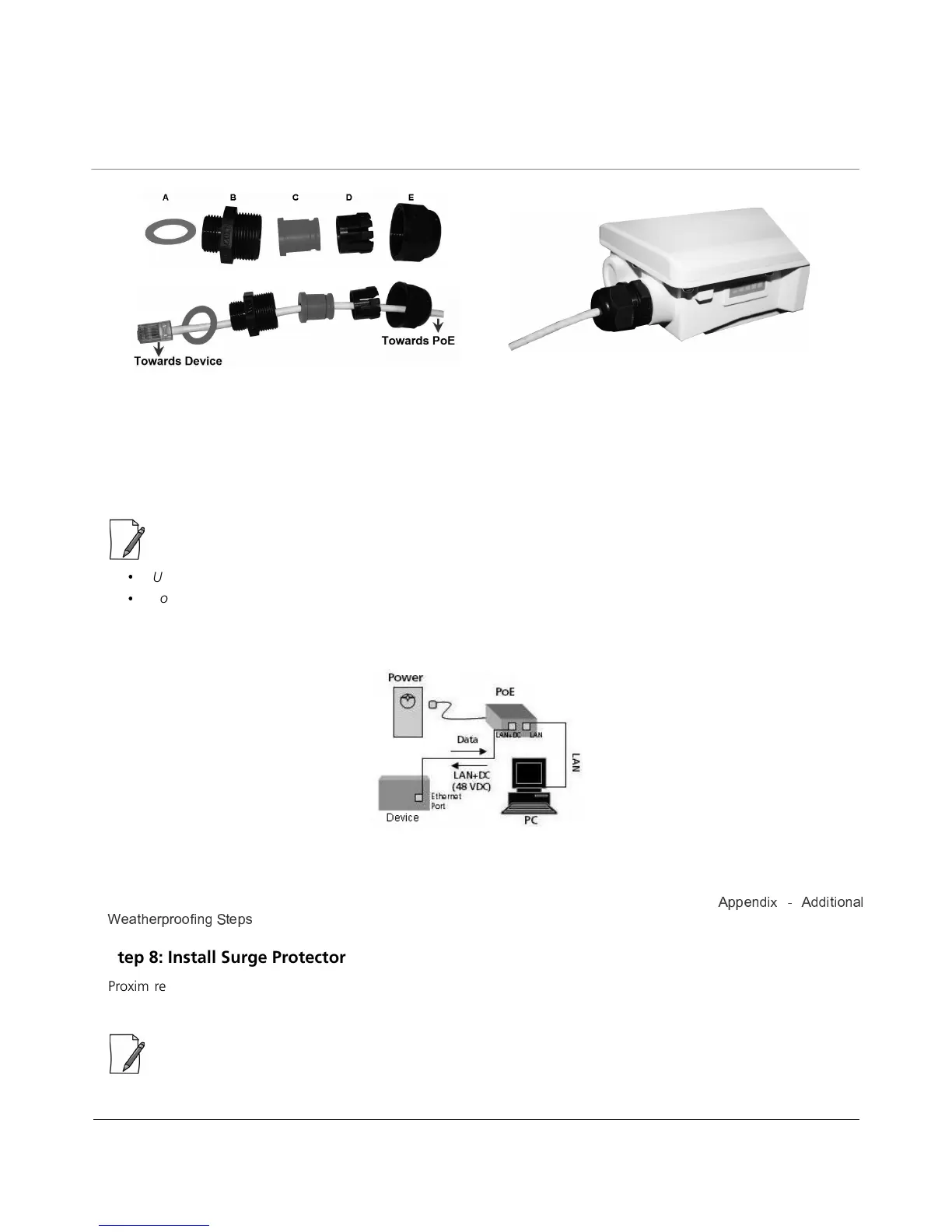
Figure 2-15 Weatherproofing RJ45 Connector
2. To connect the device through a hub or a switch to a Personal Computer, connect an Ethernet cable between the
network interface card in the Personal Computer and the hub/switch, and between the hub/switch and the RJ45 LAN
port on the PoE Injector.
3. To connect the device directly to a Personal Computer, connect an Ethernet cable between the network interface card
in the Personal Computer and the RJ45 LAN port on the PoE Injector.
:
Use only the PoE supplied with the product.
You should use a straight through Ethernet cable between the PoE and the device. When you use a 4-pair cross over
Ethernet cable, the reload functionality gets activated and forcibly deletes the operating image.
The following figure is the pictorial representation of the cabling setup.
Figure 2-16 Cabling Setup
Additional Weatherproofing Steps
To add an additional layer of protection to the connectors against the environment, see
b O \ M R b M M R Y R ^ \ K a
§ O K Y [ O L L ^ ^ ¨ R \ W
`
Y O c
.
Step 8: Install Surge Protector
Proxim recommends two approved lightning surge protectors to be installed, one near to the device and the other at the
building ingress point.
: To buy a suitable Surge Protector, place an order separately with your distributor.



 To Next Page
 Loading...






