4 5
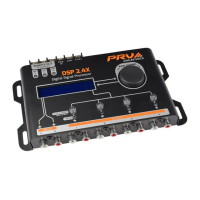
1. SEQUENCER: It allows sequenal acvaon of other products through the remote
acvaon (REM) connecon. Use a cable of at least AWG 20.
2. REM IN: Allows automac acvaon of the amplier when turning on the radio/
player. Connect to the remote output of the radio/player mininum of AWG 20.
3. NEGATIVE POWER CONNECTOR (GND): Connect to the negave terminal of the
baery using a cable minimum of AWG 13.
4. POSITIVE POWER CONNECTOR (+BAT): Connect to the posive terminal of the
baery using a cable minimum of AWG 13. It is recommended to use a fuse for
external protecon of 1A.
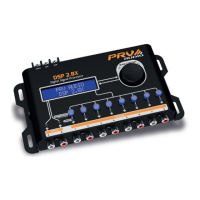
5. DISPLAY LCD: It allows visualizaon and interacon with the processor system.
6. ENCODER: Rotary control that allows interacon with the processor system
funcons and resources:
• ENTER funcon: Short press on the encoder.
• RETURN funcon: Long press on the encoder.
Overview
5
9
21 3 4
8
6
1110
7
7. HOTKEYS: Shortcut keys for selecng output channels:
• Short press: Selects the channel for applying the parameters.
• Long press: Allows you to turn the selected output channel on or o.
HOTKEY on blue: output channel on.
HOTKEY lit red: output channel o.
8. LED LIMITER: The LEDs will light when the “LIMITER” of the channel in queson is
acng, they are also used as indicators of output saturaon.
9. LED MAX: The LEDs will light indicang that the respecve input signal has
reached the maximum level allowed.
10. AUDIO INPUT (INPUT): Conectores do po RCA com atuação independentes
(A e B). Conecte ao rádio/player através de cabos RCA blindados de qualidade
para evitar ruídos.
11. AUDIO OUTPUT (OUTPUT): RCA connectors, provide the audio processed
according to the sengs made on the processor.
ROTATION: Navegation, increase and decre-
ase in values.
SHORT PRESS: Enter, select, skip parameter.
LONG PRESS: Return to the previous screen.
SHORT PRESS: Select output channel.
LONG PRESS: Output ON/OFF.
Navigation keys
Navigaon and control of the DSP2.8X are made via the ENCODER knob and the
HOTKEYS hotkeys.
ENCODER HOTKEYS


 To Next Page
 Loading...