4826 Sterling Drive, Boulder, CO 80301
PH: 720.406.8946 service@psaudio.com www.psaudio.com
Getting Started
Getting Started xix
©2016 PS Audio Inc. All rights reserved.
®
Owner’s Reference DirectStream Junior
of Bridge II to another, more familiar name, like John’s DAC. This friendly name
is what will appear in the JRiver or MController Play-To windows as described
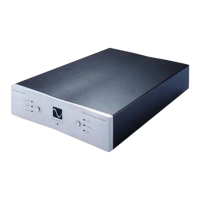
above. To change the friendly name, you must access DirectStream Junior’s setup
window. Press and hold the front panel selector button for 3 seconds to access
the setup menu. Press the selector button (next to the display) to toggle to the
next setup screen. Press the button 6 times to access the friendly name screen.
To change the name, press and hold the selector button for 3 seconds while in the
friendly name screen. The edit menu appears. Follow the same instructions found
in the Input Naming section of this manual for further instructions.
Network Settings
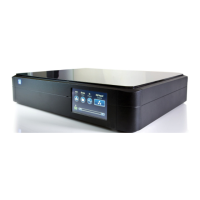
It is sometimes useful to nd out the network setting when you have the Network
Bridge connected to your home network through the router. To discover the
network setting, go to the setup menu by pressing and holding the front panel
selector button for 3 seconds. Toggle through the screens by multiple button
Network settings


 To Next Page