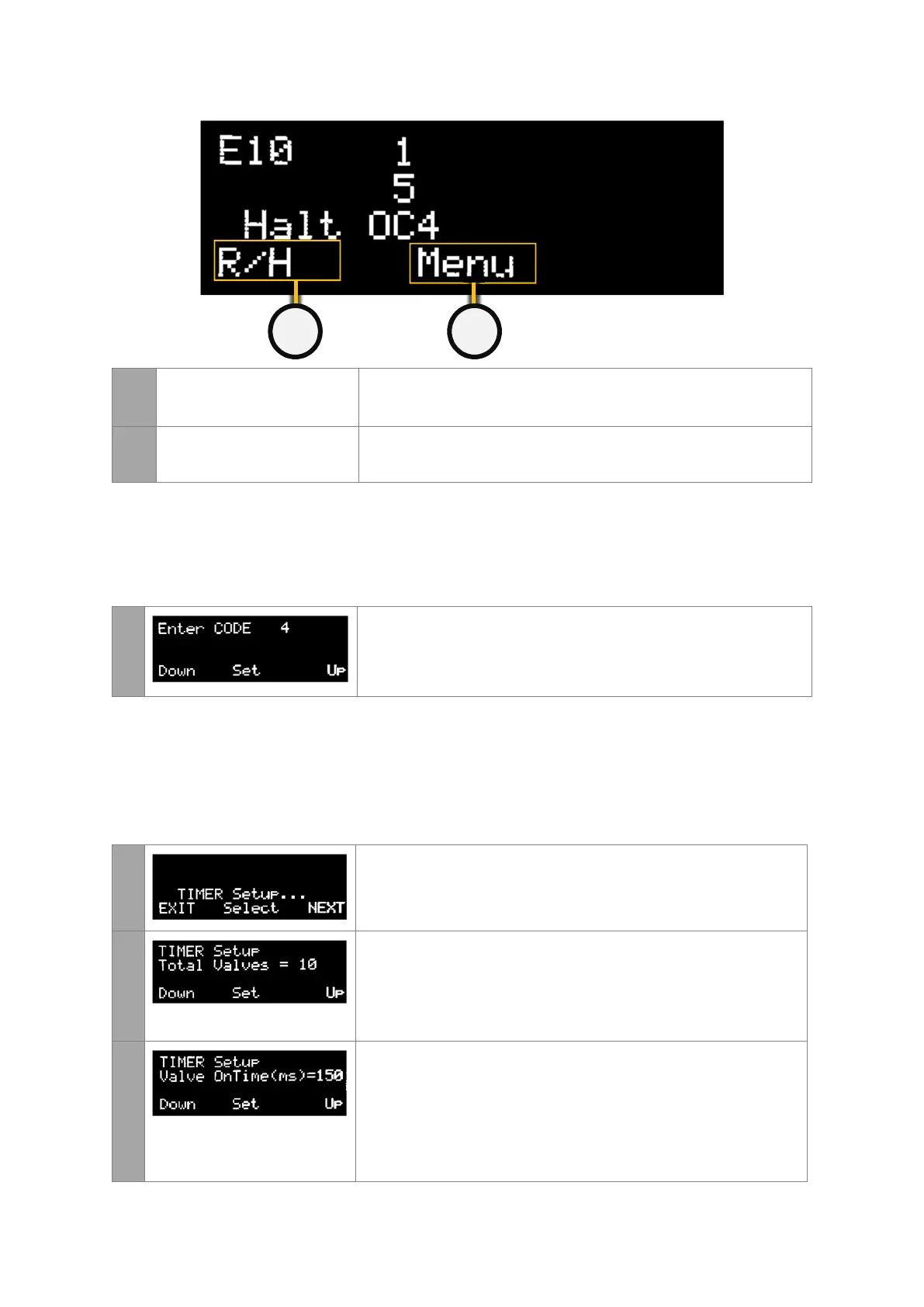
7
PULSE OR HALT Press on the left button to manually change the state between
Halted and Pulsing.
8
MENU Press on the middle button to check alarms, enter maintenance
mode or to alter the settings of the controller.
Accessing the Settings Area
From the main screen, continue pressing the middle button unit the Enter CODE page
appears
1
To enter the code, select the left DOWN or right UP buttons. The
password code for all controllers is set to 4.
When this has been entered enter the middle SET button.
Timer Settings
This menu allows the user to change the settings of the controller such as number of valves,
sequencing, the pulse on and off times. Keep pressing NEXT until the TIMER Setup page is
displayed.
1
To modify the controller timer settings, enter the middle Select
button.
2
This page specifies the number of valves connected to the E10.
To alter the number of valves connected to the system use the left
DOWN or right UP buttons. When the desired number of valves has
been entered enter the middle SET button.
3
Keep pressing the set button to skip the next few pages until the
user gets to OnTime page.
This page modifies the length of the pulse duration.
The pulse duration is user selectable in milli seconds (ms) and can be
between 1ms to 999ms in length.


 To Next Page