2 3
English
English
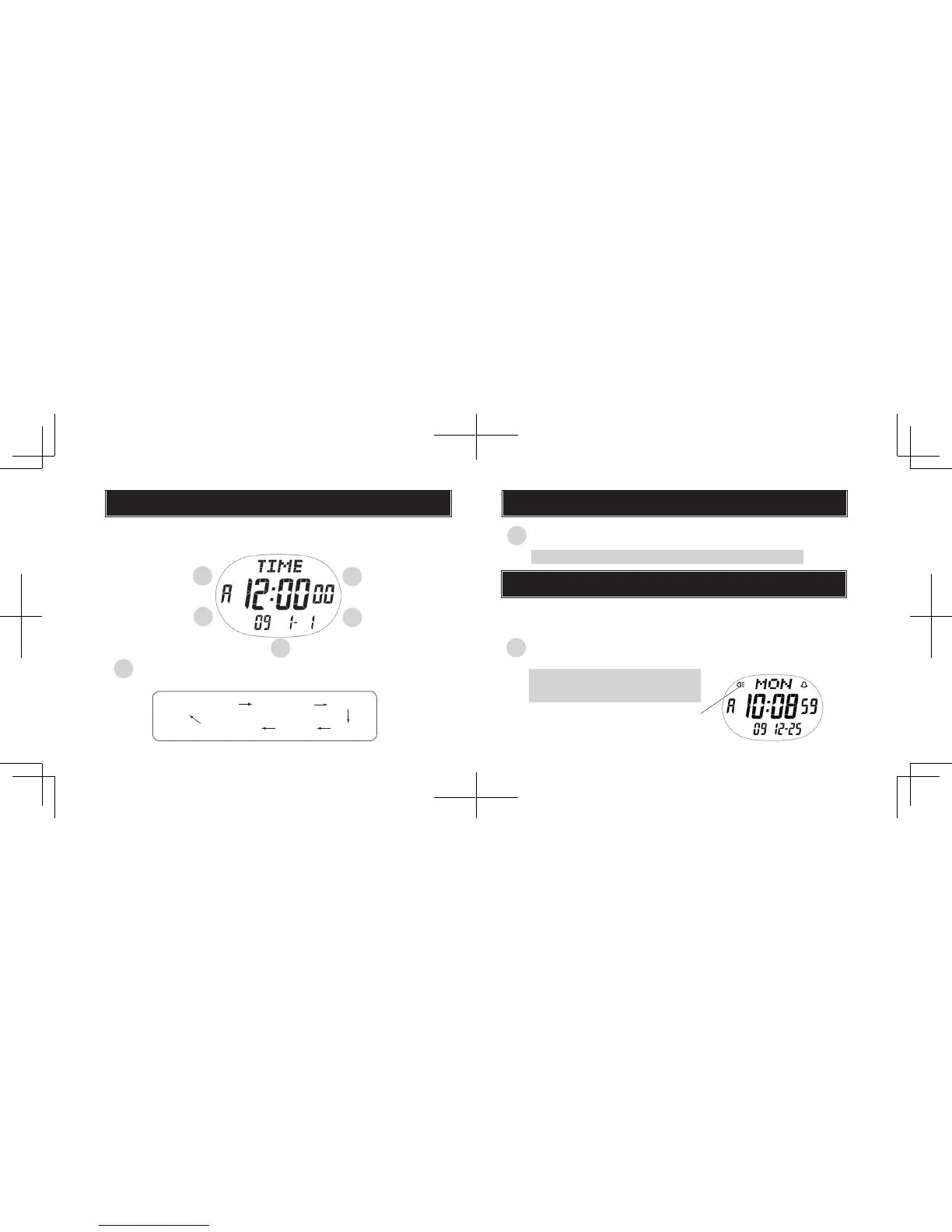
MODE CHANGE
B
A
D
C
E
With each pressing, the mode in the digital display changes
in the following order:
ALARM
TIME/CALENDAR
(TIME)
STOPWATCH
(CHRONO)
TIMER
WORLD TIME
l
Selection of a desired mode can be made by pressing and holding
button A for more than two seconds.
AUTO ILLUMINATION
D
With each pressing for more than 2 seconds in any mode, the
auto illumination can be set or cancelled.
A A
A
A
A
A
MEMORY
RECALL
A
ILLUMINATING LIGHT (LED PANEL)
Auto illumination mark
D
Press to turn on the LED light.
The display panel is evenly illuminated for 2 seconds.
l
If set in advance, the display is illuminated for approximately 2
seconds with each press of any of the buttons (except pressing
buttons for adjusting items or digits).
The auto illumination cannot be set or
cancelled when either of the setting
displays is shown.


 To Next Page