10
Storing and selecting presets
Store up to 50 of your favourite DAB and up to 50 FM radio stations as presets for easy access.
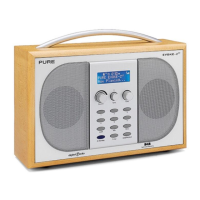
To quick-store a DAB or FM station to a preset button (1–5)
Tune to the DAB or FM station you want to store. Press and hold one of the numbered Preset
buttons (1–5) for two seconds until you see the ‘Preset saved’ message on the bottom line.
To store a DAB/FM station to the preset list (1–50)
1. Tune to the DAB or FM station you want to store.
2. Press and release the 6+ button to view the numerical list of stored presets, then turn the
Tune dial to choose any Preset number between 1 and 50. You can overwrite existing presets.
3. Press and hold the 6+ button (or the Tune dial) for tw
o seconds until you see the ‘Preset
saved’ messag
e. The current DAB/FM station is now stored to that number on the Preset list.
To recall a preset when listening to DAB or FM
1. To tune to Presets 1 to 5, press the corresponding numbered button on the unit (1 to 5).
2. To access the full list of presets (from 1 to 50), press and release the 6+ button, turn the
Tune dial right or left to scroll through the list of presets, then push and release the Tune dial
to tune to the selected preset.
Storing and selecting presets
Empty preset
Preset 06
Empty Preset
Preset 10
Preset 10 saved
Classic FM
erformed by New Phil
Classic FM
erformed by New Phil
Classic FM
Preset 01 saved
BBC Radio 6Music
BBC Radio 6 Music
Now playing: No Cars G
2
Tune
Tune
2
Tune
Classic FM
Preset 10
Tune
Tune
Tune
2



 To Next Page
 Loading...