6
Adjusting and muting the volume
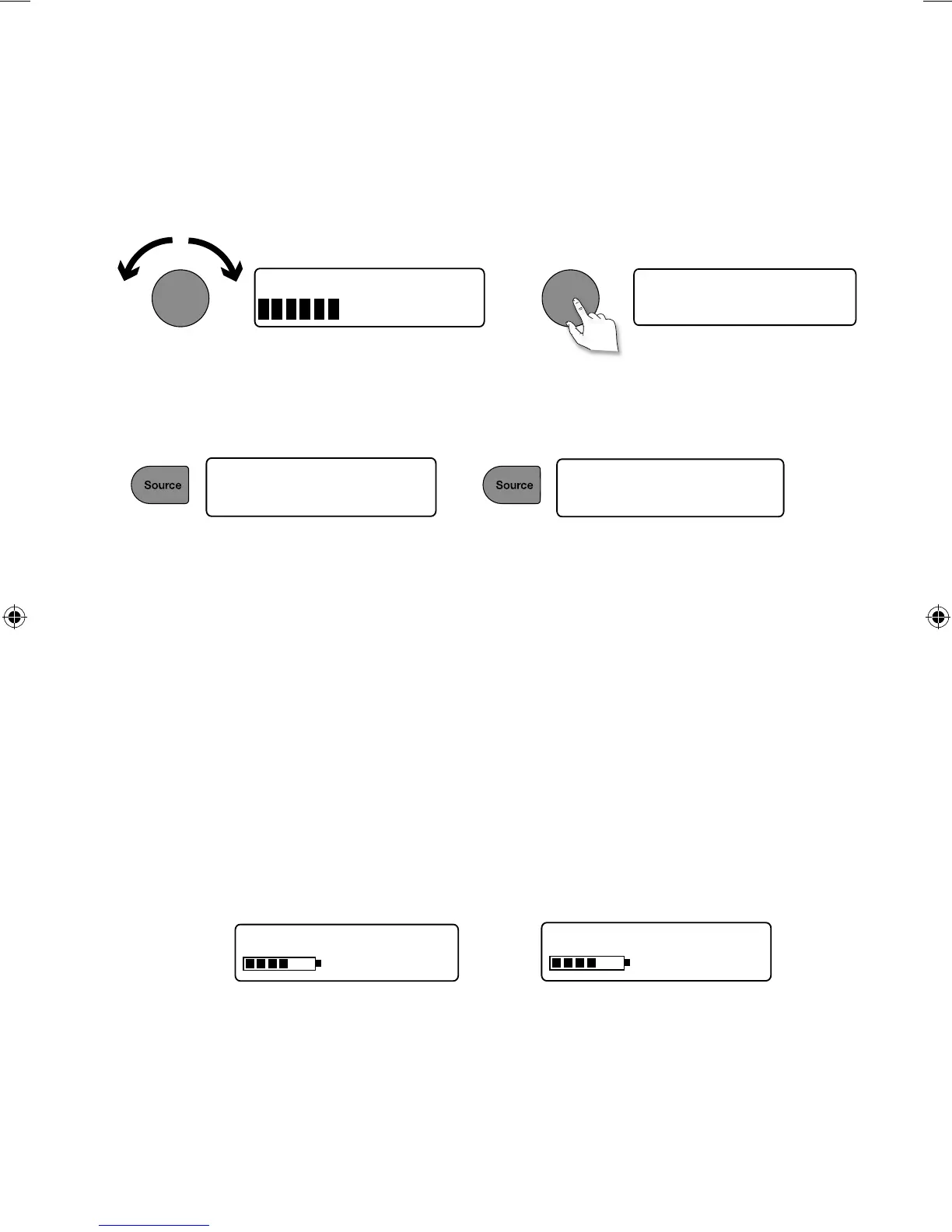
Turn the Volume dial or press the Volume buttons on the remote to increase or decrease the volume.
Press the Volume dial to mute.
Changing source
Use the Source button to choose between digital radio, FM radio or Auxiliary device (a separate device
such as an MP3 player connected to the Aux In socket).
Volume
Volume
FM radio
Muted
BBC Radio 2
Auxiliary Input
Changing the information shown on screen
You can change the information that is displayed on screen. To change the information that is displayed on
screen:
1. Press Menu.
2. Turn and press the Select dial to select ‘Information’.
3. Turn and press the Select dial to select one of the following options:
Scrolling text Information broadcast by most digital stations and some FM radio (RDS)
stations.
Full screen time Displays the time (and an alarm indicator if the alarm is set).
Signal quality Displays signal strength.
ChargePAK status Displays a charging or power remaining indicator for a ChargePAK F1
rechargeable battery pack (available separately).
OR
BBC Radio 6Music
charging
BBC Radio 6Music
50%
Charging indicator
(when receiving mains power)
Charge remaining
(when powered by a ChargePAK)
EVOKE_D4_Euro.indb 6 9/3/2013 3:14:56 PM



 To Next Page