7.5.1 HARDWARE RESET
Use this small white button labeled
H_RST
after changing
Setup Option Jumper positions to effect the changes. The
Hardware RESET turns Heat, Air and Fan off, resets the units'
clock, and reads the Setup Option jumper positions, before
initiating normal operation.
7.5.2 SOFTWARE RESET
Use this feature to make all settings and programs their
default values The Software RESET button turns Heat, Air and
Fan off, resets the units' clock, and reads the Setup Option
jumper positions. It then makes all settings and programs
their default values before initiating normal operation.
N O T E: Pressing this button will overwrite your program and
install the default values of all temperature programs and setup
values into the unit’s nonvolatile memory. To ease
reprogramming later, record your thermostat’s programs and
settings in the table provided before using this button. (See
Page 12.)
7.6 TEMPERATURE VARIATION / SWING
Your thermostat works by turning your heating or cooling
system on and off whenever the room temperature varies a
certain number of degrees from the set-point temperature.
This variation is the "swing." Your system should cycle on
about 3 to 6 times per hour. A smaller swing number
increases the number of cycles, so room temperature is more
constant. A larger swing number decreases the number of
cycles, saving energy in most cases.
7.6.1 SWING 1 - 1st STAGE
This setting controls when the heating or cooling turns on and
off.
• Swing 1 sets the temperature variation that the system
allows above and below the set temperature before
switching the heating or cooling unit on and off.
To change this value:
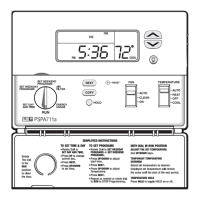
• Rotate the
SPEED DIAL
®
to
ENERGY USAGE
• Press
NEXT
and
HOLD
simultaneously. The Temperature
section of the display shows
SET TEMP SWING
and
1
denoting that you are setting
SWING 1
. The Time section
flashes the current setting.
• Select one of the 9 values from 025 to 225 with the
UP/DOWN
buttons. The smallest setting of 025 provides
the most accurate temperature control, and the system will
cycle on/off the most frequently. The largest setting of 225
provides the widest temperature differential, and the
system will cycle on/off less frequently.
• Return the
SPEED DIAL
®
to
RUN
7.7 DEAD BAND
When using Auto-Changeover, dead band provides a
disallowed temperature range between the maximum heat
set temperature and minimum cool set temperature. dead
band may be set from 1 to 6 degrees. With auto-changeover
active, dead band set to 3°F and heat set to 70°F the
minimum allowed cool set temperature will be 73°F. If the
cool set temperature is lowered, then the heat set
temperature will be lowered by the same amount maintaining
the 3°F dead band.
To change this setting:
• Set
SPEED DIAL
®
to
RUN
• Set MODE to
AUTO
• Press
NEXT
and
COPY
simultaneously for 2 seconds. The
display shows
SET DEAD BAND
, while the
Time/Temperature section flashes the current setting.
• Use
UP/DOWN
keys to adjust the DEAD BAND in 1 degree
increments.
• Press and release
NEXT
to return to
RUN
. Or, after 30
seconds the unit will automatically revert to
RUN
mode.
8 SETUP OPTIONS
There are five jumpers; each controls a setting depending on
its position. Jumpers are located on the rear of the
thermostats circuit board. For reference there a table of
settings and jumper positions printed there as well. They are
described here from J3, the rightmost jumper, to J7, the
leftmost jumper.
8.1 MINIMUM RUN TIME J3
The position of J3 sets the minimum length of time that the
thermostat must remain with
HEAT
or
COOL
either On or Off,
before it will automatically switch to the alternate On or Off
state. This Delay prevents rapid cycling of your system and
provides equipment protection for cooling units. Switch
position OFF is a 5 minute delay, and ON is a 2 minute delay.
5 minutes is the default setting, and is good for most
applications. If you feel that your system is trying to cycle
more rapidly than every 5 minutes, you may try the 2 minute
setting.
8.2 CLOCK FORMAT J4
The time shown on the thermostats clock may be displayed
in 12 or 24-hour format. Set this option to your preference.
8.3 TEMPERATURE DISPLAY FORMAT
(F/C DISPLAY) J5
Temperature may be displayed in Fahrenheit or Celsius with
this option.
8


 To Next Page