16
Headboad Backet Installation Guide (Optional)
Headboard Brackets are an optional accessory and are not included.
See page 5 for headboard bracket installation parts list.
STEP 1 STEP 2
STEP 3
Connect your headboard to the attachment plate using the
remaining long screws or hardware that came with your
headboard. The heads of the bolts will face outward. Use hex key
to tighten bolts.
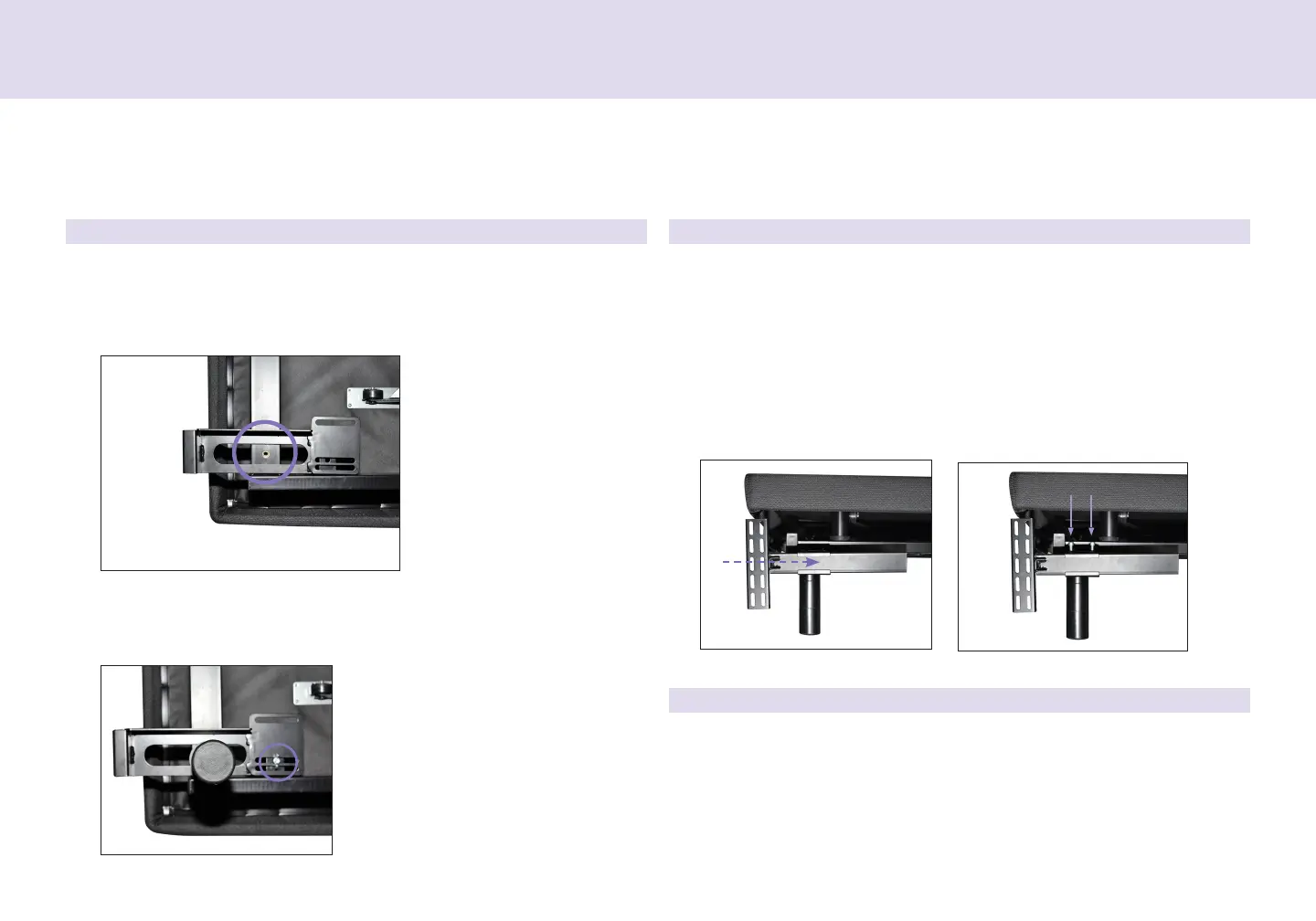
a. Measue the distance between the mounting holes on the
headboad and install the T-Backet to accommodate the
headboad.
b. To install the T-Backet, slide the T-Backet though the end of
the headboad backet. Align the at side of the T-Backet plate
to the mounting holes on the headboad.
c. Secue T-Backet in place by inseting two shot scews though
top of backet. Use hex key to tighten scews.
a. Align the hole in the backet to the nut into which the leg
theads. Hold the backet in place and scew the leg into the
base until it is snug. DO NOT OVERTIGHTEN. Too much foce
may cause the leg to spin feely.
b. Align the tab with the hole in the fame (located towads the
foot of the base) and use a shot bolt, washe and wingnut to
secue the backet. Make sue the bolt is tight.
Head of
Base
Left Side of Base


 To Next Page