4-4
Section 4 Electrical System
C280 / S280 / C310 / ST310
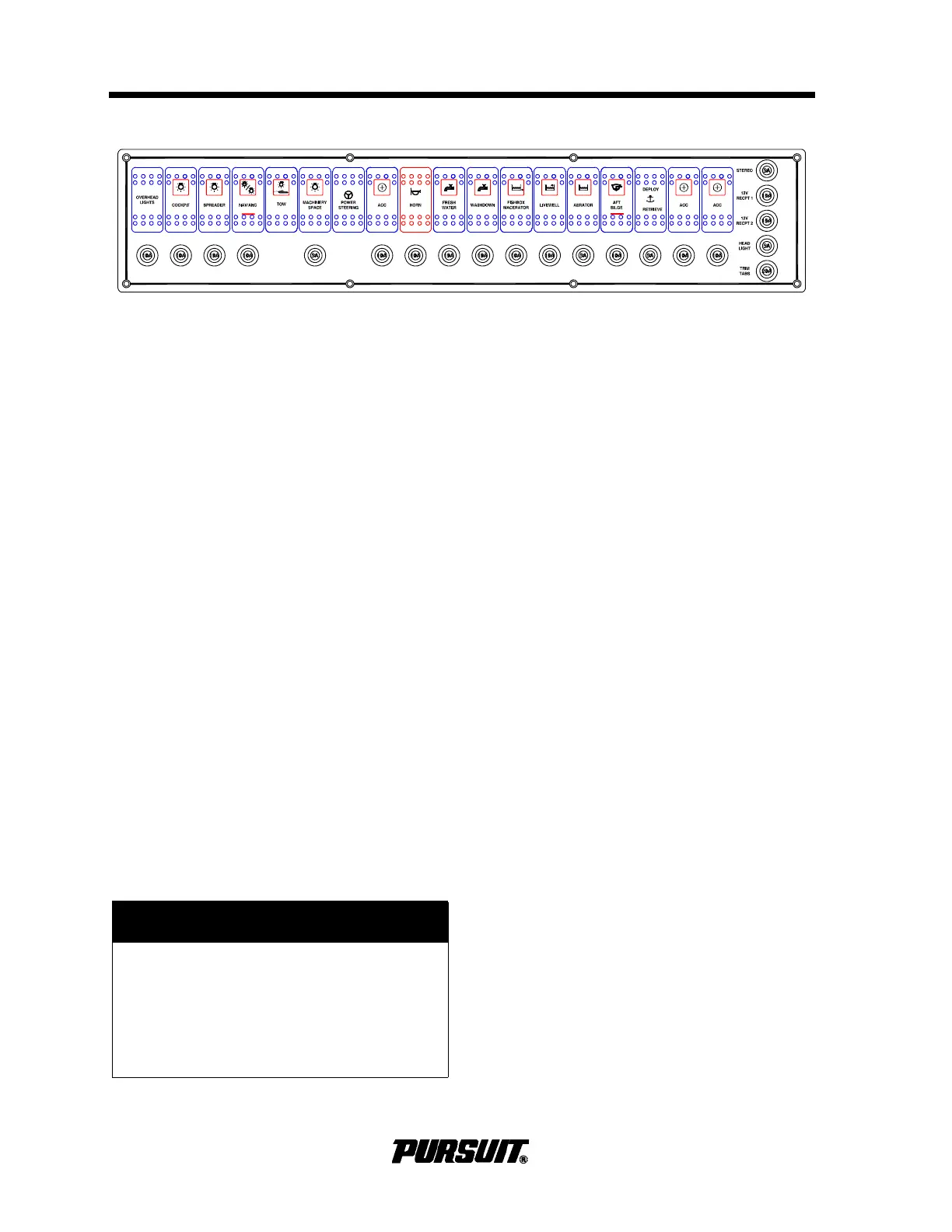
4.4 12-Volt DC Panels Helm
Helm Panel
The helm panel is equipped with switches and
circuit breakers. The breakers are in the nor-
mally "ON" position. Should any of the break-
ers trip, reset by pressing the plunger. If the
breakers continue to trip,
take your boat to an
authorized Pursuit dealer to investigate the
problem.
The following are descriptions of the
components controlled by the helm switches:
Overhead Lights
Press to activate the lights mounted under-
neath the hardtop. Press once and the lights
are red; press again and the lights are bright
white; press a third time and the lights are
dim white. If lights get out of sequence,
press the switch and hold for two seconds.
Cockpit
Press to activate the lights that illuminate the
cockpit area.
Spreader
Press to activate the flood lights located on
the hardtop.
Nav/Anc
Press the top of the rocker switch to activate
the navigation lights. Press the bottom of the
rocker switch to activate the anchor light.
Panel
Press to activate the instrument lights. The
compass light is also controlled with this
switch.
Machinery Space
Press to activate the light in the machinery
space.
Power Steering
Press to activate the power steering feature.
Tow Lights
Operates the required lighting for a boat
under tow. The Tow Lights should be oper-
ated when a boat is under tow. This lighting
arrangement meets the International Rules
of the Road standard. The indicator light on
the Nav/Anc will light but this switch must
remain off while the boat is under tow.
Underwater Lights (Optional)
Press to activate the underwater lights. DO
NOT use these lights out of the water. Water
is necessary for cooling.
Horn
Press to activate the horn.
! CAUTION
Halogen lighting contains a filament
bulb that generates intense heat, is
pressurized and could shatter if
scratched or damaged. Protect glass
halogen-cycle bulbs from contact with
liquids when operating.



 To Next Page