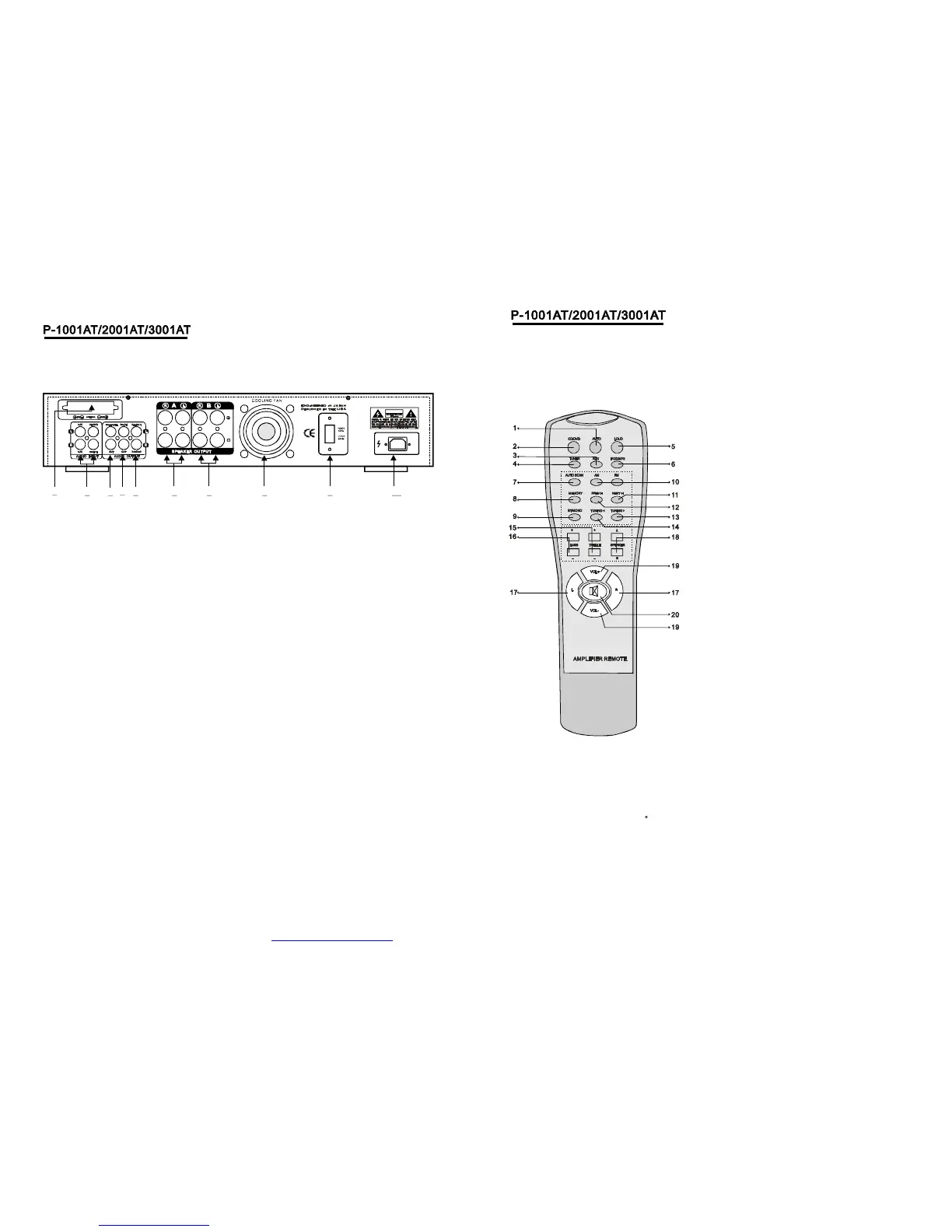
1AUTO
Automaticallysearchthesinglesourcewhenpoweron.
2CD/DVD
CD/DVD
16BASS
17L/R
18A/BSPEAKER
SpeakerA/B/A+BSelector
19VOL+VOL-
、
、
、
、
、
、
、
、
Selector.
3AUX
AUXSelector.
4TUNER
TUNERSelector.
5LOUD
Pressthebuttontocorrectanunbalanceprogramsource.
6IPOD/MP3
IPOD/MP3Selector
7AUTOSCAN
AM/FMautoscanselectorscanandstorestations
automitically.Canstore50stations.
8MEMORY
Afterastationhasbeenfoundyoucanstorethestation
bypressingtheMEMORYbuttonandthescreenwill
displaySAVE.
9ST/MONO
Stereoandmonoselector.
10AM/FM
AM/FMselector.
11/12PREV>NEXT<
Stationspreviewandnextselector.
13/14TUNING>TUNING<
Thetwokeysareusedtoadjusttothebestsingleof
thestations.
15TREBLE
Left/RightBalanceControl
MasterVolumeUpAndDown
20MUTE
MuteSelector
、
、
、
、
、
,
、
,
、
、
、
、
、
()
RemoteControllerOperation
1.Remotecontrollershouldbeoperatedwithin6
meterandthescopeof30infrontofreceiver.
2.Makesurethatthereisnobigobstaclebetween
remotecontrollerandmachine.
3.Remotesensorshouldbefaraway
fromthelight,highamountsoflightcanaffectitsperformance.
6
1
5 6
72
4
98
103
WARNING
(3)REC.LINEOUTPUTJACKS
(2)AUDIOINPUTJACKS
(1)TUNERANT
Connecttheaudioouputjacksof
DVD/CDAUXtothesejacks.、
ConnectforAMandFMantennas.
(7)BSPEAKEROUTPUTTERMINALS
(6)ASPEAKEROUTPUTTERMINALS
Connectyourtheotherspeakersystem(s)to
theseterminals.
Connectyourspeakersystemto
theseterminals.
ConnecttheRECORDinputjacksto
thesejacks.
(9)110V/220VSWITCH
(8)COOLINGFAN
Accordingtopowervoltage,pushthisbutton
tothestationofthe110Vor220V.
(4)PREOUTPUTJACKS
Connecttheprofessionalinputjacks
tothesejacks.
(10)POWERCORD
ConnecttoAC110V/60Hz&220V/50Hzoutlet.
(5)SUB-WOOFEROUTPUTJACKS1&2
5
www.mcmelectronics.com MCM Electronics Item #555-9370


 To Next Page