The Pyle Pro PWMA Series Wireless Amplifier system is designed to provide high-quality, full-range audio amplification in environments where AC power is unavailable. These systems are particularly useful for outdoor performances, events, or any situation requiring portable sound reinforcement.
Function Description:
The PWMA series amplifiers are portable PA systems that incorporate an FM receiver for wireless microphone operation, compatible with the Pyle Pro PWMA-MIC Wireless Microphone. They also feature multiple input options, allowing for the connection of wired microphones and various audio sources such as tape players, CD players, VCR audio outputs, or radios. These inputs can be used independently or simultaneously with the wireless microphone. The PWMA-3600 model also offers the ability to connect an additional speaker for expanded sound coverage and provides RCA-style audio output jacks to send the audio signal to another device, such as a secondary PA amplifier or a recording device.
Important Technical Specifications:
Amplifier Specifications (PWMA600 / PWMA3600):
- Operating Frequency: 210-216 MHz / 228.10 MHz
- Frequency Response: 50Hz - 15 KHz +/- 2 dB / 100Hz - 15 KHz +/- 3 dB
- THD, @ 15 kHz: < 0.1% / < 1%
- Dynamic Range: 90 dB (both models)
- Output Power: 50W / 10W
- Speaker Type: 6.5" full-range speaker / 8" full range/2.5" tweeter
- Internal Battery: 12V 3A / 6V; 4A x 3
- Recharge Time/Usable Time: 4 hrs/10 hrs / 4 hrs/ 8 hrs
- Weight: 17.6 lbs (8 kg) / 30.5 lbs (13.85 kg)
- Dimensions (H x W x D): 11.6"x 7.9" x 6.2" (295 x 200 x 157 mm) / 23.8"x10.2"x13.4" (605 x 260 x 340 mm)
Wireless Mic Specifications (PWMAMIC):
- RF Power Output: < 5 mW
- Operating Frequency: 228.10 MHz
- Max. Acoustic Pressure: 136 dB spl
- Power Source: 9v battery
- Battery Life: 6 hours (10 hr alkaline)
- Weight (with battery): 8.8 oz (250g)
Usage Features:
Front Panel Controls (PWMA600):
- Battery Charging Indicator: Shows the charging status.
- Low Battery Indicator: Alerts when the battery is low.
- "On Air" LED: Illuminates when the wireless microphone signal is received.
- Power LED: Indicates if the amplifier is on.
- On/Off Switch: Controls the main power.
- Wireless Volume Control: Adjusts the volume of the wireless microphone.
- Wired Mic Volume Control: Adjusts the volume of the wired microphone.
- Aux Input Volume Control: Adjusts the volume of auxiliary input sources.
- Bass Level Control: Adjusts the low-frequency response.
- Treble Level Control: Adjusts the high-frequency response.
Rear Panel Controls (PWMA600):
- DC Adapter Input Jack (14V/1.8A): For connecting the AC adapter for power and charging.
- RCA Type Output Jacks: For sending audio to other devices.
- BNC Jack for Flexible Antenna: For connecting the wireless microphone antenna.
- RCA Type Auxiliary Input Jacks: For connecting external audio sources.
- 1/4"/XLR Combo Jack for WIRED MIC: Accepts both 1/4" and XLR connectors for wired microphones.
- Fuse Holder (for 3A fuse): Contains the protective fuse.
Front Panel Controls (PWMA3600):
- Wireless Mic Volume Control: Adjusts the volume of the wireless microphone.
- Bass Level Control: Adjusts the low-frequency response.
- Treble Level Control: Adjusts the high-frequency response.
- "On Air" LED: Illuminates when the wireless microphone signal is received.
- Battery Charging Indicator: Shows the charging status.
- Power LED: Indicates if the amplifier is on.
- On/Off Switch: Controls the main power.
Left Front Panel (PWMA3600):
- Aux Input Volume Control: Adjusts the volume of auxiliary input sources.
- Wired Mic1 Volume Control: Adjusts the volume of the first wired microphone.
- Wired Mic2 Volume Control: Adjusts the volume of the second wired microphone.
- RCA type AUX OUT jacks: For sending audio to other devices.
- RCA type AUX IN jacks: For connecting external audio sources.
- 1/4"/XLR Combo Jack for WIRED MIC1: Accepts both 1/4" and XLR connectors for the first wired microphone.
- 1/4"/XLR Combo Jack for WIRED MIC2: Accepts both 1/4" and XLR connectors for the second wired microphone.
Setting Up for Use:
- Volume Controls: Before powering on, set all volume controls to the "O" position.
- Antenna: Ensure the flexible rubber antenna is attached to the BNC connector on the rear panel (or front panel for PWMA-3600), pointing upwards for best results.
- Wireless Microphone: Turn on the wireless microphone; its Power LED should illuminate.
- Amplifier Power: Push the power switch on the amplifier's front panel to ON; the amplifier's Power LED will illuminate. The "On Air" LED will light up when the amplifier receives a signal from the mic. If not, check the mic batteries.
- Microphone Placement & Volume: Position the microphone where speaking will occur and adjust the amplifier's wireless mic volume control as needed.
- Tone Adjustment: Adjust bass and treble controls as desired.
Using with Wired Microphones:
- Plug the wired microphone into the combo mic input jack(s). The PWMA-3600 has two combo jacks on the front left panel, while the PWMA-600 has one on the rear panel.
- Adjust the wired microphone volume(s) independently from the wireless mic for flexible performance.
- Connect audio outputs from sources like tape players, CD players, or VCRs to the RCA input jacks on the rear of the PWMA-600 or the left front panel of the PWMA-3600 using RCA-type patch cords.
- Adjust the auxiliary volume independently of the microphones.
Recharging the Batteries:
- The PWMA-600 has a low battery indicator that flashes when the battery is low. The PWMA-3600 has a power indicator that alerts to a low battery condition.
- Plug in the AC adapter to recharge. Batteries typically recharge in about 4 hours and provide up to 10 hours of use.
- During charging, the Charge LED will glow RED and turn GREEN when charging is complete.
Adding an Additional Speaker (PWMA-3600 only):
- Connect an additional speaker or pair of speakers to the terminals on the rear panel of the PWMA-3600. Ensure the total impedance is within the 4-16 Ohm range.
Sending Audio to Another Destination (PWMA-3600 only):
- Use the RCA-style audio output jacks to send the audio signal to another device, such as a secondary PA amplifier or a recording device. Monitor recording levels to avoid overdriving.
Wireless Microphone (PWMA-MIC) Usage:
- Battery Insertion/Change: Hold the mic by the grille, unscrew the lower portion of the body, and slide it away to expose the battery well. Insert a single 9V battery, noting the polarity (insert the side with the (+) terminal first). Slide the body closed and screw it firmly to the grille module.
- Turning On: Slide the small Power switch at the base of the mic to ON. The red LED will illuminate.
- Turning Off: Slide the switch to OFF to conserve battery power when not in use.
Maintenance Features:
Caring for Your Pyle Pro Amplifier:
- Keep Dry: Wipe immediately if it gets wet.
- Ventilation: Use only in well-ventilated installations.
- Handle Gently: Avoid dropping the amplifier.
- Cleanliness: Keep away from dust and dirt. Wipe occasionally with a damp cloth; avoid harsh chemicals, solvents, or detergents.
Replacing the Fuse:
- The amplifier uses a fuse for protection against power surges and short circuits.
- If the amplifier suddenly turns off or won't turn on, check the fuse.
- Replace the fuse with the same kind and rating if necessary.
- Also, check for and correct any short or overload conditions.

 Need help?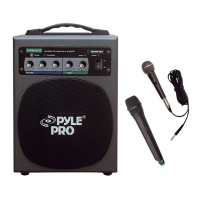

 To Next Page
 General