EasyManua.ls Logo

Pyle Pro PWMA600 - Battery Management and Care; Recharging Amplifier Batteries; Inserting Wireless Microphone Batteries; Turning On the Wireless Microphone

Pyle Pro PWMA600
5 pages
Print Icon
To Next Page IconTo Next Page
To Previous Page IconTo Previous Page
Loading...
Recharging
the
batteries
PWMA-600
model
features
a
low
battery
indicator
on
the
front
panel
which
advises
you
of
a
low
battery
condition
before
it
is
too
late.
The
LED
will
begin
to
flash
when
a
low
battery
condition
occurs.
PWMA-3600
model
features
a
power
indicator
on
the
front
panel
which
advises
you
of
a
low
battery
condition
before
it
is
too
late.
The
LED
will
begin
to
flash
when
a
low
battery
condition
occurs.
Be
sure
to
plug
in
the
AC
adapter
to
recharge
when
this
occurs.
Batteries
recharge
in
about
4
hours,
and
usually
last
up
to
10
hours
between
charges.
During
charging,
the
Charge
LED
will
glow
RED,
and
will
turn
GREEN
when
charging
is
complete.
Adding
an
additional
speaker
(PWMA-3600)
You
can
attach
an
additional
speaker
or
pair
of
speakers
to
the
rear
of
the
PWMA-3600
to
the
terminals
found
on
the
rear
panel.
Be
sure
the
total
impedance
across
the
terminals
resulting
from
the
addition
of
these
speakers
is
in
the
4-16
Ohm
range.
Sending
the
audio
signal
to
another
destination
The
PWMA-3600
feature
a
pair
of
RCA
style
audio
output
jacks,
which
enable
you
to
take
an
audio
signal
fees
out
to
another
device.
This
might
be
used,
for
example,
in
a
situation
where
a
person
is
performing
outdoors
where
power
is
unavailable,
but
you
also
want
to
bring
a
feed
indoors
to
a
secondary
or
PA
amplifier.
You
can
also
record
the
audio
from
these
jacks,
which
may
be
appropriate
for
a
special
occasion
or
event.
When
you
do
so,
be
sure
to
keep
an
eye
on
the
recording
levels
on
your
recorder
to
avoid
overdriving!
USE
AND
CARE
OF
THE
PWMA-MIC
WIRELESS
MICROPHONE
Inserting/changing
the
batteries
The
PWMA
MIC
uses
a
single
9v
battery,
which
will
provide
about
8
hours
of
continuous
usage,
12
hours
if
you
use
an
alkaline
battery.
To
access
the
battery
to
change
it,
hold
the
mic
by
the
grille
in
one
hand,
and
unscrew
the
lower
portion
of
the
body.
You
will
be
able
to
slide
the
grille
section
away
from
the
body,
exposing
a
rectangular
well
which
holds
the
battery.
Noting
the
polarity,
slide
the
battery
into
this
well
in
the
direction
shown
by
an
arrow
on
the
label.
Note
that
the
battery
should
be
oriented
such
that
you
insert
the
side
with
the
(+)
terminal
first.
When
the
battery
is
fully
contained
within
the
well,
slide
closed
the
mic
and
screw
the
body
firmly
to
the
grille
module.
Turning
on
the
PWMA-MIC
microphone
At
the
base
of
the
mic
(where
the
antenna
protrudes)
is
a
small
Power
switch
with
ON/OFF
markings.
To
turn
the
mic
on,
slide
the
switch
to
ON.
The
red
LED
adjacent
to
the
switch
will
be
illuminated,
indicating
the
mic
is
now
on.
When
you
are
done
using
the
mic,
be
sure
to
turn
it
off
to
conserve
battery
power.
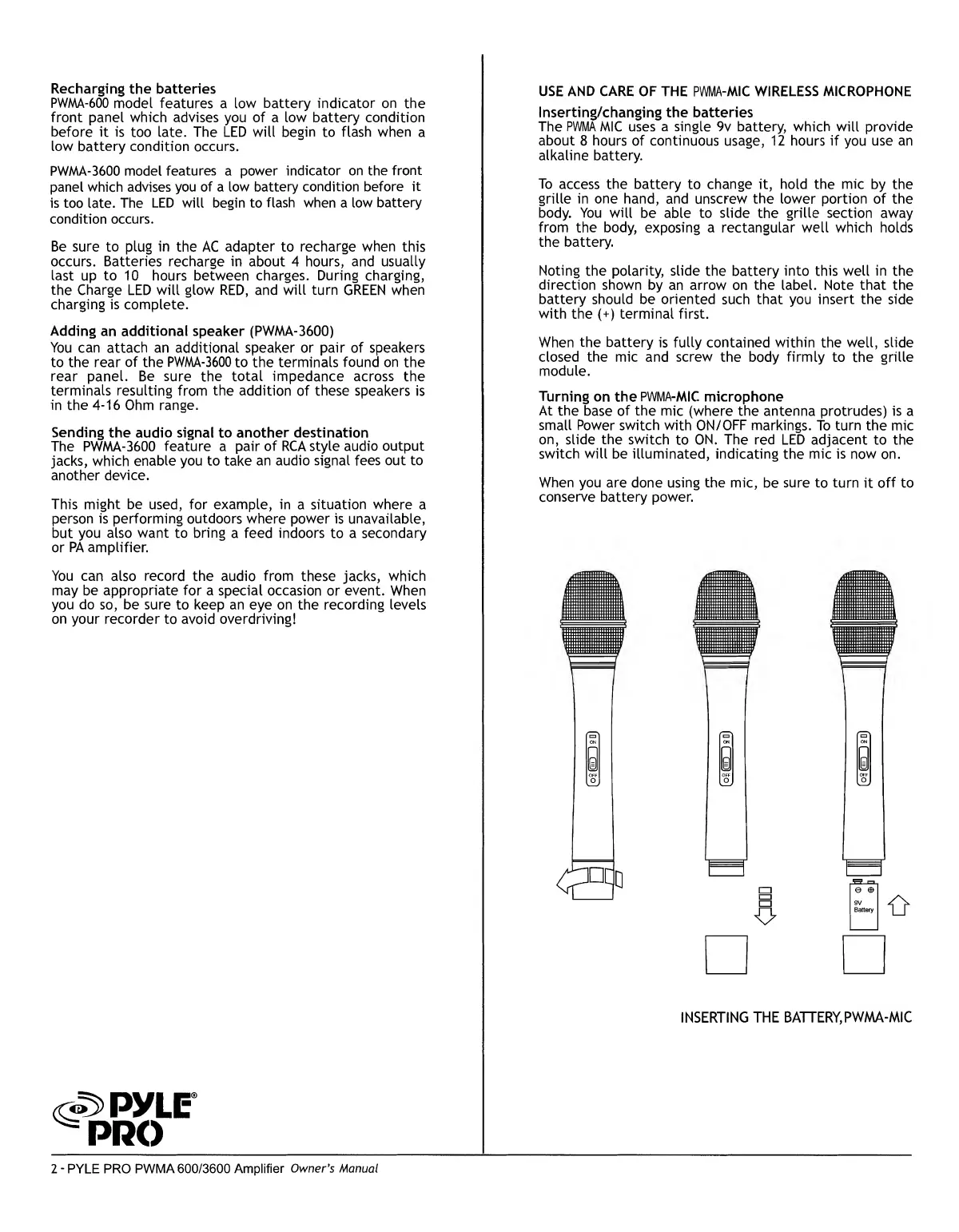
INSERTING
THE
BATTERY,PWMA-MIC
ss>
py
le
=
PRO
2
-
PYLE
PRO
PWMA
600/3600
Amplifier
Owner's
Manual

Related product manuals