EasyManua.ls Logo

Pyle Pro PLTTB-1 - Ending Playback; Maintenance and Specifications; Replacing the Cartridge

Pyle Pro PLTTB-1
12 pages
Print Icon
To Next Page IconTo Next Page
To Previous Page IconTo Previous Page
Loading...
PYLE
PRO
PLTTB-1
Stereo
Turntable
Operating
the
Turntable
-
con’t:
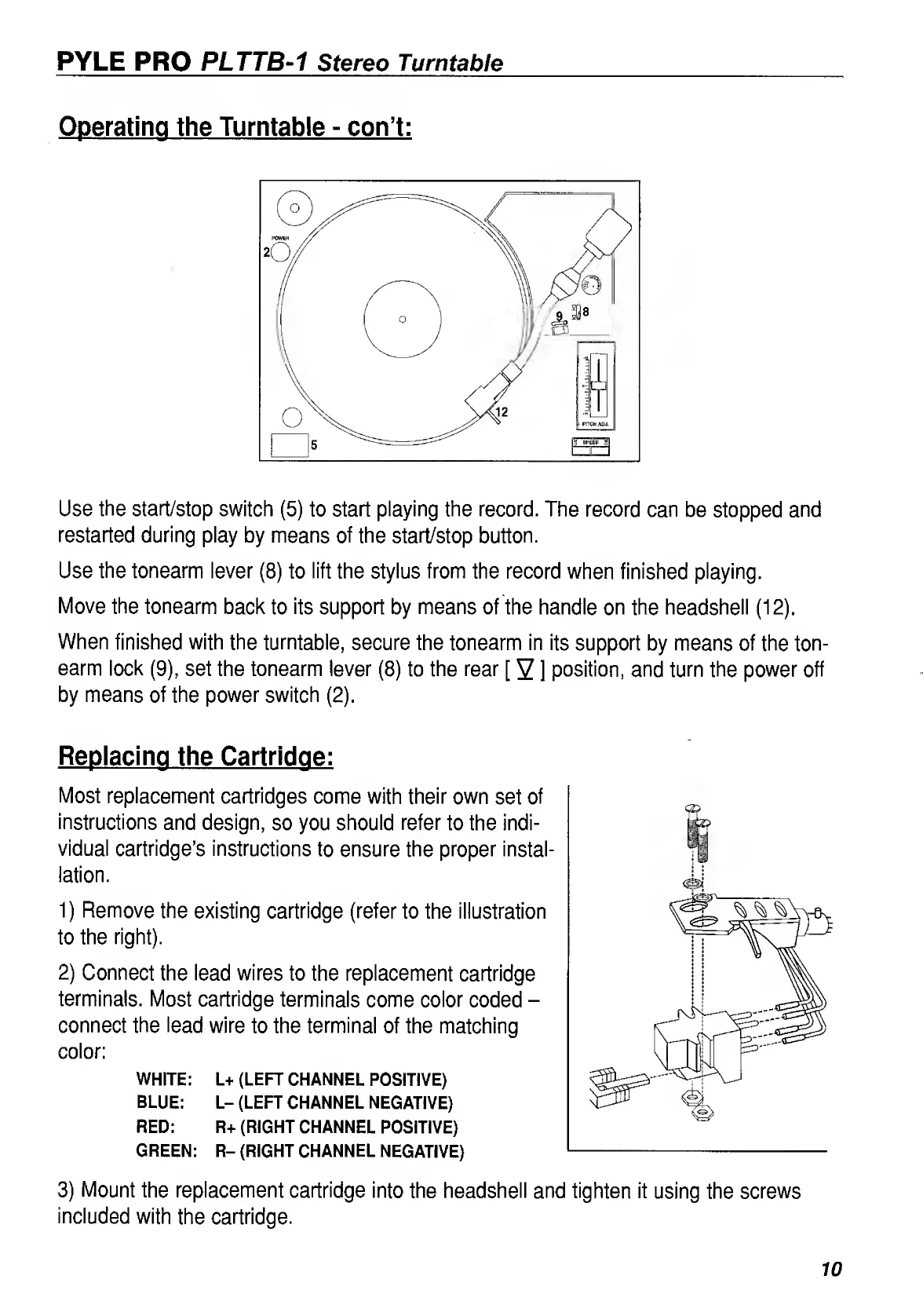
Use
the
start/stop
switch
(5)
to
start
playing
the
record.
The
record
can
be
stopped
and
restarted
during
play
by
means
of
the
start/stop
button.
Use
the
tonearm
lever
(8)
to
lift
the
stylus
from
the
record
when
finished
playing.
Move
the
tonearm
back
to
its
support
by
means
of
the
handle
on
the
headshell
(12).
When
finished
with
the
turntable,
secure
the
tonearm
in
its
support
by
means
of
the
ton¬
earm
lock
(9),
set
the
tonearm
lever
(8)
to
the
rear
[
2
]
position,
and
turn
the
power
off
by
means
of
the
power
switch
(2).
Replacing
the
Cartridge:
Most
replacement
cartridges
come
with
their
own
set
of
instructions
and
design,
so
you
should
refer
to
the
indi¬
vidual
cartridge’s
instructions
to
ensure
the
proper
instal¬
lation.
1)
Remove
the
existing
cartridge
(refer
to
the
illustration
to
the
right).
2)
Connect
the
lead
wires
to
the
replacement
cartridge
terminals.
Most
cartridge
terminals
come
color
coded
-
connect
the
lead
wire
to
the
terminal
of
the
matching
color:
WHITE:
L+
(LEFT
CHANNEL
POSITIVE)
BLUE:
L-
(LEFT
CHANNEL
NEGATIVE)
RED:
R+
(RIGHT
CHANNEL
POSITIVE)
GREEN:
R-
(RIGHT
CHANNEL
NEGATIVE)
3)
Mount
the
replacement
cartridge
into
the
headshell
and
tighten
it
using
the
screws
included
with
the
cartridge.
10

Related product manuals