www.PyleUSA.com
17
LISTEN TO RADIO, LINE INPUT OPERATION ADVANCED PLAYBACK
• MP3, AUX EXTERNAL CONNECTION OF AUDIO SIGNAL INPUT
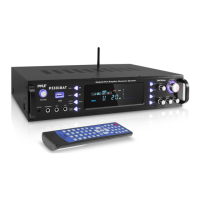
Press INPUT key on the remote control or on the unit’s panel. The unit can input
MP3/AUX and AM/FM external connection audio signal, the display shows the
status. Audio signal of any equipment can be connected.
• INPUT TRANSFER TO MP3, AUX
Press INPUT key on the remote control or on the unit’s panel. The unit can input
MP3/AUX and AM/FM external connection audio signal, the display shows the
status. Audio signal of any equipment can be connected.
• LISTEN TO RADIO
• FM/AM
Press INPUT key to transfer the radio reception, then press [FM/AM] key on the
machine or in the remote control. The machine will turn into FM/AM mode, and
the display shows the frequency and the channel number of the current radio
station.
• MANUAL SCAN
Press [ /FRE] or [ /FRE+] key on the unit’s panel or on the remote control to
carry out manual scan to search for your need
• AUTO SCAN
Press AUTO key on the unit’s panel or on the remote control, then the machine
itself will scan within the frequency range once completely automatically



 To Next Page