EasyManua.ls Logo

Pyle PDWM17BT - User Manual

Pyle PDWM17BT
6 pages
Print Icon
To Next Page IconTo Next Page
Loading...
Introduction:
This device combines the function of wireless
transmitter and receiver in one for audio
streaming. In the Transmitting (TX) Mode,
It streams audio wirelessly from the non-BT
devices to your Wireless BT headphone or speakers.
In the Receiving (RX) Mode, it streams audio to your
wired speaker, headphone, car stereo or home stereo
system wirelessly, from your Wireless BT-enabled media
player. If you want to have a better experience, please
read this instruction carefully.
Features:
2-IN-1 BT Transmitter & Receiver Wireless Audio Adapter Advanced BT Technology
5.1 with Transmitter and Receiver
Broadcast Audio Output from TV, CD player, or Old PC to Wireless Headphones,
Speakers and Even Car Stereo System
Low Latency and Instant Sound Transmission
Supreme Audio Connectivity and Quality
With Improved Connection Stability
Faster Pairing, and Reduced Power Consumption for Connected Devices
Switch Operation and Audio Connection Modes with the Simple Flick of a Switch
Compatible with Activation of Siri/Google Assistant for IOS/Android
Suitable for In-car Usage as a Hands-free Car Kit.
Built-in Rechargeable Battery
Compatibility:
This device can be paired as a hands-free kit with any compatible Wireless BT
enabled devices. Each time can only be connected with one Wireless BT device.
www.PyleUSA.com
Question and Answer IconNeed help?

Do you have a question about the Pyle PDWM17BT and is the answer not in the manual?

Overview

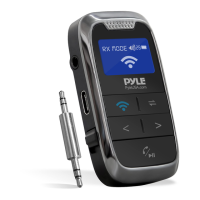
The Pyle PDWM17BT is a versatile 2-in-1 5.1 Wireless BT Streaming Transmitter Receiver, designed to act as an audio adapter for various home appliances, LCD displays, and AUX audio jacks. This device combines the functionalities of both a wireless transmitter and receiver, enabling seamless audio streaming in different scenarios.

Function Description:

In Transmitting (TX) Mode, the PDWM17BT streams audio wirelessly from non-Bluetooth devices (such as TVs, CD players, or old PCs) to Bluetooth-enabled headphones or speakers. This allows users to enjoy audio from their legacy devices with modern wireless convenience. In Receiving (RX) Mode, the device streams audio wirelessly from a Bluetooth-enabled media player (like a smartphone or tablet) to wired speakers, headphones, car stereos, or home stereo systems. This effectively upgrades non-Bluetooth audio systems to receive wireless audio. The device also supports hands-free car kit functionality, making it suitable for in-car usage.

Important Technical Specifications:

  • BT Technology: Advanced BT Technology 5.1 with Transmitter and Receiver.
  • Construction Material: ABS.
  • Supported Profiles: A2DP, AVRCP.
  • Audio Codecs: SBC.
  • Input Voltage/Current: DC5.0V / 500mA.
  • Battery Type: Rechargeable Li-ion Battery, 250 mAh.
  • Charging Time: 1.5 Hours.
  • TX Working Time: 10 hours.
  • RX Working Time: 10 hours.
  • Wireless BT Network Name: 'PyleUSA'.
  • Wireless BT Version: 5.1.
  • Wireless Range: 30'+ ft.
  • Product Dimensions (L x W x H): 2.60" x 1.50" x 0.54" -inches.
  • Connectivity: Includes Wireless BT Audio Control Receiver, 3.5mm Audio Head, Type C Charging Cable.

Usage Features:

The PDWM17BT offers a user-friendly experience with its intuitive controls and clear LCD display.

  • Power On/Off: A simple "ON/OFF" switch controls the device's power. The device automatically powers off if no Bluetooth devices are paired within 10 minutes.
  • Mode Switching: A dedicated switch allows users to easily toggle between "TX" (Transmitting) and "RX" (Receiving) modes. The LCD display shows the current mode and pairing status.
  • Device Searching and Pairing: In TX mode, the device automatically searches for available Bluetooth devices. The BT symbol flashes, and "Paring" is displayed. Once successfully paired, the device's Bluetooth pairing name appears on the screen. If pairing fails, the "BT" button can be pressed to re-search.
  • Volume Control: In both RX and TX modes, pressing and holding "<" decreases the volume, while pressing and holding ">" increases it.
  • Music Control (RX Mode):
    • Short press "<" for the previous song.
    • Short press ">" for the next song.
    • Press the Play/Pause button to play/pause music.
  • Call Management (RX Mode - Hands-free Car Kit):
    • Press the Play/Pause button to answer incoming calls.
    • Press the Play/Pause button to hang up calls.
    • Press and hold the Play/Pause button for 2 seconds during a call to reject an incoming call.
    • Press the Play/Pause button twice to redial the last number.
  • Bluetooth Disconnection: In RX mode, press the Play/Pause button once to disconnect the Bluetooth device. In TX mode, pressing the Play/Pause button once disconnects the current BT devices, searches for, and connects another device.
  • Siri/Google Assistant Activation: When connected to a mobile phone via Bluetooth, pressing and holding the Play/Pause button activates Siri or Google Assistant. A short press ends the assistant.
  • Display: The LCD shows the RX/TX mode, battery level, and the name of the connected device (e.g., "iPhone (2)").

Maintenance Features:

To ensure optimal performance and longevity, users should adhere to the following precautions:

  • Environmental Conditions: Avoid using the device in moist or underwater conditions, near heaters or high-temperature services, or in direct and strong sunshine.
  • Physical Handling: Prevent the device from falling.
  • Disassembly: Do not dismantle the product without due permission, as this may void the warranty.

The PDWM17BT is compatible with any Bluetooth-enabled devices and can connect with one Bluetooth device at a time. It is designed to work with all of today's latest devices, including smartphones, tablets, laptops, and computers. The device comes with a 3.5mm Audio Head and a Type C Charging Cable, making it ready for immediate use.
Pyle PDWM17BT Specifications

General IconGeneral
BrandPyle
ModelPDWM17BT
CategoryReceiver
LanguageEnglish

Related product manuals