EasyManua.ls Logo

Pyle PT696BT - User Manual

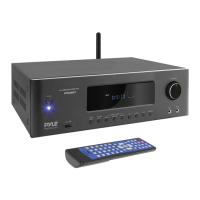
Pyle PT696BT
9 pages
Print Icon
To Next Page IconTo Next Page
Loading...
PYLE
PyleUSA.com
PT696BT
5.2-Ch Surround Sound Stereo Amplifier System
with 4K Ultra HD Support, MP3/USB/AM/FM Radio (1000 Watt MAX)
USER MHNUHL
PYLE
VISIT US ONLINEi
Have a question?
Need service or repair?
Want to leave a comment?
V
PyleUSA.com/ContactU$
PyleUSA.com
Questions? Issues?
We are here to help!
Phone: (1)718-535-1800 Email:
support@pyleusa.com

Questions and Answers

  • P
    Patricia DudleyAug 19, 2025
    Why is there display but no sound on my Pyle PT696BT Receiver?
    • A
      akennedyAug 19, 2025
      If your Pyle Receiver has a display but no sound, here's what to check: * Ensure the speaker wires are correctly connected according to the wiring diagram. * Verify that the selected input on the receiver corresponds to the playback source. * Adjust the main volume knob clockwise to increase the volume level. * Deactivate the MUTE function, if it's on.
  • T
    Theresa GonzalezAug 21, 2025
    How to fix a Pyle PT696BT Receiver remote control that is not working?
    • J
      Jeffrey DominguezAug 21, 2025
      If the Pyle Receiver's remote control isn't working, try these steps: * Make sure to aim the remote transmitter window directly at the host receiving window on the receiver. * Remove any obstacles that might be blocking the signal between the remote and the unit. * Replace the remote batteries with new ones.
  • J
    Jose ThompsonAug 23, 2025
    What to do if the phone cannot transmit audio to the Pyle PT696BT Receiver via BT?
    • W
      watsonericAug 23, 2025
      If your phone can't transmit audio to the Pyle Receiver via Bluetooth, consider the following: 1. Ensure that Bluetooth is turned on in your mobile phone. 2. Start playing music on your phone. 3. Rematch the Bluetooth connection between your phone and the receiver. 4. Switch the receiver input to the 'BT' channel. 5. Turn off other Bluetooth devices that may interfere with the connection.
  • J
    James LopezAug 26, 2025
    What to do if Pyle Receiver is out of control?
    • D
      Derek HernandezAug 26, 2025
      If your Pyle Receiver seems to be out of control, it may be due to disturbance or improper operation. Try turning the receiver OFF and then ON again to reset it.
  • F
    fgoodAug 27, 2025
    Why is the channel sound wrong on my Pyle Receiver?
    • F
      fowlerwendyAug 28, 2025
      If the channel sound is not correct on your Pyle Receiver, the channel sound mode may be incorrect. Press 'CH. MODE' on the panel or remote control to adjust it.
  • T
    Timothy BrownAug 30, 2025
    What to do if there is display but no sound from my Pyle Amplifier?
    • D
      dustingarciaAug 30, 2025
      If your Pyle Amplifier has a display but no sound, here are some possible causes and solutions: * Check the speaker wiring and ensure it's correctly connected according to the wiring diagram. * Make sure the playback source corresponds to the selected signal state. Select the input state that is playing. * Verify that the volume isn't at its lowest level. Turn the main volume knob clockwise to increase the volume. * Ensure that MUTE is not activated. Disactivate MUTE.
  • M
    Mr. Brian Stevens MDSep 1, 2025
    Why is my Pyle Amplifier remote control not working?
    • J
      Jeffrey LloydSep 1, 2025
      If your Pyle Amplifier's remote control isn't working, consider these potential reasons: * Ensure that the remote transmitter window is aimed directly at the receiving window on the amplifier. * Check for any obstacles between the remote control and the unit, and remove them. * The remote control batteries may be drained. Replace them with new batteries.
  • N
    Natalie SchultzSep 4, 2025
    How to fix if my phone cannot transmit audio to the Pyle Amplifier via Bluetooth?
    • J
      Jacqueline RobertsonSep 4, 2025
      If your phone can't transmit audio to the Pyle Amplifier via Bluetooth, try the following: * Ensure that the Bluetooth function on your mobile phone is turned on. * Make sure music is playing on your phone. * Verify that the amplifier's Bluetooth is paired with your mobile phone's Bluetooth. Rematch the Bluetooth connection if necessary. * Confirm that the amplifier input channel is set to 'BT' channel. * Turn off other Bluetooth devices to resolve connection issues.
  • G
    Gene RobinsonSep 6, 2025
    What causes sound distortion on a Pyle Amplifier?
    • T
      Tim CalhounSep 6, 2025
      Sound distortion on your Pyle Amplifier can be caused by the main volume adjustment being too high. Try turning down the main volume to reduce the distortion.
  • R
    Rebecca CraneSep 8, 2025
    What to do if Pyle Amplifier is out of control?
    • J
      Joshua CohenSep 8, 2025
      If your Pyle Amplifier is out of control, it might be due to disturbance or improper operation. Try turning it OFF and then turning it ON again.

Summary

Safety Precautions and Radio Station Operation

General Safety Precautions

Guidance on avoiding hazards like electric shock, heat, and internal part damage.

Front and Rear Panel Overview

Front Panel Controls

Detailed explanation of buttons, knobs, and jacks on the front of the receiver.

Rear Panel Connections

Identification and function of all input and output jacks on the rear panel.

Remote Control Functions

Remote Control Layout

Mapping of buttons on the remote control to their specific functions.

Advanced Features and Settings

USB and Bluetooth Operation

Guide to playing music from USB drives and connecting via Bluetooth.

Troubleshooting and Product Information

Troubleshooting Common Issues

Solutions for problems like no display, no sound, and remote control malfunctions.

Technical Specifications and Connectivity

Pyle PT696BT Specifications

General IconGeneral
BrandPyle
ModelPT696BT
CategoryReceiver
LanguageEnglish

Related product manuals