Need help?
Do you have a question about the Pyle PLMR90UW and is the answer not in the manual?
Advises on selecting a suitable mounting location and general safety precautions.
Details the steps for drilling, fitting the bracket, and securing the receiver.
Illustrates the wiring harness connections using the ISO standard for proper setup.
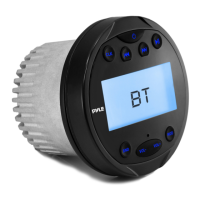
Explains the primary function of each button on the unit's interface.
Covers powering the unit, displaying/setting time, and auxiliary input.
Guides on switching to radio mode, selecting bands, stations, and saving presets.
Describes playing music files from a USB drive and navigating tracks.
Explains how to pair a mobile device and stream audio wirelessly.
Details how to use Bluetooth audio streaming (A2DP) and control playback.
Lists key features and detailed performance metrics like power and frequency response.
Provides unit dimensions and lists available models (White, Black, Silver).
Addresses common issues like no power, sound, or Bluetooth connection with solutions.
 General
| MP3 playback | Yes |
|---|---|
| CD-R playback | No |
| Audio formats supported | MP3, WMA |
| Peak Music Power Output (PMPO) | 112 W |
| Output power | 56 W |
| Product color | White |
| Ready for iPod | - |
| Frequency range | 20 - 20000 Hz |
| Signal-to-Noise Ratio (SNR) | 55 dB |
| AM band range | 530000 - 1710000 kHz |
| FM band range | 87.5 - 107.9 MHz |
| Supported radio bands | AM, FM |
| Bluetooth version | 2.1+EDR |

 To Next Page