www.PyleUSA.com
6
www.PyleUSA.com
7
Operating Instructions
Preparation before operation
• This product must be placed on a at, solid object to ensure that it has sufficient
capacity to support the product without falling.
• Please use this product according to the safety requirements in front of this
manual and connect with other products (TV, speaker, DVD player or player) as
required.
• Open the audio source device connected to this product
• Press the power switch button on the panel to turn ON the power.
Operation
Channel Selection
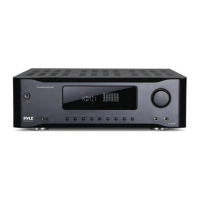
The product has 11 pairs channels input, digital channel input and analog channel
input: Select HDMI 1-3, OPTICAL, COAXIAL and USB digital input by pressing digital
input button on the panel or remote control.
Select AUX, BT, DVD/CD and FM by pressing the 'analog input' button on the panel
or remote control.
Channel Mode
Press "channel mode", select2.1 or 5.1 channels on the panel or remote control
Volume Adjustment
Total volume adjustment:
Rotate the "VOLUME/MULTI" VOLUME/multi-function adjusting knob on the panel,
or press the 'total VOlUME +/-' button on the remote control to adjust the VOLUME.
Center, surround, heavy bass channel volume adjustment:
Press "main menu" on the panel, adjust the screen to show "CV xx", ''the SRV xx'',
''xx'' and ''SWVxx SLV'', then rotate the "MULTI' VOLUME/multifunctional adjustment
button on the panel, adjust the Volume of center channel, right surround channel,
left surround channel and the heavy bass channel.
Press the ''Center volume +/-'' surround volume +/-'' and ''heavy bass +/-'' button
on the remote control , adjust the volume of Center, surround and heavy bass.
Channel.
MAIN CHANNEL TONE AND BALANCE
Press the 'MENU' on the control panel of the receiver system. Adjust the display
'TRExx' 'BASSxx' and 'L-- //--R'. 'VOLUME/MULTI' is volume/Multi-function knob.
This knob can adjust main channel bass/Treble volume level and Left/Right channel
volume balance.
USB OPERATION
Press the 'Input' button on the remote control or on the control panel of the receiver
system. Select 'USB'mode. Then insert USB ash disk. This unit can automatically
play the USB ash disk le. Then press , , button to operate the corresponding
function. Supports WMA/MP3/APE/PLAC les
Note:
1. Because video les continuously updates, this product can't play all format les.
2. If USB ash disk doesn’t work on USB mode. The operation is invalid
MIC
• Insert MIC. The display will show 'OK ON'
• Press the 'OK MENU' on the control panel of the receiver system. Rotate 'VOLUME
/MULTI' knob. Adjust MIC volume. Press the 'MIC VOL+/-"MIC ECHO+/-"MIC DELAY
+/-" on the remote control. Adjust the microphone Master/echo/delay volume level.
HIFI
• In ANALOG INPUT mode, press the 'HIFI' button on the remote control.
Output is 2.0ch stereo audio mode.
HDMI
1. Connect audio equipment (Blu-ray DVD player, Set Top Box ) with HDMI output
by using HDMI cable.
2. Press the 'Digital input' on the remote control or on the control panel of the
receiver system. Select the appropriate channel.
3. Press the 'CH. MODE' on the remote control to change the channel of the
broadcast program.
4. HDMI with ARC function. Set the TV audio in 'External speaker' or 'Audio
system', press 'ARC ON' on remote control,. The display will show 'ARC on', This
amplier can play the TV audio. Press 'ARC o', The amplier goes back to default
channel.
Note: HDMI Version 1.4B. Support 3D 4K
Make sure the TV has ARC function and set the TV in ARC ON state.


 To Next Page
 Loading...