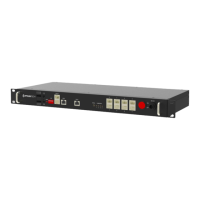
The Pylontech LV-Hub is a communication hub designed for parallel connection of multiple 48V Lithium-Ion Phosphate battery groups, specifically compatible with US2000, US3000, Phantom-SA, and US1800 battery storage systems. It acts as a central point for managing communication between these battery groups and an inverter, supporting both CAN and RS485 communication protocols.
Function Description:
The primary function of the LV-Hub is to facilitate communication and management of up to 25 battery groups via CAN bus or up to 5 battery groups via RS485. It aggregates communication from individual battery groups, allowing the inverter to interact with the entire battery bank as a single, larger unit. This is crucial for systems requiring higher capacities than a single battery group can provide. The hub ensures coordinated operation, monitoring, and control of the connected batteries. It also provides a debug port (RS232) for troubleshooting and system analysis.
Important Technical Specifications:
- Operating Voltage Range: 48 Vdc
- Communication Interface: CAN/RS485
- System Consumption: 2W
- Size: 442 x 190 x 44mm
- Protection Degree: IP20
- Weight: 3.0kg
- Operation Life: 15 years
- Working Temperature: -20 to 60°C
- Storage Temperature: -40 to 80°C
- CAN (Max 25 groups):
- Baud Rate: 500K
- Terminal Resistance: 0/120Ω
- RS485 (Max 5 groups):
Ports and Indicators:
The LV-Hub features a comprehensive set of ports and indicators for easy setup and monitoring:
- Dry Signal: Function reserve.
- Reset Switch Button: Press for 2 seconds to restart the system.
- Dip Switch (1-6): Dip 6 controls the CAN OUT terminal resistance (Up: 120Ω, Down: 0Ω).
- CAN OUT (RJ45): CAN output port, only the upper port is used.
- RS232 (RJ45): Debug port.
- CAN IN (RJ45): Connects to port 0 (only for CAN communication).
- STATUS LED: Indicates the hub's operational status.
- Lights once when the hub is turned ON.
- Red alarm if no battery is connected or at least one group is offline, or if a battery group is removed. No alarm when a battery group is added.
- NUMBER/BIN 1-4 LEDs: Shows the quantity of linked battery groups using a binary code (green flash).
- 1 group: LED 1 on.
- 2 groups: LED 2 on.
- 3 groups: LEDs 1, 2 on.
- 4 groups: LED 3 on.
- 5 groups: LEDs 1, 3 on.
- 6 groups: LEDs 2, 3 on.
- 7 groups: LEDs 1, 2, 3 on.
- RJ45 Ports (0-7): Used for connecting battery groups. Only ports 0-5 are typically used.
- ON/OFF Switch: Turns the LV-Hub ON/OFF.
- 48VDC Input: Power supply port, takes 48VDC power from an external AC/DC adapter.
RJ45 Port Pin Definition:
- CAN OUT:
- Pin 2: GND
- Pin 4: CANH
- Pin 5: CANL
- RS485:
- Pin 6: GND
- Pin 7: RS485A
- Pin 8: RS485B
- RS232 Pin:
- Pin 3: TX
- Pin 6: RX
- Pin 8: GND
Usage Features:
- Protocol Support: Compatible with CAN-Bus-protocol-PYLON-low-voltage-V1.2-20180408 or above, and RS485-protocol-pylon-low-voltage-V3.1-20180408 or above.
- Scalability:
- For RS485 communication, each LV-Hub can connect up to 5 battery groups, with each group containing a maximum of 8 US2000 or US3000 batteries (or 8 US2000B Plus/US3000 batteries). No external power supply is required for the hub in this configuration.
- For CAN communication, each LV-Hub can connect up to 5 battery groups, with each group containing a maximum of 8 US2000 or US3000 batteries (or 8 US2000B Plus/US3000 batteries). A 48VDC power input is required for the hub.
- For US2000C/US3000C/UP5000/US5000 models, each LV-Hub can connect up to 6 battery piles, with each pile configuring a maximum of 16 batteries.
- Multi-Hub Configuration: Multiple LV-Hubs can be cascaded to further expand the battery bank capacity. Up to 5 hubs can be connected in Level 1, and these can then connect to other hubs in Level 2, allowing for a maximum configuration of 200 US2000 or US3000 batteries.
- Current Management: If a battery group's current exceeds 120A, it requires two pairs of external power cables.
- Inverter Compatibility: When used with SMA SUNNY ISLAND, the ADD switch on the master HUB (or single HUB) must be set to 000011 (for B14V0105 product label) or 000101 (for B14V0106 product label).
Maintenance Features:
- LED Indicators: Provide clear visual feedback on the hub's status and the number of connected battery groups, aiding in quick diagnostics.
- Reset Switch: Allows for easy system restart in case of issues.
- Debug Port (RS232): Enables connection to a computer for detailed debugging and analysis of communication data.
- Cable Connection Guidelines: The manual provides detailed instructions and diagrams for connecting communication and power cables, including specific pin definitions for RJ45 ports, which are crucial for correct installation and troubleshooting.
- Dip Switch for Terminal Resistance: The adjustable terminal resistance on the CAN OUT port (Dip 6) allows for proper termination of the CAN bus, which is important for signal integrity in larger systems.
- Battery Group Configuration: The manual emphasizes checking the ADD Switch settings on the battery modules themselves, as these settings are critical for proper communication with the LV-Hub.
- Power Cable Requirements: Instructions specify the need for suitable protection breakers between the battery system and the inverter, and the calculation of sufficient cable pairs based on system current, ensuring electrical safety and optimal performance.
- Master Battery Setup: For US2000C/US3000C/UP5000/US5000 models, specific steps are outlined for configuring the master battery's dip switches and connecting communication cables after all batteries are online, ensuring proper system initialization.
- Cable Type Specification: The manual specifies the use of 8-pin direct-pin cables for communication between battery modules and between hubs, and highlights that certain communication cables (between Group 1 Master Battery A/CAN to LV-HUB Port 1) should have the first 3 pins NULL or use a specific Pylontech cable (WI0SCAN30RJ1), which simplifies cable selection and avoids compatibility issues.

 Need help?
 General


 To Next Page
