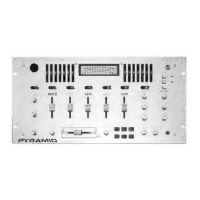
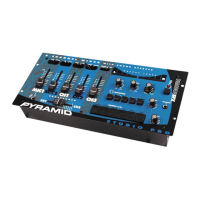
This document is the owner's manual for the PYRAMID Studio PRO DJ Mixer, covering models PM-8501, PM-8001, PM-7501, and PM-4001.
Function Description:
The PYRAMID Professional DJ Mixer is a sophisticated control center designed for mixing sound sources from multiple playback devices or live performances. It allows users to adjust sound levels, create special sound performances, and tailor the sound to compensate for environmental conditions or personal preferences.
Important Technical Specifications:
- MIC 1 (XLR jack): 1.5mV, 600 ohm, Balanced (Low)
- MIC 2 (PHONE jack): 1.5mV, 600 ohm, Unbalanced (Low); 6.0mV, 10K ohm, Unbalanced (High)
- PHONO: 3mV, 50K ohm
- LINE: 150mV, 27K ohm
Output Level:
- MAIN OUT: 2V, 10K ohm
- RECORD: 150mV, 10K ohm
Frequency Response:
Distortion:
- MIC: < 0.20%
- PHONO: < 0.05%
- LINE: < 0.03%
S/N Ratio:
- MIC: > 60 dB
- PHONO: > 70 dB
- LINE: > 80 dB
Equalizer:
- Control Frequency: 60 Hz, 150 Hz, 400Hz, 1K Hz, 2.4K Hz, 6K Hz, 15K Hz
- Boost/Cut Range: +/- 12 dB at center
Tone Control Frequency for MIC 1:
- BASS: 100 Hz
- TREBLE: 10K Hz
- Boost/Cut Range: +/-10dB
Talkover Attenuation:
Echo Delay Time (PM-8501/PM-8001):
Power Source:
- 120 VAC 60 Hz/220 VAC 50 Hz, 20W
Dimensions:
Specifications are typical; individual units might vary and are subject to change and improvement without notice.
Usage Features:
General Controls:
- Power ON/OFF: Push in to turn power on, push again to turn power off.
- BNC Lamp Adaptor: Connects a 12V/3W max lamp to light up the unit in dark environments.
- Dual LED Meter: Indicates the output signal level of the master channel.
- Channel Volume Control: Slide upwards to increase volume, downwards to decrease.
- Input Device Selector: Selects the input source for each playing channel.
- Master Level Control: Controls the mixer's overall volume level.
- Head Phone Jack: 6.3 mm jack for headphone connection.
- CUE Assign Selector: Selects the channel to monitor and prepare before mixing.
- CUE Level Control: Adjusts the headphone's volume level.
- CUE/MASTER Fader (PM-8001/PM-4001): Adjusts the monitoring signal level between assigned cue and master output.
Microphone Features (MIC 1 & MIC 2):
- MIC 1 XLR Input: For balanced or unbalanced, low impedance XLR type microphones.
- MIC 1 Talkover: Lowers the sound of input sources when using the DJ's microphone.
- TALK: Attenuates all outputs except MIC 1 and MIC 2, allowing only MIC 1 to be heard clearly.
- AUTO MUTE: Automatically attenuates all outputs as long as you are speaking.
- OFF: Returns all outputs to the same level when MIC 1 is not in use, useful for paging.
- MIC 1 Bass Tone Control: Adjusts the bass of the primary microphone (MIC 1) to improve sound.
- MIC 1 Treble Tone Control: Adjusts the treble of the primary microphone (MIC 1) to improve sound.
- MIC 1 Level Control: Controls the microphone's volume level before mixing.
- MIC 2 Input: Connects high quality, high impedance (10k-ohm) or low impedance (600-ohm) microphones via a 1/4-inch plug. A switch above the volume control selects HI or LO impedance.
- Low Level Audio Source Input: Connects up to two low-level audio sources (e.g., magnetic-cartridge turntables) to PHONO 1 and PHONO 2. Ground wire connection (black or green) to GND is required for turntables with magnetic cartridges.
- High Level Audio Source Input: Connects up to six high-level audio sources (e.g., tuner, cassette tape deck, CD player, camcorder, VCR) to LINE 1, LINE 2, LINE 3, LINE 4, LINE 5, and LINE 6.
- Caution: Do not connect high-level output audio sources into MIC or PHONO inputs.
Audio Output Connections:
- AMP Output: Connects to a receiver/amplifier's left and right input jacks (AMP R and L) to play the mixer's output signal through a speaker system.
- REC Output: Connects to a tape deck's left and right input jacks (REC R and L) to record the mixer's output signal.
- Caution: Adjust audio device controls (Tape Deck: POWER OFF, Amplifier/Receiver: POWER OFF, TONE FLAT) before connecting to avoid sudden and unusable sound outputs.
Crossfader:
- Dual Railed Removable Crossfader: Smoothly switches between two input sources.
- Crossfader Assign Switch: Quickly and smoothly switches between two assigned sources of each playing channel.
- <A: Fades in input source selected by ASSIGN A and fades out input source selected by ASSIGN B.
- B>: Fades in input source selected by ASSIGN B and fades out input source selected by ASSIGN A.
- Center: Mixes input sources selected by ASSIGN A and ASSIGN B equally.
7-Band Frequency Equalizer:
- EQ/Bypass Switch: Push in to operate equalizer, push out to defeat.
- Allows tailoring sound output to preference and compensating for acoustic surroundings.
- Seven sliding frequency controls (60, 150, 400, 1k, 2.4k, 6k, and 15k Hz) vary the level of a narrow band of frequencies by +/- 12dB.
- 60 Hz: Adjusts low bass range (organ notes, bass drums), reduces rumbles/low-frequency noise, compensates for poor bass response.
- 150 Hz: Adjusts low to middle-bass range (tuned drums, timpani, low-bass instruments).
- 400 Hz: Adjusts upper-bass range. Over-accentuated upper bass creates muddy/boomy sound; too little makes music hollow/thin.
- 1K Hz: Adjusts middle frequency range (vocals), enhancing or blending vocals. Often called "presence."
- 2.4K Hz: Adjusts upper-middle frequency range (vocals, clarinets, saxophones). Boosting makes the program sound "brighter."
- 6K Hz: Adjusts lower high frequency range (flutes, oboes, violins, piccolos, treble instruments). Boosting adds vibrancy; too much makes music harsh.
- 15K Hz: Adjusts high-frequency sounds (cymbals, other high-frequency sounds). Boosting adds brilliance; too much makes music piercing/unpleasant; too little causes loss of brilliance/dimensionality.
- Controls overlap slightly for smooth frequency control.
MONO/STEREO Selector:
- MONO: Combines left and right channels, sending signals to OUTPUT R and L jacks for monaural amplifiers (e.g., PA amplifier).
- STEREO: Keeps left and right stereo channels separated, sending signals to OUTPUT R and L jacks for stereo amplifiers or tape decks.
Echo Features (PM-8501/PM-8001):
- Echo ON/OFF Switch: Activates echo mode.
- Echo Delay Control: Adjusts the delay time of the echo (10 for maximum, 0 for minimum).
- Echo Repeat Control: Controls the length of time a tone is repeated (reverberation) (10 for longest, 0 for shortest).
- Echo Level Control: Controls the output level of the echo effect (10 for raising, 0 for lowering).
Digital Sound Effects (PM-8501/PM-7501):
- Six pre-programmed sound effects: LASER, MACHINE GUN, TRON BLAST, SIREN, EMERGENCY, and UFO.
- Pressing a button generates the sound continuously until released.
- Sound Effect Speed Control: Adjusts the pitches of the effects.
- Sound Effect Volume Control: Adjusts the volume of the effects.
Maintenance Features:
- The mixer requires very little maintenance.
- Troubleshooting:
- Nothing Works: Check AC power connection (outlet "live"), power connection to rest of system (amplifier/receiver).
- No Signal from Audio Input Source: Check control settings, connection between mixer and input source.
- Hum from PHONO: Check turntable's ground wire (black or green) to the mixer.
- Hum from Other: Ensure no low-level inputs are connected to LINE input jacks.
- Feedback ("Sequels"): Move microphone further away from output speakers or use a directional microphone.

 Need help?
 General

 To Next Page