Page 6 / 8
After cooking ends automatically, the temperature display will indicate the residual
heat, if any (see: Residual Heat Indication), will be flashing and buzzer will sound for
7 minutes. Touching will cancel the latter.
Residual Heat Indication:
After cooking has ended manually or automatically, if the internal oven temperature
is above 60 °C, ‘down arrow’ (˅) on the right side of heat bars flashes every 2 second and
also “hot” is displayed on the temperature display. Each one of the 5 heat bars symbolizes
now 60 °C. This indication goes on until the oven temperature falls below 60 °C.
SPECIAL FEATURES
Minute Minder Alarm:
In standby mode (when cooking something related) key once to touch the icon on
the screen by tapping the left until it starts to blink. or keys to set the time using. 7
seconds, then stops blinking. 7 minutes during the set time is reached, the alarm sounds.
The alarm can be stopped or tapping the keys.
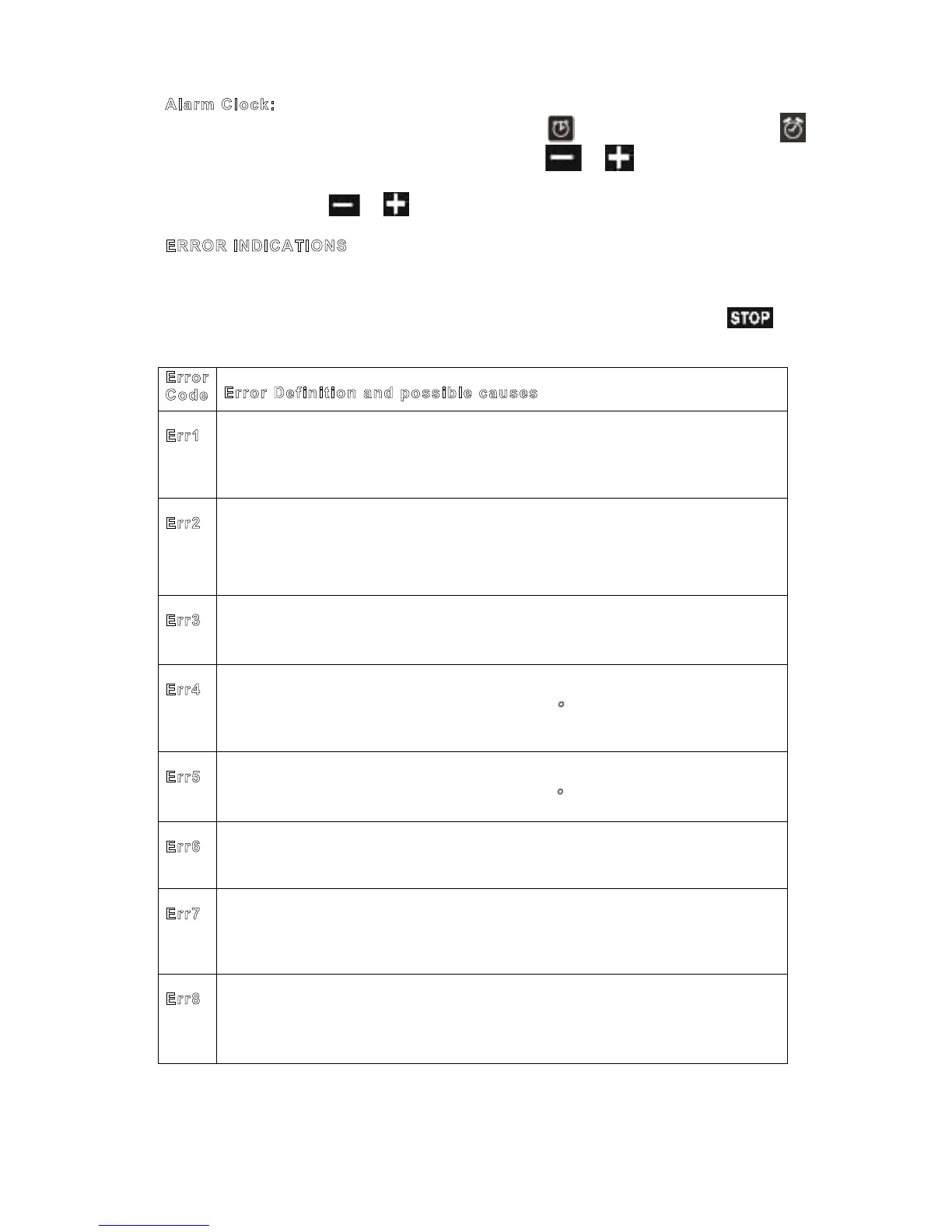
Alarm Clock:
In standby mode (when cooking something related) key twice to touch the icon on
the screen by tapping the left until it starts to blink. or keys to set the time using.
7 seconds, then stops blinking. The set time is reached, the alarm starts sounding. The
alarm can be stopped or tapping the keys.
ERROR INDICATIONS
When situations which prevent normal operation occur, the device enters error
mode. Device is in the standby status but an error code is displayed on Time of Day
Display. Even if the error recovers, this code will remain on the display until key is
touched. A total number of 8 error codes exist:
Code
Error Definition and possible causes
Err1
Communication error between UM and PM boards
DKB2-XX-POC400 data cable connector may be loose on either side
DKB2-XX-POC400 data cable may be defect
Oven Cavity Temperature Sensor Open Circuit
PT–1000-M2-XXX sensor connector may be loose on the PM
PT–1000-M2-XXX sensor may be defect
POC 400 PM may be defect
Err3
Oven Cavity Temperature Sensor Open Circuit
PT–1000-M2-XXX sensor may be defect
Front Panel Temperature Limit Exceeded
The Temperature of the UM exceeded limit (100 ºC) , check cooling fan
POC 400 UM may be defect
PM Temperature Limit Exceeded
The Temperature of the PM exceeded limit (105 ºC) .
POC 400 PM may be defect
POC 400 UM may be defect.
Err7
PM heat sensor error
POC 400 PM may be defect.
No Temperature Regulation
Check heating elements and connections
POC 400 PM may be defect
In case of an Error Message:
If those errors cannot be recovered by touching the button, disconnecting the oven
from mains power and connecting again after 2 minutes may correct the errors.
PROGRAMMABLE OPTIONS
Buzzer Tone: There are three buzzer tones to select.
Touch the key 5 seconds long, time of day display will show the currently valid tone
as “tn 1” (high) or “tn 2 (medium)” or “tn 3 (low)". The valid tone can be changed by a
key touch within 7 seconds after the last one. Default tone is “tn 1”.
Key Sound: There are three key sound options to select.
Touch the key key 5 seconds long, time of day display will show the currently valid key
tone as “bt” (beep tone) or“c” (click tone) or “nt" (no tone). The valid key sound can be
changed by a key touch within 7 seconds after the last one. Default key sound is “bt”.
Time of Day Mode 24h/12h: Default mode is 24 hours. If 12h am/pm mode is desired,
touch both and keys 5 seconds long. Mode changes and a beep tone occur. Do the
same for vice versa.



 To Next Page