38
© 2008 Directed Electronics. All rights reserved.
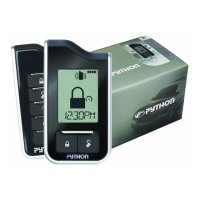
Remote start display: Clock, temperature or runtimes
!LLOWSYOUTOCHOOSEWHATISDISPLAYEDINTHETEXTDURINGTHEREMOTESTART
sequence. Clock displays the current time during remote start.
Temperature displays the current cabin temperature during the remote start.
Runtime displays the runtime remaining during the remote start.
Low Runtime Alerts
The remote reports with one short beep followed by 1 short error tone
REPEATEDTWICEANDTHETEXTAREADISPLAYShRUNTIMEvWHENTHEREMOTE
start runtime is at the 3-minutes remaining and one more time at 1 minute
remaining. You have the option to let the remote start timeout or use the
hRUNTIMERESETvFEATURE7HENPROGRAMMEDh/FFvYOUWILLNOTRECEIVEA
low runtime alert on the remote.
#AR/NOR/FF(OMEs
4URNS/FFOR/NCAROPERATIONFROMTHEREMOTE4HEOPTIONFORhHOMEv
is not available.
"ACKLIGHT#OLOR/FFs
Turn Off the LCD backlighting or changes the color of the backlighting.
Color options include: Blue, green, red, aqua, purple, lime, clear
Temperature Units F and Cs
Display temperature in Fahrenheit or Celsius
Button Press Beep On or Offs
Turn Off beeps when a button on the remote is pressed
System Type Remote Start & Security or Remote Starts
Select the type of system you are using, security system with remote start
or a keyless entry system with remote start (to ensure that the correct icons
are displayed on the LCD)
Clock Set s
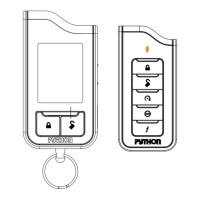
To enter clock set mode, Press the
BUTTON4HE,#TEXTDISPLAYREADS
hHOURvTOCONlRMENTRYINTHECLOCKSETMENU
Press the
AUX
button to move up the menu, press the button to move



 To Next Page