8 – Session analysis
8.1 – Viewing sessions and lap times
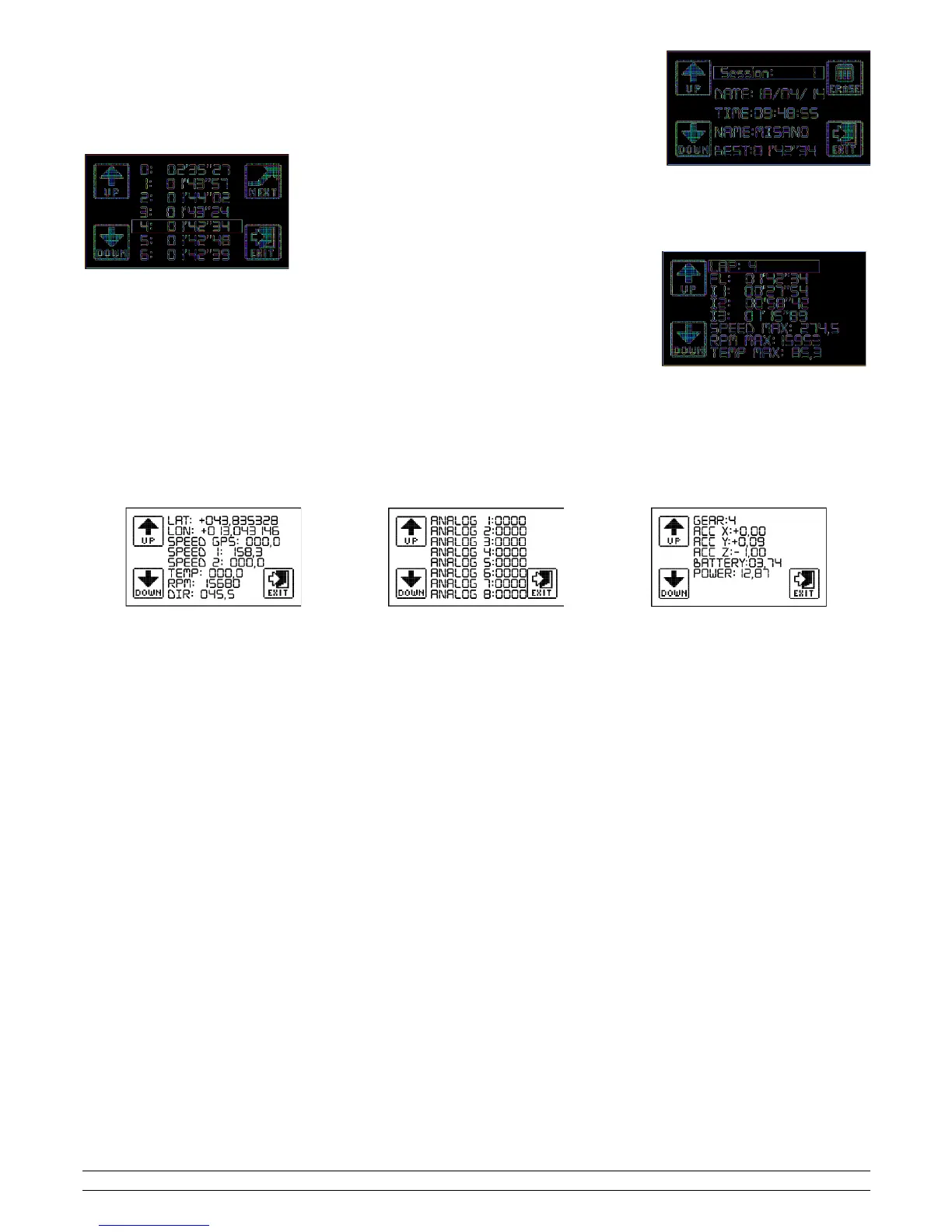
Access the device menu and select the LAPS icon; if there are no sessions registered, the device will return to the
main menu; otherwise, the following screen will show the information relating to the first session.
To scroll through the sessions, click on the arrows UP and DOWN; press the centre of the display to access and
see the session times.
Press the UP and DOWN arrows to scroll the bar up and down; once you have chosen a time per lap you can
press NEXT and view the details of a single lap.
Press one of the arrows (UP or DOWN) to view details of the previous or following lap, or press at the centre of
the display to go back to the previous screen.
8.2 – Deleting a session
Access the device menu, click on the LAPS icon, view the session you wish to delete, press ERASE then confirm deletion by pressing the YES icon.
9 – Viewing values in real time
The real time values screen allows you to see all the measurements retrieved by the GPS, all the analogue and digital measurements retrieved by the Box
Expander; from this screen it is possible to calibrate the sensors connected (the so-called "zero" of the sensors).
To access these screens, access the menu, select the INFO icon and then select VALUE; a series of screens will appear and you can scroll these by clicking
on the UP and DOWN arrows:
With regard to the analogues and SPEED 1 and SPEED 2, these will appear with their default name if they have not been changed; if they have been
changed, the name associated to the analogue access will appear.
To change the name, you need to open the configuration file CONFIG.CFG in the RacePro software and refer to the software manual.
10 – Download data
The files contained in the memory card are managed like any files in a digital archive memory (USB stick, memory card, etc,); this is why there is no
download time, you simply need to connect the Start device to the PC or insert a memory card inside a reader and copy the files contained in the
SESSION folder.
The *.SES file is formatted as follows:
NAME DATE TIME CIRCUIT BEST-LAP.SES
Do not rename the session files under any circumstances; Start will no longer be able to open the files.
To eliminate the content of the memory card, eliminate all the files inside the SESSION folder.
PZRacing Via de Gasperi 5 – 61032 Fano (PU) Italy - Tel: +39 0721 820434 – Email: tech@pzracing.it


 To Next Page