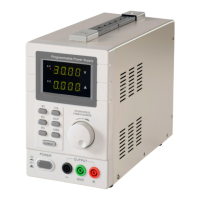
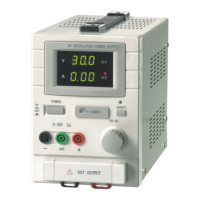
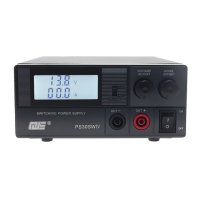
The QJ3003GIII and QJ3005GIII are programmable DC laboratory power supplies, offering a voltage output range of 0-30V with a USB 2.0 interface. These devices are designed for various laboratory and industrial applications, providing stable and adjustable DC power.
Function Description
These power supplies operate in both Constant Voltage (C.V.) and Constant Current (C.C.) modes. In C.V. mode, the voltage is adjustable between 0 and 30 volts. In C.C. mode, the current is adjustable between 0 and 5 amps for the QJ3005GIII and 0 and 3 amps for the QJ3003GIII. The devices feature dual channels for independent or parallel/serial operation, allowing for flexible power configurations.
The front panel includes two large LED displays for each channel, showing real-time output voltage and current values. Each channel has dedicated coarse and fine adjustment knobs for precise control of voltage and current. Status indicators for C.V. and C.C. modes are also present.
Key features include:
- Voltage and Current dual LED display: Provides clear, real-time readings.
- Voltage and Current Coarse/Fine adjustment: Enables precise control over output parameters.
- Protection mode: limited current output: Safeguards against overcurrent conditions.
- Parallel or serial connection detection to automatically switch outputs: Simplifies multi-channel operation.
- Stylish plexi-glass display panel: Enhances durability and aesthetics.
- Memory: 3 programmable memories: Allows users to save and recall frequently used voltage and current settings.
The power supplies can be connected in parallel or series. In parallel connection, the total current output is the sum of the individual channel currents (e.g., 0 to 6 amps for QJ3003GIII or 0 to 10 amps for QJ3005GIII), while the voltage remains at 0 to 30 volts. In serial connection, the total voltage output is the sum of the individual channel voltages (e.g., 0 to 60 volts), and the current remains at 0 to 3 amps for QJ3003GIII or 0 to 5 amps for QJ3005GIII. The devices automatically detect parallel or serial connections and adjust the output accordingly.
The memory function allows users to store up to three pairs of voltage and current values. These settings can be easily recalled, simplifying repetitive tasks and ensuring consistent power delivery.
Important Technical Specifications
| Model Number |
QJ3003GIII |
QJ3005GIII |
| Output Voltage |
0-30 V |
0-30 V |
| Output Current |
0-3A |
0-5A |
| Power effect |
C.V. ≤ 0.01 % + 3 mV |
C.V. ≤ 0.01 % + 3 mV |
|
C.C. ≤ 0.1 % + 3 mA |
C.C. ≤ 0.1 % + 3 mA |
| Load Effect |
C.V. ≤ 0.01 % + 3 mV |
C.V. ≤ 0.01 % + 5 mV |
|
C.C. ≤ 0.1 % + 5 mA |
C.C. ≤ 0.1 % + 10 mA |
| Resolution |
10 mV |
10 mV |
|
1 mA |
1 mA |
| Accuracy (25 °C ± 5 °C) |
≤ 0.1% + 20 mV |
≤ 0.1% + 20 mV |
|
≤ 0.1 % + 5 mA |
≤ 0.1 % + 5 mA |
| Ripple & Noise (20Hz-20MHz) |
≤ 1 mV rms |
≤ 1 mV rms |
|
≤ 3 mA rms |
≤ 3 mA rms |
| Temperature Coefficient |
≤ 150 ppm |
≤ 150 ppm |
|
≤ 150 ppm |
≤ 150 ppm |
| Readout Resolution |
10 mV |
10 mV |
|
1 mA |
1 mA |
| Readout Temperature Coefficient |
≤ 100 mms |
≤ 100 mms |
|
≤ 100mms |
≤ 100mms |
| Parallel Load Regulation |
≤ 0.1%+0.1V |
≤ 0.1%+0.1V |
| Serial Load Regulation |
≤ 0.1%+0.1V |
≤ 0.1%+0.1V |
| Dimensions |
220(W) x 145(H) x 310(D) mm |
220(W) x 145(H) x 310(D) mm |
| Weight |
6.5kg |
7kg |
| Fixed Output |
5V/3A |
5V/3A |
| Fuse |
T4A /250 V |
T5A /250 V |
| Input Voltage |
220 V/ 50 Hz |
220 V/ 50 Hz |
Usage Features
Power On/Off: The device is turned on and off using the main power switch located on the front panel. Before turning on, ensure the power cord is properly connected to a grounded power outlet.
Operating in C.V. or C.C. mode:
- When the output current is below the preset limit, the power supply will enter C.V. mode, and the C.V. indicator light will turn on.
- If the output current is over the preset limit, the power supply will automatically switch to C.C. mode, and the C.C. indicator light will turn on.
- Adjusting voltage and current is done via the coarse and fine adjustment knobs. For instance, to set a specific voltage in C.V. mode, adjust the voltage adjustment knob to the desired level. The current adjustment knob sets the current limit.
Setting up pre-set voltage and current (Memory function):
- Press the "SAVE" button to enter memory mode.
- Use the "SER" or "LOCK" buttons to select one of the three memory locations (M1, M2, M3).
- Adjust the voltage and current to the desired values using the respective knobs.
- Press the "SAVE" button again to store the settings in the selected memory location.
- To recall a saved setting, press "SAVE" and then select the desired memory location. The unit will beep twice to confirm a successful save or recall.
Load Connection:
- Connect the positive end of the load to the power supply's red (+) terminal.
- Connect the negative end of the load to the power supply's black (-) terminal.
- For grounding, connect the positive terminal "+" or negative terminal "-" to the green ground terminal with a conductive wire to realize 0 potential at the ground, or the output will be floating between 0 potential and ground.
Safety Instructions:
- Keep the device away from children and unauthorized users.
- Use indoors only. Keep away from water, rain, moisture, splashing, and dripping liquids. Never put objects filled with liquids on top of or close to the device.
- Do not disassemble or open the cover under any circumstances. Touching live wires can cause life-threatening electroshocks. There are no user-serviceable parts inside the device. Refer to an authorized dealer for service and/or spare parts. Always connect the device to an earthed power socket.
- Caution: The device heats up during use. Ensure ventilation openings are clear at all times. For sufficient air circulation, leave at least 1" (±2.5 cm) in front of the openings. Place the device on a flat, heat-resistant surface, do not place the device on carpets, fabrics...
- Always disconnect mains power when the device is not in use or when servicing or maintenance activities are performed. Handle the power cord by the plug only.
- Keep the device away from dust and extreme temperatures.
- Protect the device from shocks and abuse. Avoid brute force when operating the device.
- Do not use the device when damage to housing or cables is noticed. Do not attempt to service the device yourself but contact an authorized dealer.
Maintenance Features
Cleaning and Maintenance:
- Disconnect the device from the mains prior to maintenance activities.
- The power supply cables must not show any damage. Have a qualified technician maintain the device.
- Wipe the device regularly with a moist, lint-free cloth. Do not use alcohol or solvents.
- There are no user-serviceable parts, apart from the fuse. Contact your dealer for spare parts if necessary.
- Store the device in a dry, well-ventilated, dust-free room.
Replacing the Fuse:
- Only replace the fuse by a fuse of the same type and rating (T4A/250V for QJ3003GIII, T5A/250V for QJ3005GIII).
- Before replacing the fuse, unplug the mains lead.
- Wedge the fuse holder out of its housing with a flat-head screwdriver.
- Remove the damaged fuse from its holder and replace with the exact same type of fuse.
- Insert the fuse holder back in its place and reconnect power.
The device is designed to be robust and reliable, with minimal user maintenance required beyond basic cleaning and fuse replacement. Adhering to the safety guidelines and proper usage procedures will ensure a long lifespan and optimal performance of the power supply.

 Need help?
 General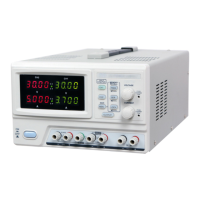

 To Next Page