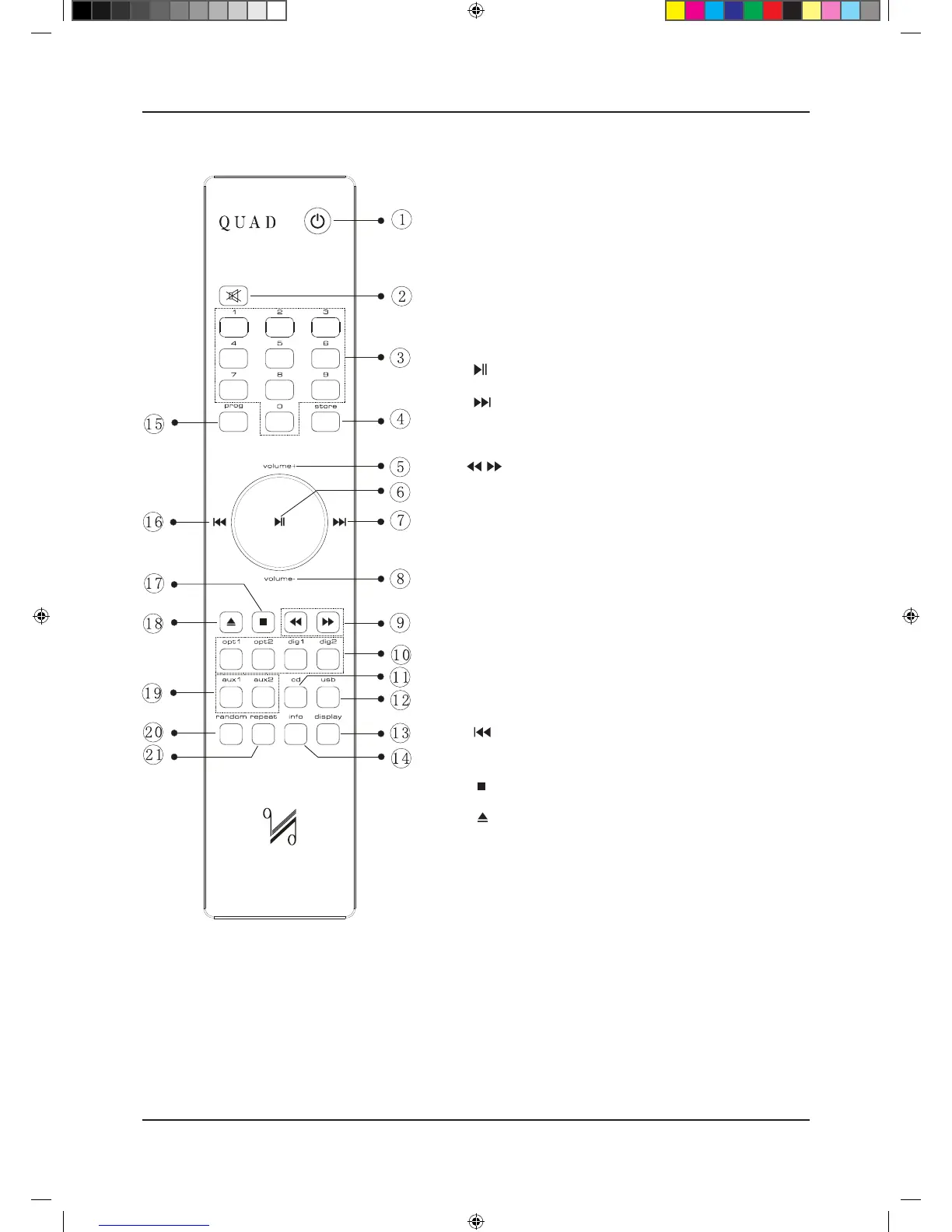
REMOTE HANDSET
1 Standby Press to bring the unit in/out of Standby
2 Mute Press to mute/unmute the sound
3 Number keys See “Handset Operation” below
4 Store Press to store a track in Program mode
5 Volume+ Increase Volume
6 Press to start/pause CD/USB playback
7 Move to the next track of CD/USB
8 Volume– Decrease Volume
9 Press and hold to Fast Reverse/ Fast Forward search
10 Digital Press to select Digital inputs
11 CD Press to select CD playback
12 USB Press to select the USB input
13 Display Press to alter the display ON/OFF
Press and hold to alter the display brightness
14 Info Press to display more information
15 Prog Press to enter a program of tracks
Press and hold to select a filter.
16 Press once to replay the current track of CD/USB
Press again to move to the previous track of CD/USB
17 Press to stop CD
18 Press to eject/load the disc
19 Aux1/Aux2 Press to select Analogue inputs
20 Random Press to select/deselect random play
21 Repeat Press to select a repeat mode


 To Next Page