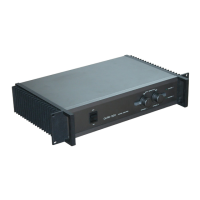
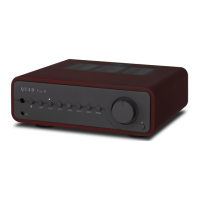
The QUAD Artera Pre is an innovative pre-amplifier designed to deliver superior sound quality, characterized by the purity of its analogue electronics. It is compatible with a wide range of music sources, offering versatility through both balanced and unbalanced inputs and outputs. This device is intended to provide many hours of listening pleasure.
Function Description:
The Artera Pre serves as a central control unit for an audio system, managing various audio inputs and outputs, volume control, and sound adjustments. It features a comprehensive set of analogue inputs, including three RCA (AUX1, AUX2, AUX3), one XLR, and a Phono MM/MC input, allowing connection to a diverse array of source components such as CD players, streamers, and turntables. For outputs, it provides one RCA (PRE OUT), one RCA (AUX), and one XLR output, enabling connection to power amplifiers, integrated amplifiers, audio processors, AV controllers, or audio recording devices. A 6.35mm headphone jack is also included on the front panel for private listening.
The device incorporates a built-in low-noise precision RIAA amplifier specifically for turntables, supporting both Moving Magnet (MM) and Moving Coil (MC) cartridges. The Phono input is exclusively for turntables, and a GND terminal is provided to reduce hum in systems where a turntable with a separate ground wire is connected.
For system integration, the Artera Pre includes two standard 12V trigger output ports. These allow for the remote triggering of other units with TRIGGER INPUTS, such as a QUAD Artera Stereo power amplifier, bringing all connected Artera units in and out of standby simultaneously.
Important Technical Specifications:
- Analogue Inputs: 3 x RCA (AUX1, 2 & 3), XLR, Phono MM/MC
- Analogue Outputs: 1 x RCA (PRE OUT), 1 x RCA (AUX), 1 x XLR, 1 x 6.35mm Headphone Jack
- Gain (max., Volume = 100):
- +8dB (Line/XLR)
- +53.5dB (Phono MM)
- +73.5dB (Phono MC)
- Input Sensitivity (Vol = 84, Vout = 0dBu):
- 775mV (Line/XLR)
- 4.1mV (Phono MM)
- 410uV (Phono MC)
- Input Impedance:
- 10K (Line/XLR)
- 47K//100pF (Phono MM)
- 100R//1.7nF (Phono MC)
- Max. Output Level (THD < 0.1%):
- Input Headroom (THD < 0.1%, Vol = 50):
- 4.1V (RCA)
- 8.2V (XLR)
- 62mV (Phono MM) / 6.2mV (Phono MC) @ 1kHz
- Frequency Response: 20Hz-20kHz (± 0.2dB)
- Total Harmonic Distortion: <0.002% (20Hz-20kHz)
- S/N Ratio (Vout = 0dBu):
-
110dB(A) (Line/XLR)
-
80dB(A) (Phono MM)
-
76dB(A) (Phono MC)
- Channel Separation: >100dB (10kHz)
- Output Impedance:
- 120 Ohms (RCA)
- 100 Ohms (XLR)
- Standby Consumption: <0.5W
- AC Mains Supply Requirement (Factory set):
- 230V~50-60Hz
- 115V~50-60Hz
- 100V~50-60Hz
- Dimensions (W×D×H): 320 x 320 x 105mm
- Net Weight: 7.8kg
Usage Features:
- Front Panel Controls: The Artera Pre features a large rotary control for volume adjustment, which also acts as a display for various settings. A source selection button and a power/mute LED are also present.
- Remote Handset: A comprehensive remote control is provided for convenient operation. It allows users to:
- Enable/disable standby mode.
- Turn the display on/off and adjust brightness.
- Display more information (Info).
- Increase/decrease volume.
- Confirm menu settings.
- Switch channels/menu settings.
- Select specific input channels (XLR, Pre, Phono, Aux1/2/3).
- Enter/exit mute mode.
- Access menu settings (Prog).
- Volume Adjustment: Volume can be adjusted from both the front panel (by pressing the upper/lower part of the screen) and the remote handset. The volume level is variable between 0 and 100. The default volume limit is 80, and the system sets a safe low level of 20 upon first switch-on. When coming out of standby, the volume defaults to the previous setting, or 50 if the previous setting was louder than 50. Headphone and main output volume controls are independent.
- Mute Function: The MUTE key on the handset mutes the sound output. Mute can be cancelled by pressing the Mute key again, changing the volume level, or cycling the unit through standby.
- Display Brightness: The display has 8 levels of brightness, adjustable via the remote handset. A brief press cycles through "Display Off," "Display On," and then the 8 brightness levels.
- EQ (Tone Adjustment): When EQ is enabled, Bass and Tilt adjustments become available. EQ settings are Off by default and apply to AUX1, AUX2, AUX3 (when AvDir(AUX3)=Off), Phono, and XLR (when XLR Direct=Off) inputs, but not to AUX OUT.
- Bass Settings: Three options are available: Flat (default), Boost, and Cut.
- Tilt Settings: Adjusts the whole frequency response naturally with seven predefined settings in dB (Bass, Treble), ranging from [(+3,-3)] to [(-3,+3)]. The default is [(0,0)].
- Gain Adjustment: Individual gain settings for each input (AUX1, AUX2, AUX3 (AvDir(AUX3)=Off), Phono, and XLR) can be adjusted by +/-8dB to change input sensitivity. 0dB is the default.
- Balance Control: The Left and Right channel balance can be adjusted up to 6dB in 0.5dB steps, from +3dB / -3dB to -3dB / +3dB.
- Volume Limit: Users can set a maximum volume limit between 0 and 100 to protect loudspeakers and amplifiers. The default limit is 80.
- XLR Direct Mode: This mode provides a fully balanced signal path, connecting the input directly to the 4-channel volume control and then to the XLR output. This bypasses all other signal processing and EQ features.
- AvDir (AUX3) Mode: An AV Bypass mode for AUX3, where the gain of the AUX3 audio path is set to a fixed level output (0dB). This is ideal for sources with built-in volume control, such as AV processors.
- Phono Cartridge Selection: Users can select between MM (default) or MC settings to match their turntable cartridge type.
- Default Channel: The unit can be set to default to a user-chosen input or "Recall Last Input" (default) when switched on.
- Auto Standby: Three auto-standby modes are available:
- Never: The unit will not enter standby automatically, even without signal input.
- 20 Minutes: Enters standby if no signal input for 20 minutes.
- 1 Hour: Enters standby if no signal input for 1 hour.
- Firmware Version Display: The current firmware version of the Artera Pre can be viewed in the menu options.
Maintenance Features:
- General Care: Clean the unit only with a dry cloth. Do not block ventilation openings and install in accordance with manufacturer's instructions, away from heat sources.
- Power Cord Protection: Protect the power cord from being walked on or pinched, especially at the plugs and where it exits the apparatus.
- Servicing: All servicing should be referred to qualified service personnel. Do not remove the cover as there are no user-serviceable parts inside.
- Fuse Replacement: The mains supply fuse on the rear panel is accessible after removing the IEC mains plug. If it breaks, check for obvious causes before replacing it with a fuse of the correct rating and type (T500mAL 250V Slow Blow for 220-240V; T1AL 250V Slow Blow for 100-120V).
- Battery Replacement (Remote): The remote control requires 2 x AAA batteries (not supplied). Ensure correct polarity when inserting. Dispose of depleted batteries according to local recycling rules.
- Factory Reset: A factory reset option is available in the menu to restore the Artera Pre to its default settings.
- Warranty: QUAD offers a three-year extended warranty for products purchased from Jan 1st, 2021, onwards, provided the product is registered online within ninety days of purchase. Unregistered products receive a one-year limited warranty or the statutory warranty period, whichever is longer. The warranty requires proof of purchase from an authorized dealer and covers defects in materials and workmanship. Exclusions include normal wear and tear, cosmetic damage, products with altered serial numbers, purchases from unauthorized dealers, non-new products, and damage from misuse, unsuitable apparatus, unauthorized repairs, transit damage not attributable to QUAD, power supply issues, environmental factors, or force majeure events.
- Disposal: The product is marked for correct disposal within the EU, indicating it should not be disposed of with household waste. It should be recycled responsibly through return and collection systems or by contacting the retailer.

 Need help?

 To Next Page
 General