4
REMOTE HANDSET
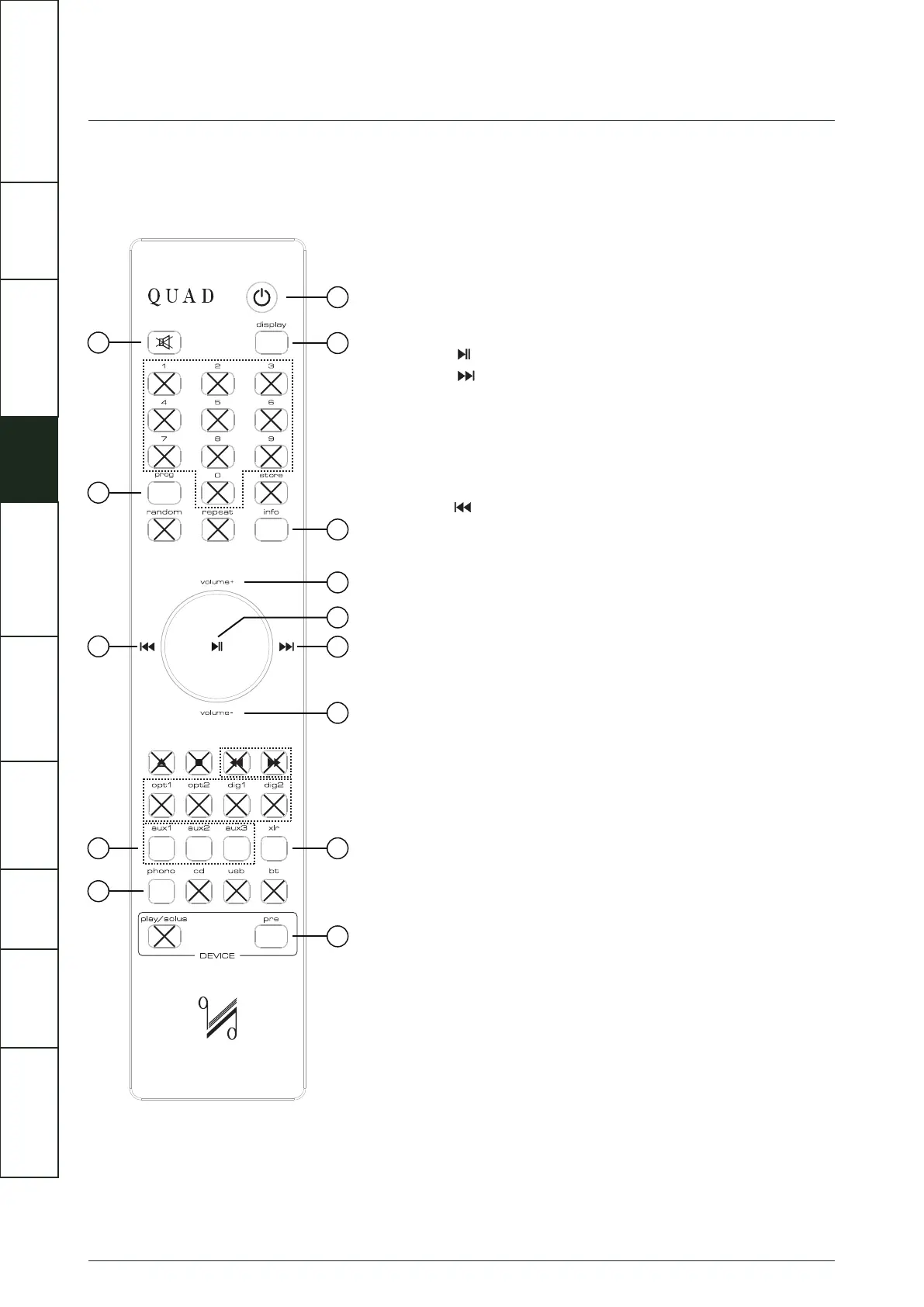
Standby
Display
Info
Volume+
Volume–
xlr
Pre
Phono
Aux1/2/3
Prog
Mute
Press to enable / disable standby mode
Press to turn the display on/off
Press and hold to adjust the display brightness level
Press to display more information
Press to increase volume
Press to confirm the menu settings
Press to switch channels/menu settings
Press to decrease volume
Press to select XLR input channel
Press to select Artera Pre control mode
Press to select PHONO input channel
Press to select Analogue input channel
Press to switch channels/menu settings
Press and hold to enter menu settings
Press to enter/exit mute mode
1
2
3
4
5
6
7
8
9
10
11
12
13
14
1
2
4
7
5
3
8
9
10
12
13
14
11
6
IMPORTANT
SAFETY INFORMATION
REMOTE
HANDSET
CONTROLS AND
FUNCTIONS
CONNECTIONS
SYSTEM
OPERATIONS
MENU
OPTIONS
SPECIFICATIONS CONTENTSINTRODUCTION
WARRANTY
COVERAGE



 To Next Page