11
OPERATION
Standby Mode
Vena II will be in standby mode when powered on. The indicator on front panel is lit. Press button to bring Vena II out of
standby.
You can activate the ‘auto standby’ function by holding the button down for 3 seconds.
Using this ‘auto standby’ function, Vena II will automatically go into standby mode when there is no signal input or operation for
30 minutes. Vena II will be switched to the Blurtooth source input when unit is activated for the first time, and switched to the last
input source used after that.
Protection Mode
Vena II is protected by a thermal switch which interrupts the AC Power supply if the amplifier is grossly overloaded for a period of
time. To restore operation, simply press the button on the front panel. It is thus fully protected against gross overload,
short-circuited output etc, but not neccessarily against seriously inadequate ventilation.
Mute Mode
Vena II will go into Mute mode with no sound output for 3 seconds when the unit is switched on and all indicators will flash 3 times.
After 3 seconds the indicators will stop flashing and Vena II will exit from Mute mode.
Users can also press to bring Vena II in or out of Mute mode when playing music.
Combination Keys Function
Vena II has a volume control knob on the front panel. Users can decrease or increase the music level with this volume knob. Please
aways turn up the volume gradually.
Playing Music via Analog Inputs
Connect the analog signal of a source unit to Vena’s AUX1 or AUX2 input. Press AUX1 or AUX2 button on the front panel. AUX1
or AUX2 indicator will be lit and music will start playing.
Playing Music via Digital Inputs
Connect coaxial SPDIF signal of source units to the digital in COAX jack on Vena’s rear panel. Press COAX button on the front
panel, COAX indicator will be lit and music will start playing.
Connect optical (TOSLink) signal of source units to Vena’s OPT1 or OPT2 jack on Vena’s rear panel. Press OPT1 or OPT2 button
on the front panel. OPT1 or OPT2 indicator will be lit and music will start playing.
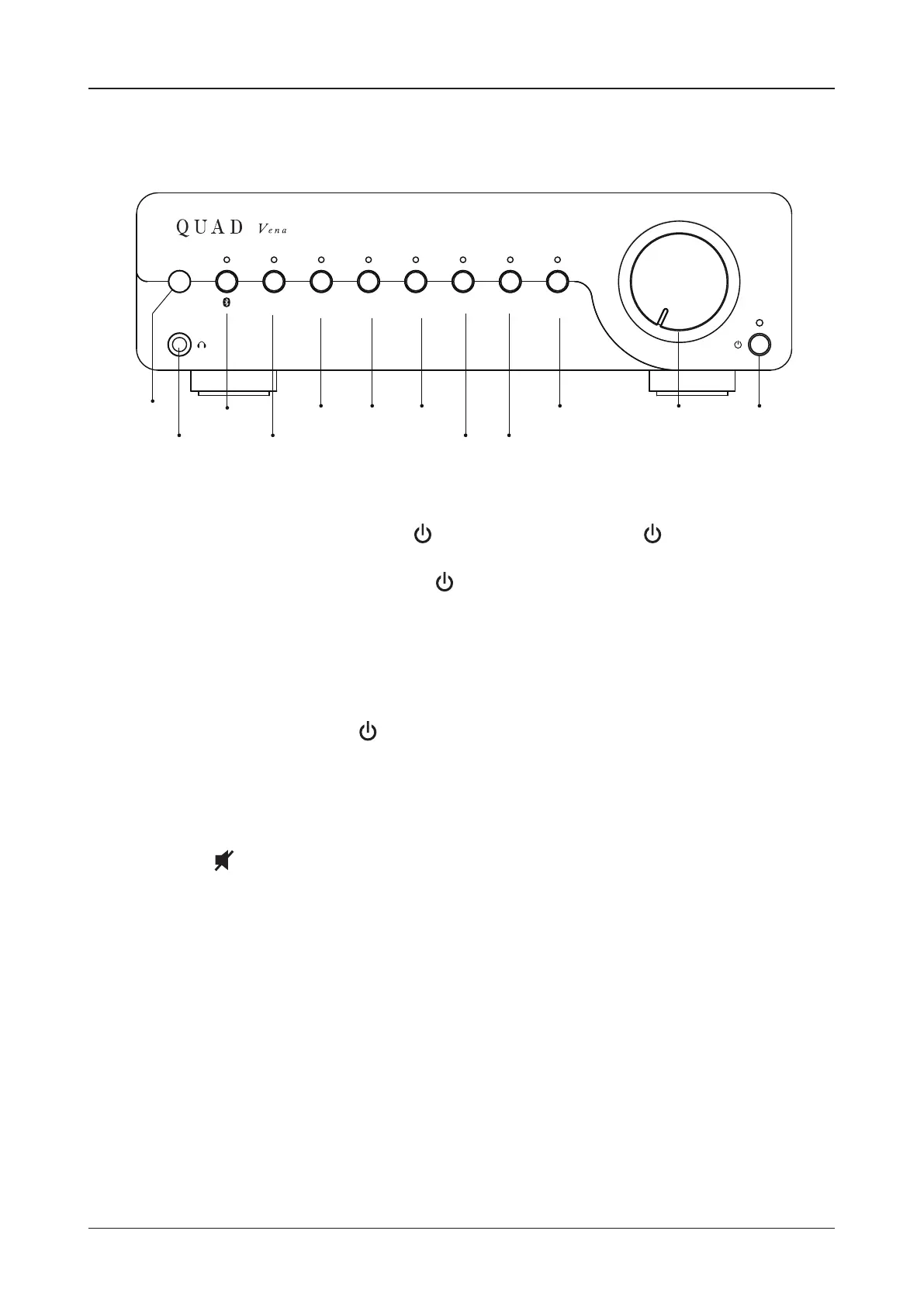
USB OPT 1 OPT 2 COAX AUX 1 AUX 2
PHONO
II
Remote
Input
Headphone
Output
Bluetooth
BUTTON/LED
PC USB
BUTTON/LED
OPT1&2
BUTTON/LED
Analog 1&2
BUTTON/LED
COAX
BUTTON/LED
Volume
Control
Standby
BUTTON/LED
PHONO BUTTON/LED


 To Next Page