EasyManua.ls Logo

QualGear QG-KIT-VA-3IN-B - User Manual

Default Icon
6 pages
Print Icon
To Next Page IconTo Next Page
Loading...
Version: November 2017
QG-KIT-VA-3IN-B
1 Year Limited Warranty
Scan the QR Code™ below
for more info about this product:
PROJECTOR MOUNTING KIT
CAUTION!
Do not exceed the maximum rated weight
specified. Otherwise, serious injury or
property damage may occur.
(70lbs)
32kg
Rated
(70lbs)
32kg
Rated
Slide projector assembly into the
projector plate until you hear a click.
Projector
Tighten the screws using Allen Key (H)
as shown on the right.
Allen Key (H)
Projector Mount
Projector Plate
Click!
11
Hanging the Projector Assembly onto the Projector Plate
7
gap
Question and Answer IconNeed help?

Do you have a question about the QualGear QG-KIT-VA-3IN-B and is the answer not in the manual?

Summary

Mounting to a Vaulted Wooden Joist or Wooden Stud Ceiling

Drilling Mounting Holes for Wooden Ceilings

Drill holes of 4.0mm diameter and 65mm depth at marked locations on the stud.

Mounting to a Vaulted Concrete Ceiling

Drilling Mounting Holes for Concrete Ceilings

Drill holes of 10mm diameter and 45mm depth at marked locations on the concrete.

Joining Pipe to Ceiling Adapter

Connecting Pipe to Ceiling Adapter

Twist the 3-inch NPT pipe's male threaded end into the ceiling adapter's female thread.

Securing Pipe to Ceiling Adapter

Tighten screws using Allen Key (I) to secure the pipe's position on the adapter.

Connecting Pipe to Projector Plate

Securing Pipe to Projector Plate

Connect the 3-inch NPT pipe to the projector plate and tighten set screws.

Making Adjustment for Mounting

Adjusting Extension Brackets

Adjust extension brackets on the projector mount using Allen Key (H) for optimal positioning.

Attaching Projector Mount to Projector

Securing Projector Mount

Attach the projector mount to the projector using appropriate screws and Allen Key.

Hanging Projector Assembly onto Projector Plate

Attaching Projector Assembly

Slide the projector assembly into the projector plate until a click is heard.

Disconnecting Projector Plate from Mount

Detaching Projector Plate

Slide the projector plate out from the projector assembly to disconnect it.

Overview

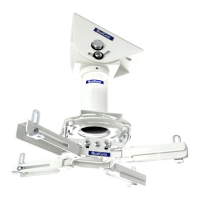
The QualGear QG-KIT-VA-3IN-B is a professional-grade projector mounting kit designed to securely suspend a projector from a ceiling, offering versatile installation options and precise adjustments. This kit is ideal for both residential and commercial installations where a stable and adjustable projector mount is required.

Function Description:

The primary function of the QualGear QG-KIT-VA-3IN-B is to provide a robust and adjustable solution for mounting a projector to a ceiling. It consists of a projector mount, a vaulted ceiling adapter, and a 3-inch NPT pipe, along with various screws and anchors for different ceiling types. The kit allows for the projector to be positioned accurately relative to the screen, with features for tilt angle adjustment and flexible extension bracket configurations to accommodate a wide range of projector models. The design emphasizes secure attachment and ease of installation, ensuring the projector remains stable during operation.

Important Technical Specifications:

  • Model Number: QG-KIT-VA-3IN-B
  • Mounting Type: Ceiling mount for projectors.
  • Ceiling Compatibility: Designed for both vaulted wooden joist/stud ceilings and vaulted concrete ceilings.
  • Pipe Standard: Compatible with all standard 1.5" NPT pipes.
  • Tilt Angle Adjustment: The vaulted ceiling adapter allows for tilt angle adjustments of up to ±45°.
  • Drill Bit Sizes (for installation):
    • For wooden ceilings: 5/32" (4mm) diameter wood drill bit, 2.5" (65mm) depth.
    • For concrete ceilings: 3/8" (10mm) diameter masonry drill bit, 1.8" (45mm) depth.
  • Hardware Included:
    • Projector Mount A (x1)
    • Wall Marking Template B (x1)
    • Vaulted Ceiling Adapter C (x1)
    • 3-Inch NPT Pipe D (x1)
    • Screws F (x3)
    • Metal Expansion Anchors G (x3)
    • M4-M6 Allen Key H (x1)
    • M 2.5 Allen Key I (x1)
    • M6 x 10mm Screws J (x4)
    • Washers K (x4)
    • M5 x 4mm Screws L (x2)
    • M5 x 4mm Security Screws M (x4)
    • M3 x 8mm Screws O (x4)
    • M4 x 10mm Screws P (x4)
    • M5 x 10mm Screws Q (x4)
  • Maximum Rated Weight: The manual explicitly warns not to exceed the maximum rated weight specified (though the exact weight is not provided on the pages, a graphic on page 1 shows "32kg (70lbs) Rated"). Exceeding this limit can lead to serious injury or property damage.
  • Warranty: 1 Year Limited Warranty.
  • Version: November 2017.
  • Usage Environment: Intended for indoor use only. Outdoor use voids the limited warranty.

Usage Features:

  • Versatile Ceiling Mounting: The kit provides specific instructions and hardware for mounting to both wooden joist/stud ceilings and concrete ceilings, ensuring adaptability to various structural environments.
  • Easy Installation Process: The manual outlines a clear, step-by-step installation process, starting from finding studs or marking concrete, drilling holes, installing the ceiling adapter, connecting the NPT pipe, and finally attaching the projector mount.
  • "Click!" Mechanism for Projector Plate: The projector assembly slides into the projector plate until an audible "click" is heard, indicating a secure connection. This feature simplifies the final attachment of the projector to the ceiling mount.
  • Adjustable Extension Brackets: The projector mount features extension brackets that can be adjusted in length and height by sliding them in and out, or up and down, using the provided Allen Key (H). This allows the mount to accommodate projectors with different mounting hole patterns.
  • Support for Three-Hole Projectors: If a projector model has only three mounting holes, the fourth extension bracket can be easily removed using Allen Key (H).
  • Precise Projector Orientation: The manual advises ensuring one of the arrows on the projector mount points towards the projector screen, aiding in correct alignment.
  • Secure Pipe Connection: The 3-inch NPT pipe twists into both the ceiling adapter and the projector plate, and is then secured with set screws (L or M) using Allen Key (I), ensuring a stable connection between the ceiling and the projector.
  • Tilt Angle Adjustment: The vaulted ceiling adapter allows for tilt adjustments of up to ±45°, providing flexibility for optimal projection angles.
  • Wall Marking Template: A wall marking template (B) is included to assist installers in accurately marking drill locations on the ceiling, ensuring precise alignment.

Maintenance Features:

  • Regular Security Checks: The manual recommends checking the ceiling projector mount at regular intervals to ensure it remains secure and safe to use. This proactive approach helps prevent potential issues arising from loosening components over time.
  • Tightening Screws: Users are instructed to tighten screws firmly but not to overtighten, as overtightening can damage components and reduce holding power. This guidance is crucial for maintaining the mount's integrity and safety.
  • Dust-Free Holes for Anchors: For concrete ceiling installations, it is emphasized that drilled holes must be free of dust for proper installation of anchors, ensuring a strong and reliable bond.
  • Support Contact: For any questions regarding instructions, warnings, or maintenance, users are directed to contact QualGear technical support via email at support@qualgear.com or their local distributor. This provides a clear channel for assistance and troubleshooting.
  • Warning Against Loosening Screws: An important warning advises against loosening screws all the way when making adjustments, as this could disconnect parts and potentially cause injury or property damage. This highlights the importance of careful handling during adjustments.

QualGear QG-KIT-VA-3IN-B Specifications

General IconGeneral
BrandQualGear
ModelQG-KIT-VA-3IN-B
CategoryProjector Accessories
LanguageEnglish

Related product manuals