Battery installation
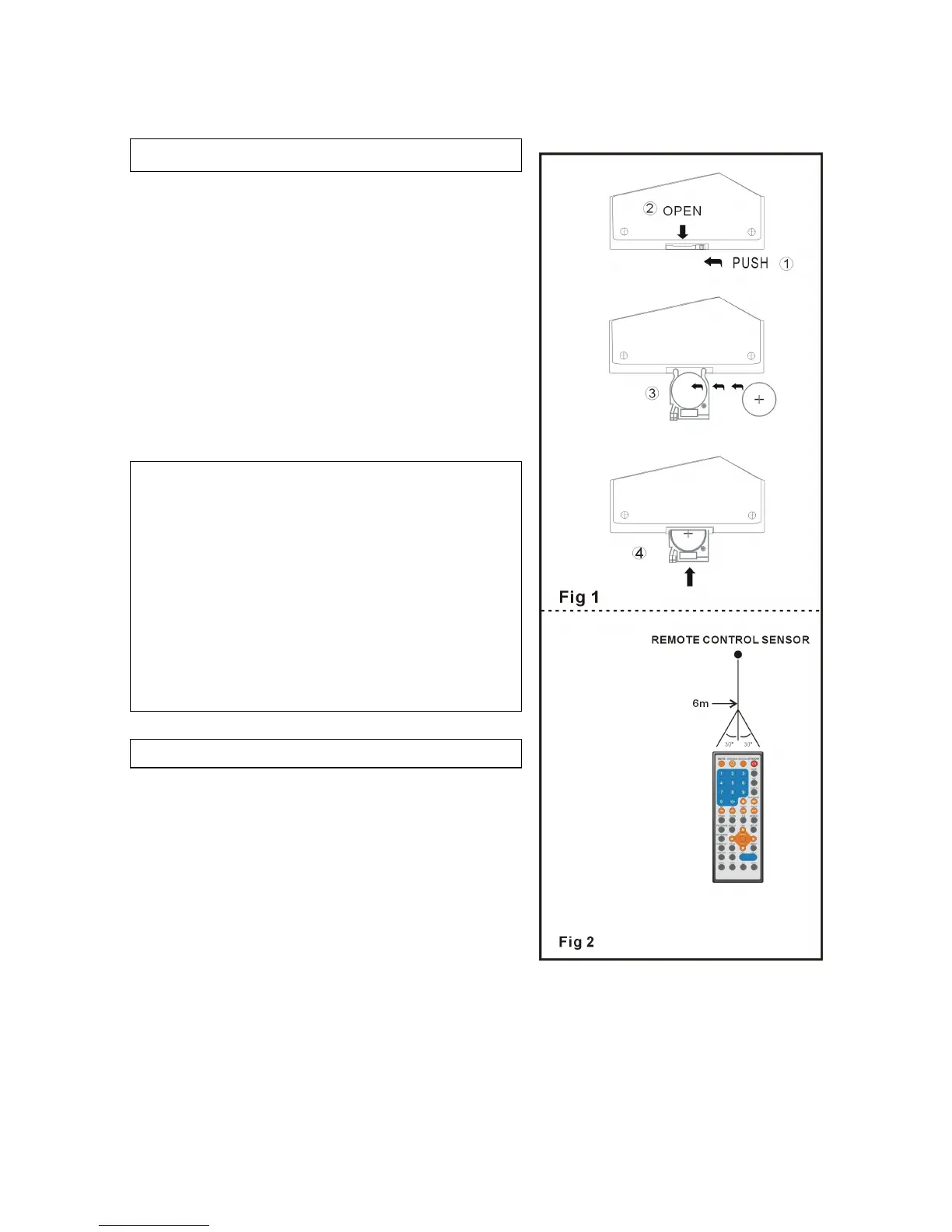
Insert the batteries while observing the correct
(+) and (-) polarities as illustrated at right(Fig 1).
Service life of battery
l The battery normally last for about one year
although this depends on how often, and for
what operations, the remote control is used.
l If the remote control fails to work even when
it is operated near the player, replace the
battery.
l Use one size CR2025 battery.
Note:
l Do not use rechargeable (Ni-Cd) battery.
l Do not attempt to recharge, short-circuit,
disassemble, heat or throw the battery into
the fire.
l Do not drop, step on or otherwise impact the
remote control. This may damage the parts or
lead to malfunction.
l If the remote control is not going to be used
for a long time, remove the battery.
Remote control operation
1. Remove the protective plastic tab before
operating the remote control.
2. Point the remote control from no more than
about 6 m from the remote control sensor and
within about 60°of the front of the player(Fig 2).
NOTE:
l The operating distance may vary according
to the brightness of the room.
l Do not point bright lights at remote control
sensor.
l Do not place objects between the remote
control and the remote control sensor.
l Do not use this remote control while
simultaneously operating the remote control
of any other equipment.


 To Next Page