EasyManua.ls Logo

Quark-Elec QK-A024 - User Manual

Quark-Elec QK-A024
16 pages
To Next Page IconTo Next Page
Loading...
QK-A024/26 Manual
V 3.0 1 of 16 2020
QK-A024/26 Manual
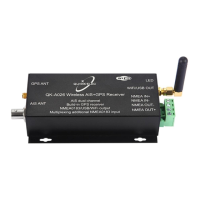
Wireless AIS + GPS Receiver
(GPS: A026 only)
With NMEA Multiplexer + WiFi
Features
Two independent receivers monitoring AIS channels (161.975MHz & 162.025MHz) and decoding
both channels simultaneously.
Sensitivity up to -105 dBm@30% PER
Up to 35 nautical miles receiving range
USB 2.0 powered (QK-A024: <120mA@5.0V) (QK-A026: <160mA@5.0V)
NMEA 0183 message output through WiFi, USB and NMEA 0183
Built-in GPS to provide positional data (No GPS connection in A024)
Combines NMEA input (4800bps default, configurable) and AIS messages (+GPS in A026), and
outputs as a seamless stream of data
BNC connector for 50 Ohm VHF antenna
Powered SMA connector for 50 Ohm GPS antenna
Ad-hoc and Station operating modes
The internal WiFi access point connects up to 4 devices simultaneously
Plug & Play connectivity with chart plotters and PCs
Compatible with Windows, Mac, Linux, Android and iOS (Initial configuration must be completed
using Windows software.)
This device connects to NMEA 0183 and is compatible with RS422 output devices. NMEA 0183-
RS232 devices can connect to our device by using the Protocol Bridge (QK-AS03)
This device does not come pre-loaded with map data. We advise using openCPN or other similar
software for map data. Some Apps may charge for map use

Other manuals for Quark-Elec QK-A024

Question and Answer IconNeed help?

Do you have a question about the Quark-Elec QK-A024 and is the answer not in the manual?

Quark-Elec QK-A024 Specifications

General IconGeneral
SBASWAAS, EGNOS, MSAS, GAGAN
Operating Temperature-40°C to +85°C
Position Accuracy2.5m CEP
Velocity Accuracy0.1 m/s
Time Accuracy30 ns
NMEA sentencesGGA, GSA, GSV, RMC, VTG
Baud Rate4800 bps, 9600 bps, 38400 bps
Supply voltage5.0V DC
Update Rate1 Hz
InterfaceUSB

Summary

Device Connections and Interfaces

Installation and Operation

Power Supply Requirements

Details the power requirements and recommended power sources.

WiFi Data Output Modes

Details WiFi modes, focusing on Ad-hoc connection for direct device access.

Ad-hoc WiFi Connection

Guides on connecting directly to the device's WiFi access point.

USB Data Interface Setup

Covers USB driver requirements and how to verify the connection in Windows.

USB Driver Installation Guide

Details driver requirements for Mac, Windows, and Linux systems.

Verifying USB Connection (Windows)

Explains how to check COM port assignment in Windows Device Manager.

Device Configuration Settings

Configuring NMEA Baud Rates

Guides users through configuring NMEA 0183 input/output baud rates using the software tool.

Configuring WiFi Station Mode

Details steps to set up the device to connect to a router's WiFi network.

Chart Software Integration

USB Setup for Chart Software

Configures chart plotter software (e.g., OpenCPN) to receive data via USB.