QK-A024/26 Manual
V 3.0 4 of 16 2020
2. Connections
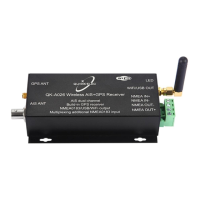
Figure 2: Typical system connection
The A024/26 multiplexer has the following options for connection to inputs, outputs and host devices.
• AIS antenna connector. Standard BNC female 50 Ohm connector. An active VHF antenna
splitter is required if one VHF antenna is shared by A024/26 and VHF voice radio. (We
recommend separate antennas ideally.)
• GPS connector (A026 only). Standard SMA female 50 Ohm connector for GPS antenna. An
integrated GPS module supplies positional data provided a GPS antenna is connected. GPS
information can be output via WiFi, USB or NMEA.
• NMEA 0183 input/output connectors. A024/26 can be connected to other AIS compatible
equipment, like wind/depth or heading sensors, via the NMEA inputs. The NMEA 0183 messages
from these devices can be multiplexed with A024/26 AIS+GPS messages and then sent out
through NMEA 0183 to a chartplotter or other NMEA device.
• USB connector. A micro USB (type C) connector supplies power to the unit and also outputs
the NMEA messages. It can also be used for adjusting parameters using the Configuration
software.
• WiFi. Connectivity in both Ad-hoc and Station Modes on 802.11 b/g/n provides WiFi output of all
messages.
• LED lights. A024/26 features three LEDs which indicate power, AIS and GPS status
respectively. Three LEDs turn on and then off after initialization. When operating, these LEDs
flash. See LED section for more LED information.

 To Next Page
 Loading...