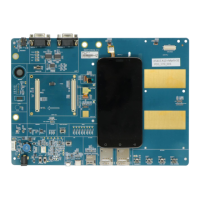
The Quectel L26-LB EVB (Evaluation Board) is an assistant tool designed for engineers to develop and test the Quectel L26-LB GNSS module. This evaluation board facilitates the process of integrating and verifying the functionality of the L26-LB module in various applications.
Function Description
The L26-LB EVB serves as a comprehensive platform for evaluating the L26-LB GNSS module. Its primary function is to enable communication with the module, provide necessary power, and offer various interfaces for data exchange and control. The board supports the reception of satellite signals, allowing for the testing of positioning, navigation, and timing capabilities. It is designed to work with both active and passive GNSS antennas, providing flexibility in setup. The EVB also includes features for firmware upgrades, ensuring that the module can be kept up-to-date with the latest software enhancements and bug fixes. Through its various interfaces and integrated tools, the EVB allows users to monitor the module's operational status, send commands, and perform detailed performance analyses.
Usage Features
The L26-LB EVB offers several user-friendly features to streamline the development and testing process:
- Micro USB Interface: The main power supply for the EVB is provided via the micro USB interface. This interface is also strongly recommended for data communication, particularly for NMEA sentences output, as it simplifies the setup by requiring only a single USB cable for both power and data.
- UART Interface: An alternative interface for data communication is the UART interface. When using this interface for NMEA sentences output, both RS232 and micro USB cables are required for operation. This interface is specifically recommended when using the PowerGPS tool for data communication.
- Antenna Interface: The EVB is equipped with an antenna connector (J101) that allows the L26-LB module to receive satellite signals. It supports both active and passive GNSS antennas, offering versatility for different testing environments and antenna types.
- Switches and Buttons:
- STANDBY Switch (S101): This switch allows the module to enter or exit standby mode, providing control over power consumption.
- RESET Button (S102): Pressing and releasing this button will reset the module, which is useful for restarting operations or recovering from unexpected states.
- FORCE_ON Button (S103): When the module is in backup mode, pressing and releasing this button will wake it up. It is important to keep this pin open or pulled low before entering backup mode; if unused, it should remain open.
- POWER Switch (S201): This switch controls the power on/off state of the entire EVB.
- USB ↔ UART Alternation Switch (S301): This switch is used to select between the micro USB and UART interfaces for data communication, providing flexibility based on the user's setup and tool requirements.
- Operation Status Indication LEDs: The EVB includes LEDs (D105, D106) to indicate the module's operational status:
- 1PPS LED (D106): Flashes at 1 Hz upon successful fix, and is extinct when there is no fix.
- TXD1 LED (D105): Flashes when data is output from TXD1, and is extinct when no data is being output.
- Test Points (J106): A set of test points are provided for advanced debugging and monitoring, including GND, STANDBY, RXD1, 1PPS, TXD1, RESET, FORCE_ON, I2C_SDA, and I2C_SCL. These points allow engineers to directly access and test various signals on the board.
- PowerGPS Tool Integration: The EVB is designed to work seamlessly with the PowerGPS tool, which is used to check the status of GNSS receivers. This tool allows users to view CNR messages, time, position, speed, and precision information. It also supports sending PMTK commands to control the module and performing automatic TTFF (Time to First Fix) testing under various conditions (full cold start, cold start, warm start, hot start).
Maintenance Features
The L26-LB EVB is designed with ease of maintenance in mind, primarily through its support for firmware upgrades and clear operational indicators:
- Firmware Upgrade: The EVB facilitates firmware upgrades for the L26-LB module via the micro USB interface. This process involves using a dedicated FlashTool on a PC, connecting the EVB, selecting the appropriate firmware files, and initiating the upgrade. This ensures that the module can always run the latest and most optimized software, addressing potential issues or adding new functionalities.
- Clear Status Indicators: The presence of operation status indication LEDs (1PPS and TXD1) provides immediate visual feedback on the module's performance. This allows users to quickly ascertain if the module has achieved a fix and if data is being transmitted, aiding in initial troubleshooting and verification of basic functionality without requiring complex diagnostic tools.
- Accessible Test Points: The exposed test points (J106) offer direct access to key signals, which is invaluable for in-depth diagnostics and troubleshooting. Engineers can use these points to verify signal integrity, measure voltages, and analyze data flow, making it easier to identify and resolve hardware or software issues.
- Comprehensive Documentation and Support: Quectel provides extensive documentation, including user guides, hardware designs, protocol specifications, and QCOM user guides, along with technical support. This wealth of information and support resources is crucial for effective maintenance, allowing users to understand the device's intricacies and resolve problems efficiently.
- ESD Handling Precautions: The manual emphasizes proper ESD handling procedures, which are critical for preventing damage to the module during mounting, handling, and operation. Adhering to these precautions is a key aspect of maintaining the device's longevity and reliability.

 Need help?
 General



 To Next Page