Quicksilver 555CAB — General Informaon
10
Please note that operator vision from the helm may be obstructed by high trim angles of the cra,
along with other factors such as outboard engine trim angles, hull trim plane angles, loading and load
distribuon, speed & acceleraon, transion from displacement to planing mode, sea condions,
rain and spray, darkness and fog, interior lights, posion of tops and curtains, and persons or
movable gear in the operator’s eld of vision.
Dash Switch Panel
Bilge pump
Navigaon lights
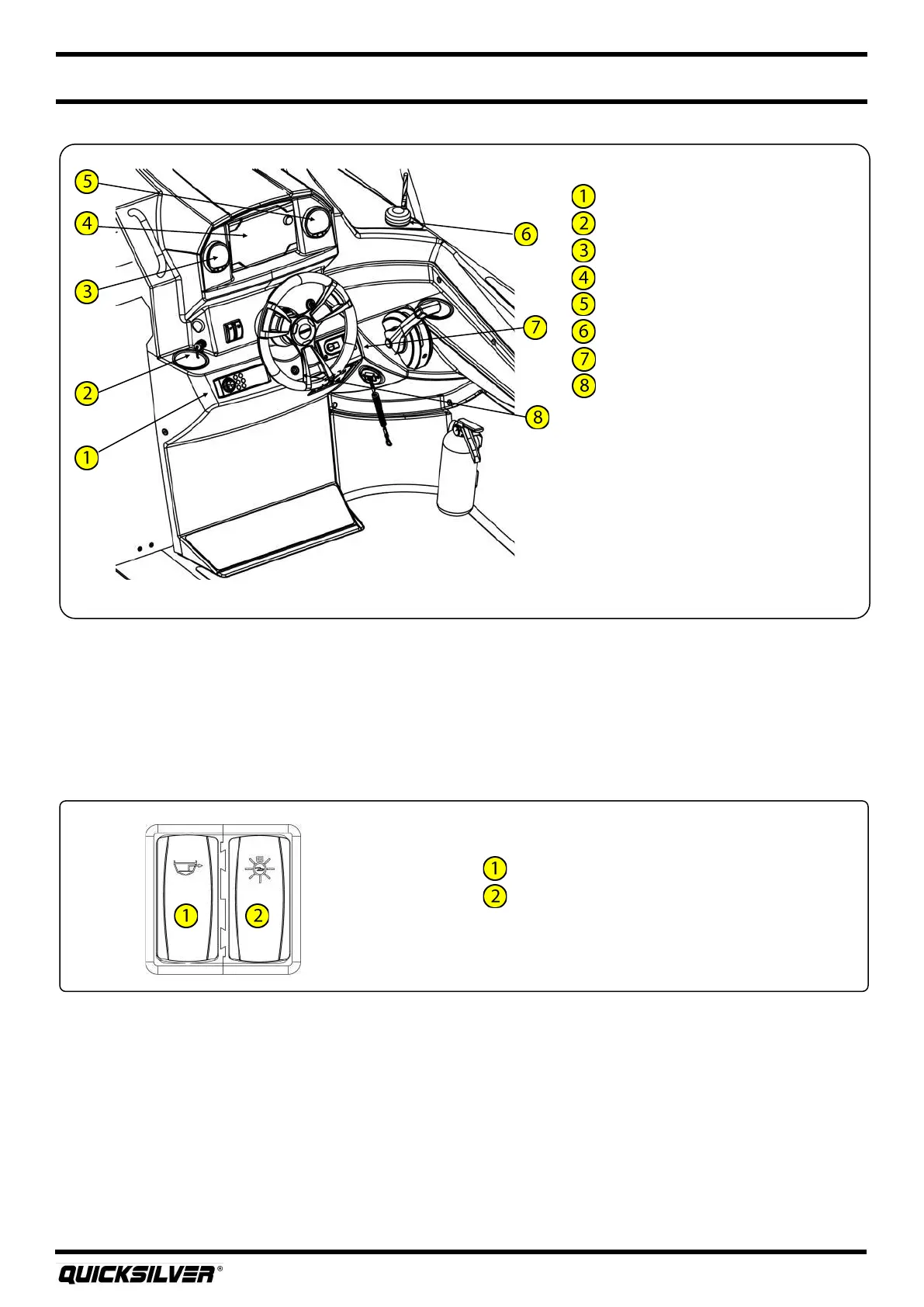
Dash Layout (oponal boat)
Stereo
Stereo USB
SC1000 Tachometer
GPS
SC1000 Speedometer
DAB radio antenna
Acve trim
Air temperature sensor
13. Navigaon Lights
Your boat comes equipped with navigaon lighng for use at night or in low visibility condions. Prior
to running at night, you must install the stern pole light into the socket located on the transom. A
three posion switch, located at the helm switch panel, controls the navigaon lights. To turn on the
Navigaon Lights, push the upper part of the switch forward. This illuminates on the port (red),
starboard (green) and all around light (white) showing other vessels that you are underway. To turn on
the Anchor Light, push the lower part of the switch down. This illuminates the all around light (white),
leng other boaters know that you are anchored at a given locaon.



 To Next Page