7
Quick Start Guide
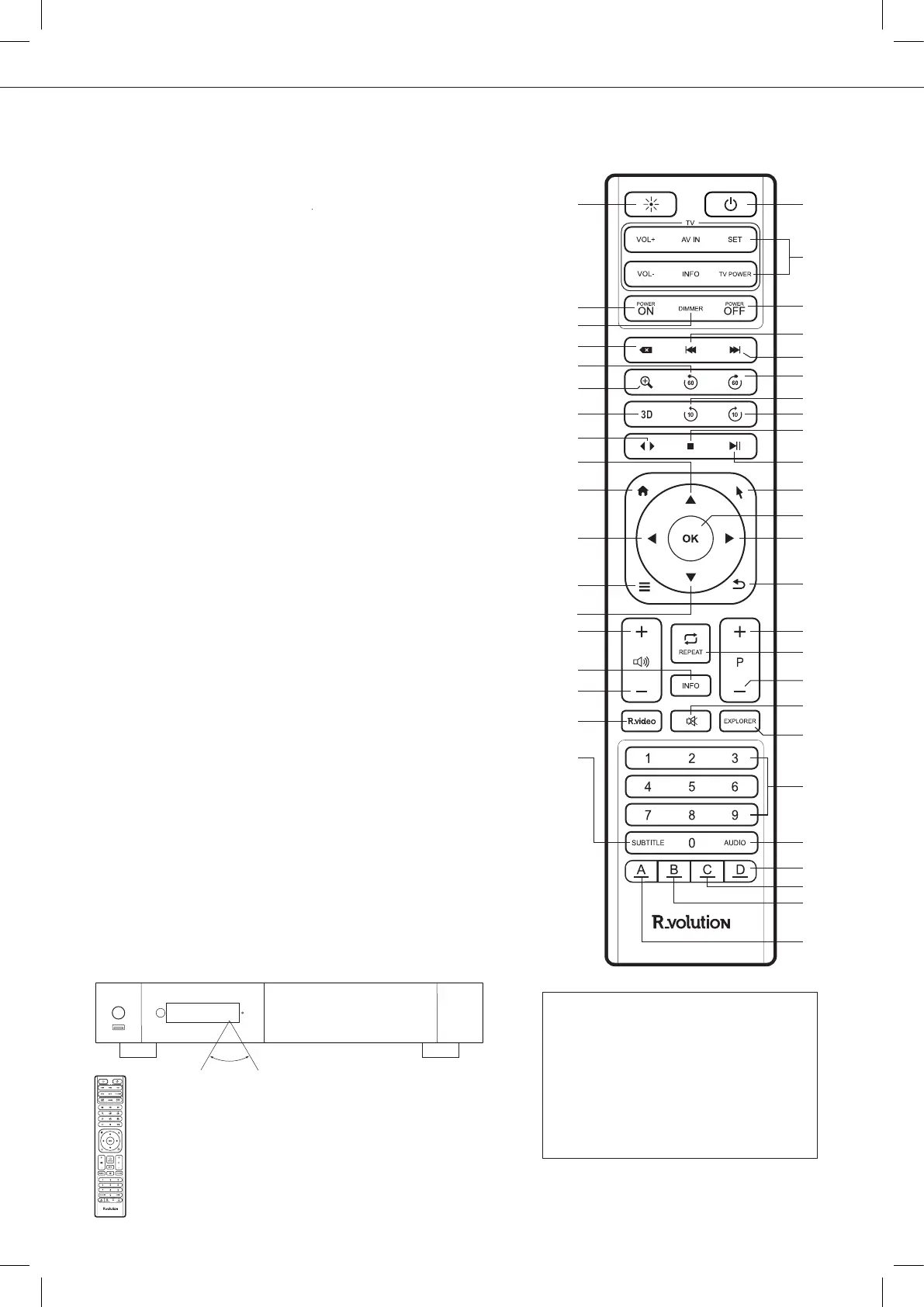
Using the Remote Control
When using the remote control, the front
window of the remote control should be
pointed to the infrared sensor on the front
panel within an angle of ±60° and a range
of about 26 ft.
Please use alkaline batteries.
Please observe polarity when inserting batteries.
Third Party Control
You can control your R_volution
player using third party devices
such as Control4, Crestron, RTI,
ProControl, Savant, Logitech, Elan...
More info:
rvolution.uservoice.com/knowledgebase
60°
Within about
26 ft (8m)
Remote Control
1. LIGHT: Turn on the backlight of the remote control.
2. POWER: Toggle power ON/OFF.
3. TV SECTION:
Programmable buttons to control TV or other
external device; For more info, please refer to the previous page.
4-5. POWER ON/OFF: Discrete power ON/OFF.
6. DIMMER: Toggle front OLED screen ON/OFF (future option).
7. DELETE: Delete the previous character entered.
8-9. PREV/NEXT: Go to the previous/next chapter.
10. ZOOM: Zoom In / Out (overscan).
11-12. -60/+60: Timeline navigation (-/+ 60 sec.).
13-14. -10/+10: Timeline navigation (-/+ 10 sec.).
15. 3D: Open the 3D settings.
16. < >: Switch the Audio Mode.
17. STOP: Stop video playback.
18. PLAY/PAUSE: Start / Pause playback.
19-20. UP: Next file (Explorer). DOWN: Previous file Explorer).
21-22. LEFT/RIGHT: Timeline navigation (-/+1 min).
23. HOME: Go to Main Menu (Home Page).
24. MOUSE: Switch to the virtual mouse mode.
25. MENU: Show / Hide the pop-up menu.
26. BACK: Return or Stop playback.
19-22. ARROWS: Navigate menu selection.
27. OK: Enter or validate the current item.
28-29. VOLUME +/-: Increase / Decrease volume.
30. REPEAT: Repeat playback (file, all, off).
31. INFO: Show / Hide the pop-up info (properties).
32-33. PAGE+/-: Timeline navigation (+/-10 sec).
34. R_VIDEO: R_video shortcut.
35. MUTE: Mute audio.
36. EXPLORER: R_rolution Explorer shortcut.
37. NUMBER Buttons:
- 1-9: direct access to 10 - 90% (video playback or movie list).
- 0: Restart from the beginning (video playback or movie list).
38. SUBTITLE: Subtitle switch.
39. AUDIO: Audio track switch.
40. RED (A): Contextual shortcut.
41. GREEN (B): Contextual shortcut.
42. YELLOW (C): Contextual shortcut.
43. BLUE (D): Contextual shortcut.
1
4
6
7
11
10
15
16
19
23
21
25
20
28
31
29
34
38
2
3
5
8
9
12
13
14
17
18
24
27
22
26
32
30
33
35
36
37
39
43
42
41
40



 To Next Page