The ProBox 3100 is a tracking device designed for vehicle installation, primarily for trucks, offering features for location tracking, driver identification, and various data inputs/outputs.
Function Description:
The core function of the ProBox 3100 is to send tracking data via GMS/GPRS. It requires a SIM card for communication, which needs to be inserted into the device. The device utilizes GPS for location data and GSM/GPRS for transmitting this data. It also features LED indicators to provide status updates on GPS, GSM/GPRS, and peripheral connections.
Beyond basic tracking, the ProBox 3100 supports several advanced functionalities:
- Driver Identification: It can integrate with RFID login systems or other driver login methods, allowing for the identification of the driver using the vehicle. This is crucial for fleet management and compliance.
- CAN Bus and J1708 Connections: The device is capable of connecting to a vehicle's CAN Bus or J1708 system. This allows it to read various vehicle parameters, providing richer data for tracking and fleet management.
- Tacho Driver Login and Remote Download: The ProBox 3100 supports connections for Tacho Driver Login and Tacho Remote Download. This is particularly important for commercial vehicles, enabling compliance with regulations regarding driver working hours and facilitating remote access to tachograph data.
- Draeger Interlock 7000 Integration: The device can be integrated with a Draeger Interlock 7000 system, likely for alcohol interlock functionality, enhancing safety and compliance.
- Temperature Sensing: It can connect to a temperature sensor, allowing for monitoring of temperature, which is essential for vehicles transporting temperature-sensitive goods.
- GSM Jamming Detection: The ProBox 3100 includes a feature for GSM jamming detection. When jamming is detected, a digital output is enabled, which can be used to trigger an alarm or other actions.
- Digital and Analog Inputs/Outputs: The device provides multiple digital and analog inputs and outputs, allowing for connection to various external sensors, switches, and actuators within the vehicle. This expands its versatility for custom applications and monitoring.
- USB Connection: A USB connection is available for software updates and configuration, making it easy to maintain and customize the device settings.
Important Technical Specifications:
- Communication: GMS/GPRS for data transmission.
- Positioning: GPS for location tracking.
- Power Supply: The device operates on a 12/24 volt ignition system. The minimum wiring for tracking requires Ground, 12 volt, and ignition connections.
- Inputs/Outputs:
- Digital Inputs: Digital 1 In, Digital 2 In, Digital 3 In.
- Analog Inputs: Analog 1 In, Analog 2 In.
- Digital Outputs: Digital 1 Out, Digital 2 Out.
- 1-Wire Data: Supports 1W DATA for connections like RFID or temperature sensors.
- CAN Bus: Supports CAN high and CAN low connections.
- J1708: Supports J1708 A and J1708 B connections.
- RS232/RS485: Supports RS232 (B, Rx, Tx, A) and RS485 (A, B) for various serial communication needs.
- K-line: Supports K-line for diagnostic or data connections.
- GSM Jamming Detection Output: Digital output 2 is enabled when jamming is detected, with a maximum rating of 300 mA. If more than 300 mA is needed, a relay must be used.
- LED Indicators:
- GPS LED: Two (2) blinks per second for GPS NOT OK, One (1) blink per second for GPS OK.
- GSM/GPRS LED: Four (4) blinks per second for GSM NOT OK, One (1) blink per second for GSM OK but NO GPRS, One (1) blink every 4 seconds for GSM AND GPRS OK, ON for Sending data by GPRS.
- Peripheral LED: Zero (0) blinks every 5 seconds for No peripheral is connected, One (1) blink every 5 seconds for 1 pc peripheral is connected, Two (2) blinks every 5 seconds for 2 pcs peripheral is connected, Three (3) blinks every 5 seconds for 3 pcs peripheral is connected.
Usage Features:
- SIM Card Installation: The device requires a SIM card. To install it, two screws on the back need to be removed to open the cabinet. The SIM card is then inserted into the cabinet and secured firmly. It's important to ensure the card is inserted properly into the socket until it is closed.
- Installation Location: The ProBox 3100 should be installed in a good location within the vehicle, typically under the dashboard or over the glove compartment. Wires can be run from behind the radio or other ignition-switched 12-volt sources.
- Antenna Mounting: The GPS antenna should be mounted as shown, pointing upwards towards the satellites. It is recommended to remove the self-adhesive tape and mount it on a flat surface.
- Wiring: The manual provides detailed wiring diagrams for various connections, including minimum wiring for tracking (Ground, 12 volt, ignition), 1-wire connection for RFID and other driver logins, CANCLIQ, J1708, Driver Panel, Tacho Driver Login, Tacho Remote Download, Draeger Interlock 7000, Temperature Sensor, GSM Jamming Detection, Digital Inputs, Analog Inputs, and Digital Outputs.
- Driver Panel: The device can connect to a driver panel, allowing for interactive control and feedback from the driver.
- Tacho Remote Download Interconnections: Specific instructions are provided for interconnecting pins C7 and C8 for Tacho Remote Download, including checking resistance values to determine if an interconnection is required.
- Safety Precautions: Users are reminded to beware of airbags when choosing an installation location.
Maintenance Features:
- Software Updates/Configuration: The device can be connected to a computer via USB for software updates and configuration, ensuring the device remains up-to-date and can be customized to specific needs.
- Troubleshooting with LEDs: The LED indicators provide a quick visual status of the device's operation, aiding in basic troubleshooting for GPS, GSM/GPRS, and peripheral connections.
- SIM Card Access: The design allows for access to the SIM card for replacement or troubleshooting by removing two screws and opening the cabinet.
- Modular Connections: The use of modular connectors for various inputs and outputs simplifies wiring and potential component replacement or upgrades.

 Need help?
 General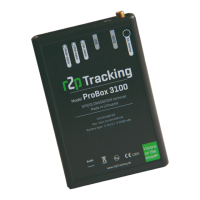

 To Next Page